
Instructions to use uonlp/Vistral-7B-Chat-gguf with libraries, inference providers, notebooks, and local apps. Follow these links to get started.
- Libraries
- llama-cpp-python
How to use uonlp/Vistral-7B-Chat-gguf with llama-cpp-python:
# !pip install llama-cpp-python from llama_cpp import Llama llm = Llama.from_pretrained( repo_id="uonlp/Vistral-7B-Chat-gguf", filename="ggml-vistral-7B-chat-f16.gguf", )
llm.create_chat_completion( messages = [ { "role": "user", "content": "What is the capital of France?" } ] ) - Notebooks
- Google Colab
- Kaggle
- Local Apps Settings
- llama.cpp
How to use uonlp/Vistral-7B-Chat-gguf with llama.cpp:
Install (macOS, Linux)
curl -LsSf https://llama.app/install.sh | sh # Start a local OpenAI-compatible server with a web UI: llama serve -hf uonlp/Vistral-7B-Chat-gguf:F16 # Run inference directly in the terminal: llama cli -hf uonlp/Vistral-7B-Chat-gguf:F16
Install from WinGet (Windows)
winget install llama.cpp # Start a local OpenAI-compatible server with a web UI: llama serve -hf uonlp/Vistral-7B-Chat-gguf:F16 # Run inference directly in the terminal: llama cli -hf uonlp/Vistral-7B-Chat-gguf:F16
Use pre-built binary
# Download pre-built binary from: # https://github.com/ggerganov/llama.cpp/releases # Start a local OpenAI-compatible server with a web UI: ./llama-server -hf uonlp/Vistral-7B-Chat-gguf:F16 # Run inference directly in the terminal: ./llama-cli -hf uonlp/Vistral-7B-Chat-gguf:F16
Build from source code
git clone https://github.com/ggerganov/llama.cpp.git cd llama.cpp cmake -B build cmake --build build -j --target llama-server llama-cli # Start a local OpenAI-compatible server with a web UI: ./build/bin/llama-server -hf uonlp/Vistral-7B-Chat-gguf:F16 # Run inference directly in the terminal: ./build/bin/llama-cli -hf uonlp/Vistral-7B-Chat-gguf:F16
Use Docker
docker model run hf.co/uonlp/Vistral-7B-Chat-gguf:F16
- LM Studio
- Jan
- vLLM
How to use uonlp/Vistral-7B-Chat-gguf with vLLM:
Install from pip and serve model
# Install vLLM from pip: pip install vllm # Start the vLLM server: vllm serve "uonlp/Vistral-7B-Chat-gguf" # Call the server using curl (OpenAI-compatible API): curl -X POST "http://localhost:8000/v1/chat/completions" \ -H "Content-Type: application/json" \ --data '{ "model": "uonlp/Vistral-7B-Chat-gguf", "messages": [ { "role": "user", "content": "What is the capital of France?" } ] }'Use Docker
docker model run hf.co/uonlp/Vistral-7B-Chat-gguf:F16
- Ollama
How to use uonlp/Vistral-7B-Chat-gguf with Ollama:
ollama run hf.co/uonlp/Vistral-7B-Chat-gguf:F16
- Unsloth Studio
How to use uonlp/Vistral-7B-Chat-gguf with Unsloth Studio:
Install Unsloth Studio (macOS, Linux, WSL)
curl -fsSL https://unsloth.ai/install.sh | sh # Run unsloth studio unsloth studio -H 0.0.0.0 -p 8888 # Then open http://localhost:8888 in your browser # Search for uonlp/Vistral-7B-Chat-gguf to start chatting
Install Unsloth Studio (Windows)
irm https://unsloth.ai/install.ps1 | iex # Run unsloth studio unsloth studio -H 0.0.0.0 -p 8888 # Then open http://localhost:8888 in your browser # Search for uonlp/Vistral-7B-Chat-gguf to start chatting
Using HuggingFace Spaces for Unsloth
# No setup required # Open https://huggingface.co/spaces/unsloth/studio in your browser # Search for uonlp/Vistral-7B-Chat-gguf to start chatting
- Atomic Chat new
- Docker Model Runner
How to use uonlp/Vistral-7B-Chat-gguf with Docker Model Runner:
docker model run hf.co/uonlp/Vistral-7B-Chat-gguf:F16
- Lemonade
How to use uonlp/Vistral-7B-Chat-gguf with Lemonade:
Pull the model
# Download Lemonade from https://lemonade-server.ai/ lemonade pull uonlp/Vistral-7B-Chat-gguf:F16
Run and chat with the model
lemonade run user.Vistral-7B-Chat-gguf-F16
List all available models
lemonade list
llm.create_chat_completion(
messages = [
{
"role": "user",
"content": "What is the capital of France?"
}
]
)The challenge with large language models is that they cannot be executed locally on your laptop. Thanks to llama.cpp project, it is now feasible to operate our Vistral-7B-Chat on a single computer (Window or Macbook) even without a dedicated GPU.
Vistral-7B-Chat - GGUF
- Model creator: Viet Mistral
- Original model: Vistral-7B-Chat
Description
This repo contains GGUF format model files for Vistral-7B-Chat.
About GGUF
GGUF is a new format introduced by the llama.cpp team on August 21st 2023. It is a replacement for GGML. GGUF offers numerous advantages over GGML, such as better tokenization, and support for special tokens. It also supports metadata, and is designed to be extensible.
Here is several clients and libraries that are known to support GGUF:
- llama.cpp. The source project for GGUF. Offers a CLI and a server option.
- text-generation-webui, the most widely used web UI, with many features and powerful extensions. Supports GPU acceleration.
- LM Studio, an easy-to-use and powerful local GUI for Windows and macOS (Silicon), with GPU acceleration.
- ctransformers, a Python library with GPU accel, LangChain support, and OpenAI-compatible AI server.
Prompt template: Vistral-7B-Chat
<s>[INST] <<SYS>>
Bạn là một trợ lí Tiếng Việt nhiệt tình và trung thực. Hãy luôn trả lời một cách hữu ích nhất có thể, đồng thời giữ an toàn.
Câu trả lời của bạn không nên chứa bất kỳ nội dung gây hại, phân biệt chủng tộc, phân biệt giới tính, độc hại, nguy hiểm hoặc bất hợp pháp nào. Hãy đảm bảo rằng các câu trả lời của bạn không có thiên kiến xã hội và mang tính tích cực.Nếu một câu hỏi không có ý nghĩa hoặc không hợp lý về mặt thông tin, hãy giải thích tại sao thay vì trả lời một điều gì đó không chính xác. Nếu bạn không biết câu trả lời cho một câu hỏi, hãy trẳ lời là bạn không biết và vui lòng không chia sẻ thông tin sai lệch.
<</SYS>>
{prompt} [/INST]
You can also use the chat template file in this repository.
LM Studio
To deploy Vistral locally on LM Studio, ensure you are utilizing the specified chat template, download here. Before initiating the process, make sure to upload the chat template, as illustrated in the image below:
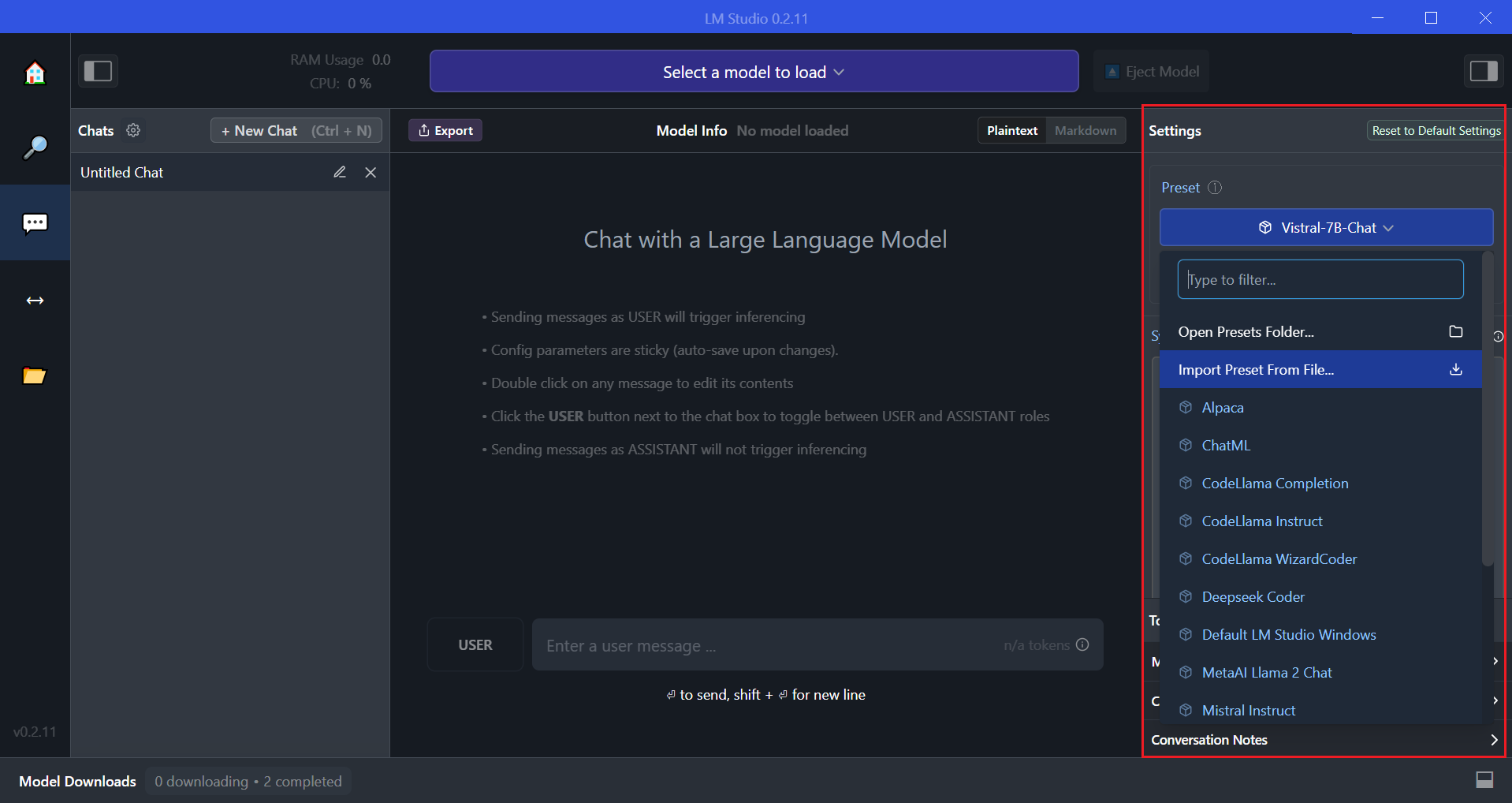
This step is crucial for the proper functioning of Vistral on your local machine.
Use with langchain
Citation
@article{chien2023vistral,
author = {Chien Van Nguyen, Thuat Nguyen, Quan Nguyen, Huy Huu Nguyen, Björn Plüster, Nam Pham, Huu Nguyen, Patrick Schramowski, Thien Huu Nguyen},
title = {Vistral-7B-Chat - Towards a State-of-the-Art Large Language Model for Vietnamese},
year = 2023,
}
- Downloads last month
- 338
# !pip install llama-cpp-python from llama_cpp import Llama llm = Llama.from_pretrained( repo_id="uonlp/Vistral-7B-Chat-gguf", filename="", )