Instructions to use satgeze/Gemma4-31B-Uncensored-HauhauCS-1M-GGUF with libraries, inference providers, notebooks, and local apps. Follow these links to get started.
- Libraries
- llama-cpp-python
How to use satgeze/Gemma4-31B-Uncensored-HauhauCS-1M-GGUF with llama-cpp-python:
# !pip install llama-cpp-python from llama_cpp import Llama llm = Llama.from_pretrained( repo_id="satgeze/Gemma4-31B-Uncensored-HauhauCS-1M-GGUF", filename="gemma4-31b-uncensored-1M-Q4.gguf", )
llm.create_chat_completion( messages = [ { "role": "user", "content": "What is the capital of France?" } ] ) - Notebooks
- Google Colab
- Kaggle
- Local Apps Settings
- llama.cpp
How to use satgeze/Gemma4-31B-Uncensored-HauhauCS-1M-GGUF with llama.cpp:
Install (macOS, Linux)
curl -LsSf https://llama.app/install.sh | sh # Start a local OpenAI-compatible server with a web UI: llama serve -hf satgeze/Gemma4-31B-Uncensored-HauhauCS-1M-GGUF # Run inference directly in the terminal: llama cli -hf satgeze/Gemma4-31B-Uncensored-HauhauCS-1M-GGUF
Install from WinGet (Windows)
winget install llama.cpp # Start a local OpenAI-compatible server with a web UI: llama serve -hf satgeze/Gemma4-31B-Uncensored-HauhauCS-1M-GGUF # Run inference directly in the terminal: llama cli -hf satgeze/Gemma4-31B-Uncensored-HauhauCS-1M-GGUF
Use pre-built binary
# Download pre-built binary from: # https://github.com/ggerganov/llama.cpp/releases # Start a local OpenAI-compatible server with a web UI: ./llama-server -hf satgeze/Gemma4-31B-Uncensored-HauhauCS-1M-GGUF # Run inference directly in the terminal: ./llama-cli -hf satgeze/Gemma4-31B-Uncensored-HauhauCS-1M-GGUF
Build from source code
git clone https://github.com/ggerganov/llama.cpp.git cd llama.cpp cmake -B build cmake --build build -j --target llama-server llama-cli # Start a local OpenAI-compatible server with a web UI: ./build/bin/llama-server -hf satgeze/Gemma4-31B-Uncensored-HauhauCS-1M-GGUF # Run inference directly in the terminal: ./build/bin/llama-cli -hf satgeze/Gemma4-31B-Uncensored-HauhauCS-1M-GGUF
Use Docker
docker model run hf.co/satgeze/Gemma4-31B-Uncensored-HauhauCS-1M-GGUF
- LM Studio
- Jan
- vLLM
How to use satgeze/Gemma4-31B-Uncensored-HauhauCS-1M-GGUF with vLLM:
Install from pip and serve model
# Install vLLM from pip: pip install vllm # Start the vLLM server: vllm serve "satgeze/Gemma4-31B-Uncensored-HauhauCS-1M-GGUF" # Call the server using curl (OpenAI-compatible API): curl -X POST "http://localhost:8000/v1/chat/completions" \ -H "Content-Type: application/json" \ --data '{ "model": "satgeze/Gemma4-31B-Uncensored-HauhauCS-1M-GGUF", "messages": [ { "role": "user", "content": "What is the capital of France?" } ] }'Use Docker
docker model run hf.co/satgeze/Gemma4-31B-Uncensored-HauhauCS-1M-GGUF
- Ollama
How to use satgeze/Gemma4-31B-Uncensored-HauhauCS-1M-GGUF with Ollama:
ollama run hf.co/satgeze/Gemma4-31B-Uncensored-HauhauCS-1M-GGUF
- Unsloth Studio
How to use satgeze/Gemma4-31B-Uncensored-HauhauCS-1M-GGUF with Unsloth Studio:
Install Unsloth Studio (macOS, Linux, WSL)
curl -fsSL https://unsloth.ai/install.sh | sh # Run unsloth studio unsloth studio -H 0.0.0.0 -p 8888 # Then open http://localhost:8888 in your browser # Search for satgeze/Gemma4-31B-Uncensored-HauhauCS-1M-GGUF to start chatting
Install Unsloth Studio (Windows)
irm https://unsloth.ai/install.ps1 | iex # Run unsloth studio unsloth studio -H 0.0.0.0 -p 8888 # Then open http://localhost:8888 in your browser # Search for satgeze/Gemma4-31B-Uncensored-HauhauCS-1M-GGUF to start chatting
Using HuggingFace Spaces for Unsloth
# No setup required # Open https://huggingface.co/spaces/unsloth/studio in your browser # Search for satgeze/Gemma4-31B-Uncensored-HauhauCS-1M-GGUF to start chatting
- Pi
How to use satgeze/Gemma4-31B-Uncensored-HauhauCS-1M-GGUF with Pi:
Start the llama.cpp server
# Install llama.cpp: brew install llama.cpp # Start a local OpenAI-compatible server: llama serve -hf satgeze/Gemma4-31B-Uncensored-HauhauCS-1M-GGUF
Configure the model in Pi
# Install Pi: npm install -g @mariozechner/pi-coding-agent # Add to ~/.pi/agent/models.json: { "providers": { "llama-cpp": { "baseUrl": "http://localhost:8080/v1", "api": "openai-completions", "apiKey": "none", "models": [ { "id": "satgeze/Gemma4-31B-Uncensored-HauhauCS-1M-GGUF" } ] } } }Run Pi
# Start Pi in your project directory: pi
- Hermes Agent new
How to use satgeze/Gemma4-31B-Uncensored-HauhauCS-1M-GGUF with Hermes Agent:
Start the llama.cpp server
# Install llama.cpp: brew install llama.cpp # Start a local OpenAI-compatible server: llama serve -hf satgeze/Gemma4-31B-Uncensored-HauhauCS-1M-GGUF
Configure Hermes
# Install Hermes: curl -fsSL https://hermes-agent.nousresearch.com/install.sh | bash hermes setup # Point Hermes at the local server: hermes config set model.provider custom hermes config set model.base_url http://127.0.0.1:8080/v1 hermes config set model.default satgeze/Gemma4-31B-Uncensored-HauhauCS-1M-GGUF
Run Hermes
hermes
- Atomic Chat new
- OpenClaw new
How to use satgeze/Gemma4-31B-Uncensored-HauhauCS-1M-GGUF with OpenClaw:
Start the llama.cpp server
# Install llama.cpp: brew install llama.cpp # Start a local OpenAI-compatible server: llama serve -hf satgeze/Gemma4-31B-Uncensored-HauhauCS-1M-GGUF
Configure OpenClaw
# Install OpenClaw: npm install -g openclaw@latest # Register the local server and set it as the default model: openclaw onboard --non-interactive --mode local \ --auth-choice custom-api-key \ --custom-base-url http://127.0.0.1:8080/v1 \ --custom-model-id "satgeze/Gemma4-31B-Uncensored-HauhauCS-1M-GGUF" \ --custom-provider-id llama-cpp \ --custom-compatibility openai \ --custom-text-input \ --accept-risk \ --skip-health
Run OpenClaw
openclaw agent --local --agent main --message "Hello from Hugging Face"
- Docker Model Runner
How to use satgeze/Gemma4-31B-Uncensored-HauhauCS-1M-GGUF with Docker Model Runner:
docker model run hf.co/satgeze/Gemma4-31B-Uncensored-HauhauCS-1M-GGUF
- Lemonade
How to use satgeze/Gemma4-31B-Uncensored-HauhauCS-1M-GGUF with Lemonade:
Pull the model
# Download Lemonade from https://lemonade-server.ai/ lemonade pull satgeze/Gemma4-31B-Uncensored-HauhauCS-1M-GGUF
Run and chat with the model
lemonade run user.Gemma4-31B-Uncensored-HauhauCS-1M-GGUF-{{QUANT_TAG}}List all available models
lemonade list
Gemma4-31B Uncensored: 1M Context + MTP + Vision
HauhauCS/Gemma4-31B-QAT-Uncensored-HauhauCS-Balanced-MTP (31B dense, Google QAT checkpoint) with a 1,048,576-token context baked in (4x the native 262,144), shipping with its MTP speculative-decoding draft head and vision tower. All numbers below were measured on these exact files.
| Capability | Status |
|---|---|
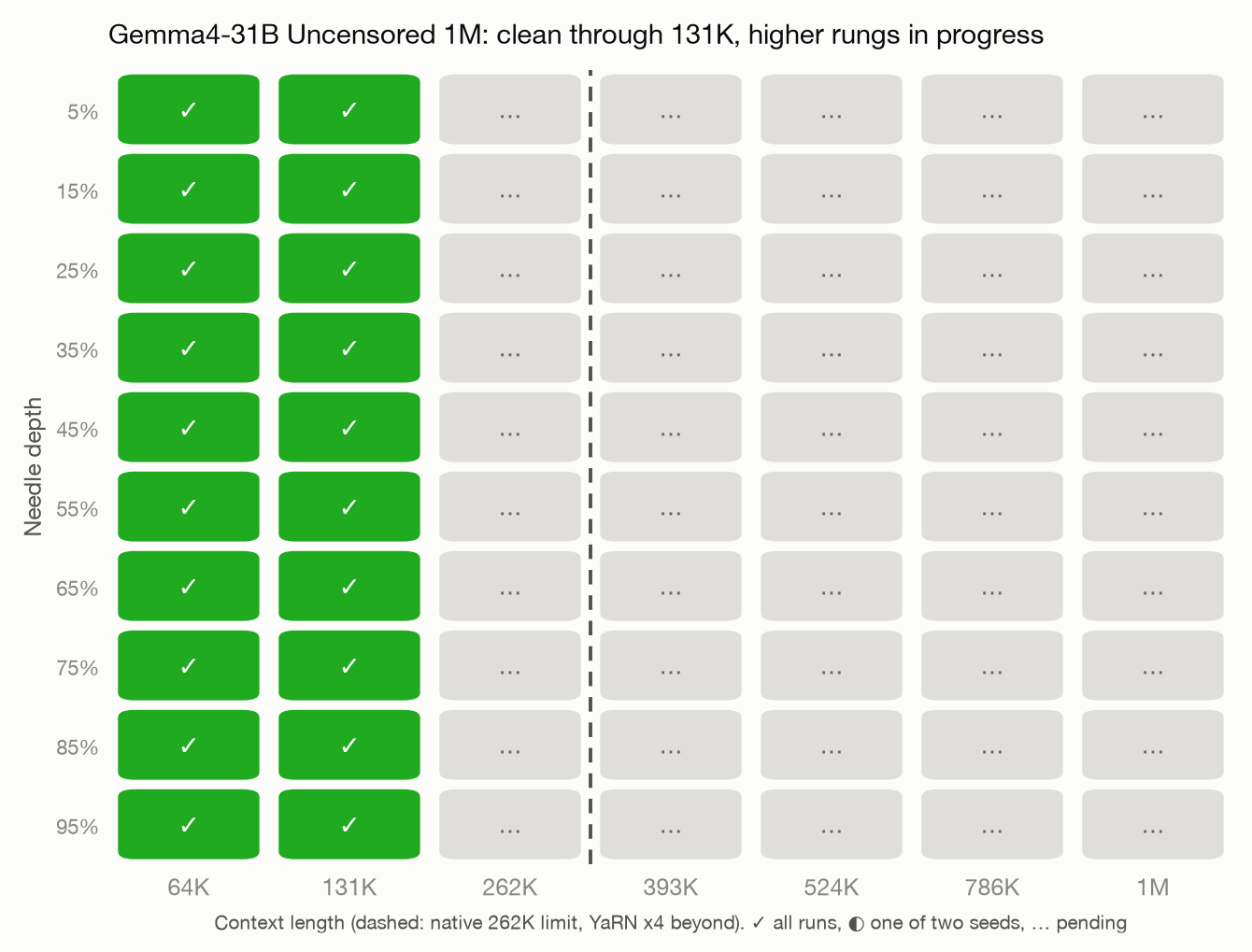
| 1M context | 10/10 through 131K; 262K to 1M rungs in progress, card will update |
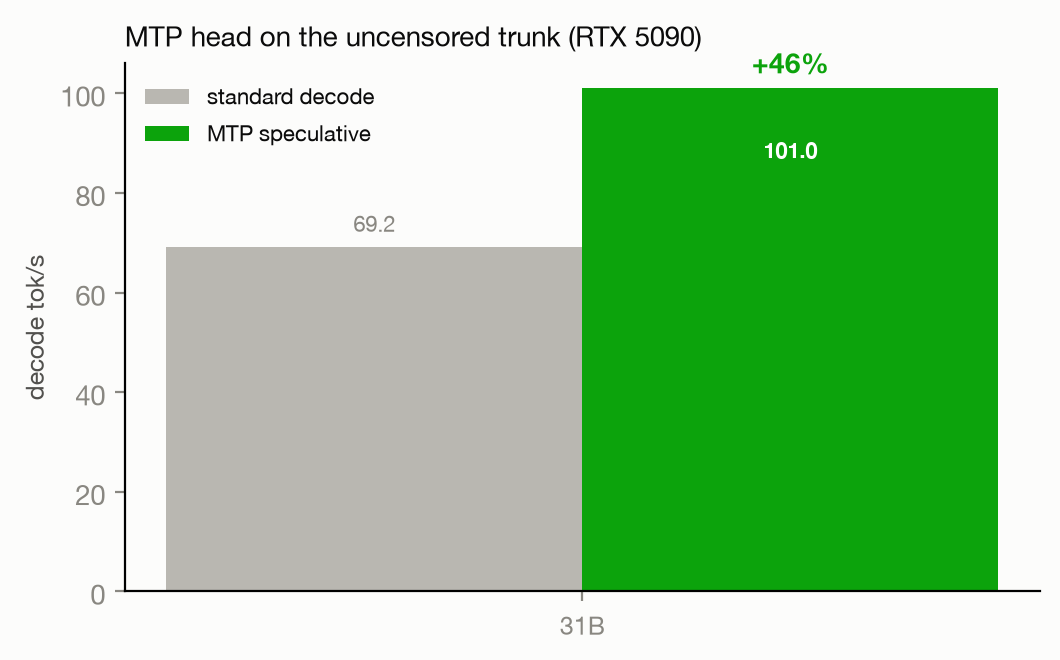
| MTP speculative decoding | 69.2 to 101.0 tok/s (+46%), acceptance 0.658 (measured on this trunk, RTX 5090) |
| Vision | Verified July 6, 2026: reads image text and identifies objects |
| Uncensored | HauhauCS Balanced abliteration; trunk weights bit-identical to the source release |
Needle-in-a-haystack
Perfect scores as far as a 32 GB card could take a dense 31B at f16 KV (131K). The 262K through 1M rungs are running on a 128 GB Mac at publish time and this card will be updated as each lands. Side note: DeepReinforce's Ornith-1.0 family description lists an unreleased 31B Dense variant built on this same Gemma 4 trunk; only their Qwen-based models have shipped.
MTP speculative decoding
The draft head predicts ahead and the trunk verifies every token, so output is identical to standard decoding, only faster. Measured speedup on this uncensored trunk beats the ~35 percent claimed upstream.
Files
| File | Size | Role |
|---|---|---|
gemma4-31b-uncensored-1M-Q4.gguf |
18.7 GB | Trunk, 1M baked, QAT 4-bit |
mtp-gemma-31b.gguf |
280 MB | MTP draft head, pair with -md |
mmproj-gemma31b-hauhau.gguf |
1.2 GB | Vision tower, pair with --mmproj |
niah_heatmap.png, mtp_speedup.png, results.jsonl |
small | Verification evidence |
Every file, every mirror
Nothing was discontinued: every quant is one click away. Hugging Face carries the curated picks, ModelScope always carries everything, and Ollama serves ready-to-run tags.
| File | Size | Hugging Face | ModelScope | Ollama |
|---|---|---|---|---|
gemma4-31b-uncensored-1M-Q4.gguf |
18.7 GB | download | download | - |
mmproj-gemma31b-hauhau.gguf |
1.2 GB | download | download | - |
mtp-gemma-31b.gguf |
280 MB | download | download | - |
Run it
llama.cpp, everything on:
llama-server -m gemma4-31b-uncensored-1M-Q4.gguf \
-c 1048576 -np 1 --jinja \
-md mtp-gemma-31b.gguf --spec-type draft-mtp --spec-draft-n-max 3 \
--mmproj mmproj-gemma31b-hauhau.gguf
Ollama (1M and vision work; Ollama has no speculative decoding yet, so the MTP head adds no speed there):
FROM ./gemma4-31b-uncensored-1M-Q4.gguf
RENDERER gemma4
PARSER gemma4
PARAMETER num_ctx 262144
The RENDERER and PARSER lines avoid imported-GGUF template bugs under tool-heavy use. Raise num_ctx as memory allows.
How this was built
YaRN rope-scaling metadata (factor 4.0 over native 262,144) baked into the GGUF header with gguf-py; weights are bit-identical to the HauhauCS release, no fine-tuning. Gemma 4's dual-rope design takes YaRN on its global-attention layers. Certification harness: 10 needles per rung at depths 5 to 95 percent, temperature 0, seeded prompts, f16 KV only. Method and tooling: github.com/satindergrewal/aviary-1m.
For base capability benchmarks see Google's official Gemma 4 cards; uncensoring quality versus the official trunk has not been independently benchmarked here.
Credits
Base model and QAT: Google (Gemma license; its terms flow down to these files). Uncensoring and packaging: HauhauCS. MTP head: Unsloth (via the HauhauCS repo). 1M YaRN extension, benchmarking, and certification: SatGeze.
Sister repos: 12B | 26B-A4B | 31B | Qwen3.6-35B
Mirrors: Hugging Face | ModelScope
- Downloads last month
- -
We're not able to determine the quantization variants.
Model tree for satgeze/Gemma4-31B-Uncensored-HauhauCS-1M-GGUF
Base model
google/gemma-4-31B