Instructions to use s3dev-ai/embeddinggemma-300m-gguf with libraries, inference providers, notebooks, and local apps. Follow these links to get started.
- Libraries
- llama-cpp-python
How to use s3dev-ai/embeddinggemma-300m-gguf with llama-cpp-python:
# !pip install llama-cpp-python from llama_cpp import Llama llm = Llama.from_pretrained( repo_id="s3dev-ai/embeddinggemma-300m-gguf", filename="embeddinggemma-300M-BF16.gguf", )
output = llm( "Once upon a time,", max_tokens=512, echo=True ) print(output)
- Notebooks
- Google Colab
- Kaggle
- Local Apps
- llama.cpp
How to use s3dev-ai/embeddinggemma-300m-gguf with llama.cpp:
Install from brew
brew install llama.cpp # Start a local OpenAI-compatible server with a web UI: llama-server -hf s3dev-ai/embeddinggemma-300m-gguf:Q4_K_M # Run inference directly in the terminal: llama-cli -hf s3dev-ai/embeddinggemma-300m-gguf:Q4_K_M
Install from WinGet (Windows)
winget install llama.cpp # Start a local OpenAI-compatible server with a web UI: llama-server -hf s3dev-ai/embeddinggemma-300m-gguf:Q4_K_M # Run inference directly in the terminal: llama-cli -hf s3dev-ai/embeddinggemma-300m-gguf:Q4_K_M
Use pre-built binary
# Download pre-built binary from: # https://github.com/ggerganov/llama.cpp/releases # Start a local OpenAI-compatible server with a web UI: ./llama-server -hf s3dev-ai/embeddinggemma-300m-gguf:Q4_K_M # Run inference directly in the terminal: ./llama-cli -hf s3dev-ai/embeddinggemma-300m-gguf:Q4_K_M
Build from source code
git clone https://github.com/ggerganov/llama.cpp.git cd llama.cpp cmake -B build cmake --build build -j --target llama-server llama-cli # Start a local OpenAI-compatible server with a web UI: ./build/bin/llama-server -hf s3dev-ai/embeddinggemma-300m-gguf:Q4_K_M # Run inference directly in the terminal: ./build/bin/llama-cli -hf s3dev-ai/embeddinggemma-300m-gguf:Q4_K_M
Use Docker
docker model run hf.co/s3dev-ai/embeddinggemma-300m-gguf:Q4_K_M
- LM Studio
- Jan
- Ollama
How to use s3dev-ai/embeddinggemma-300m-gguf with Ollama:
ollama run hf.co/s3dev-ai/embeddinggemma-300m-gguf:Q4_K_M
- Unsloth Studio new
How to use s3dev-ai/embeddinggemma-300m-gguf with Unsloth Studio:
Install Unsloth Studio (macOS, Linux, WSL)
curl -fsSL https://unsloth.ai/install.sh | sh # Run unsloth studio unsloth studio -H 0.0.0.0 -p 8888 # Then open http://localhost:8888 in your browser # Search for s3dev-ai/embeddinggemma-300m-gguf to start chatting
Install Unsloth Studio (Windows)
irm https://unsloth.ai/install.ps1 | iex # Run unsloth studio unsloth studio -H 0.0.0.0 -p 8888 # Then open http://localhost:8888 in your browser # Search for s3dev-ai/embeddinggemma-300m-gguf to start chatting
Using HuggingFace Spaces for Unsloth
# No setup required # Open https://huggingface.co/spaces/unsloth/studio in your browser # Search for s3dev-ai/embeddinggemma-300m-gguf to start chatting
- Docker Model Runner
How to use s3dev-ai/embeddinggemma-300m-gguf with Docker Model Runner:
docker model run hf.co/s3dev-ai/embeddinggemma-300m-gguf:Q4_K_M
- Lemonade
How to use s3dev-ai/embeddinggemma-300m-gguf with Lemonade:
Pull the model
# Download Lemonade from https://lemonade-server.ai/ lemonade pull s3dev-ai/embeddinggemma-300m-gguf:Q4_K_M
Run and chat with the model
lemonade run user.embeddinggemma-300m-gguf-Q4_K_M
List all available models
lemonade list
Overview
This page provides various quantisations of the base model, in GGUF format.
- google/embeddinggemma-300m
Model Description
For a full model description, please refer to the base model's card.
How are the GGUF files created?
After cloning the author's original base model repository, llama.cpp is used to convert the model to a GGML compatible file, using f32 as the output type; preserving the original fidelity. The model is converted un-altered, unless otherwise stated.
Finally, for each respective quantisation level, llama.cpp's llama-quantize executable is called using the F32 GGUF file as the source file.
Quantisations
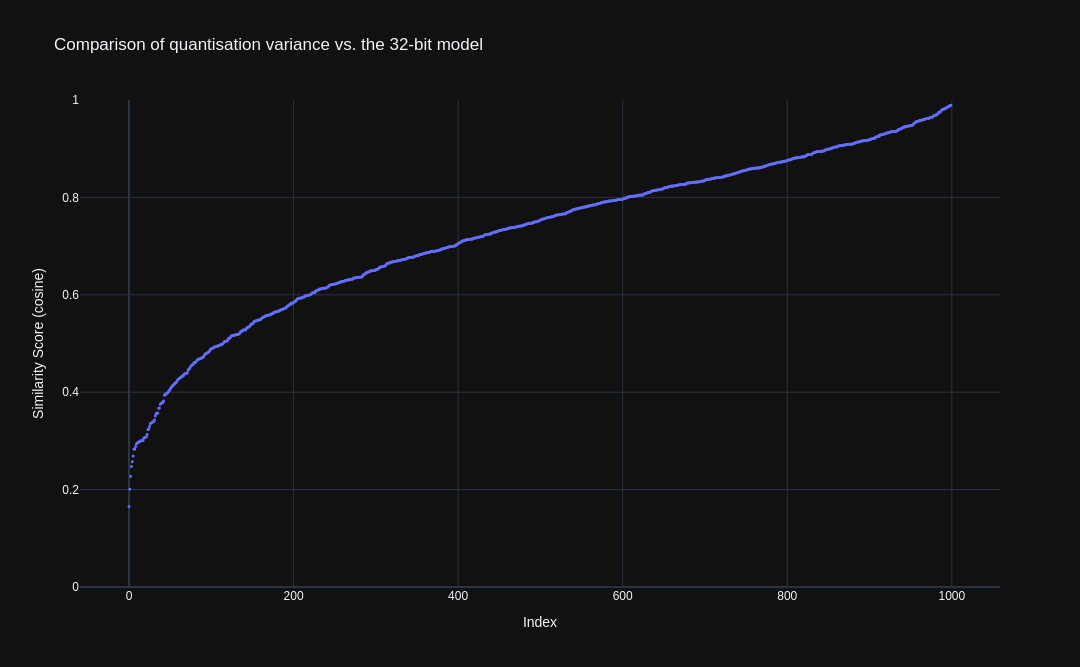
To help visualise the difference in model quantisation (i.e. level of retained fidelity), the image below shows the cosine similarity scores for each quantisation, baselined against the 32-bit base model. It can be observed that lower fidelity yields a wider scatter in scores, relative to the 32-bit model.
The underlying base dataset was sampled to 1000 records with a unbiased similarity score distribution. Using the various quantisation levels of this model, embeddings were created for sentence1 and sentence2. Finally, a cosine similarity score was calculated across the two embeddings, and plotted on the graph.
Note: This graph currently only features a single trend, which was created against the un-quantised 32-bit model. Although the quantised GGUF files are available, neither
sentence-transformersnorllama-cpp-pythonhave been updated to support thegemma-embeddingformat, so we can't use them (yet).As soon as support is available, we'll update this graph to display the fidelity for the quantisations.
- Downloads last month
- 37
2-bit
4-bit
5-bit
6-bit
8-bit
16-bit
32-bit
Model tree for s3dev-ai/embeddinggemma-300m-gguf
Base model
google/embeddinggemma-300m