Instructions to use s3dev-ai/Falcon-H1-7B-Instruct-gguf with libraries, inference providers, notebooks, and local apps. Follow these links to get started.
- Libraries
- llama-cpp-python
How to use s3dev-ai/Falcon-H1-7B-Instruct-gguf with llama-cpp-python:
# !pip install llama-cpp-python from llama_cpp import Llama llm = Llama.from_pretrained( repo_id="s3dev-ai/Falcon-H1-7B-Instruct-gguf", filename="Falcon-H1-7B-Instruct-BF16.gguf", )
llm.create_chat_completion( messages = [ { "role": "user", "content": "What is the capital of France?" } ] ) - Notebooks
- Google Colab
- Kaggle
- Local Apps
- llama.cpp
How to use s3dev-ai/Falcon-H1-7B-Instruct-gguf with llama.cpp:
Install from brew
brew install llama.cpp # Start a local OpenAI-compatible server with a web UI: llama-server -hf s3dev-ai/Falcon-H1-7B-Instruct-gguf:Q4_K_M # Run inference directly in the terminal: llama-cli -hf s3dev-ai/Falcon-H1-7B-Instruct-gguf:Q4_K_M
Install from WinGet (Windows)
winget install llama.cpp # Start a local OpenAI-compatible server with a web UI: llama-server -hf s3dev-ai/Falcon-H1-7B-Instruct-gguf:Q4_K_M # Run inference directly in the terminal: llama-cli -hf s3dev-ai/Falcon-H1-7B-Instruct-gguf:Q4_K_M
Use pre-built binary
# Download pre-built binary from: # https://github.com/ggerganov/llama.cpp/releases # Start a local OpenAI-compatible server with a web UI: ./llama-server -hf s3dev-ai/Falcon-H1-7B-Instruct-gguf:Q4_K_M # Run inference directly in the terminal: ./llama-cli -hf s3dev-ai/Falcon-H1-7B-Instruct-gguf:Q4_K_M
Build from source code
git clone https://github.com/ggerganov/llama.cpp.git cd llama.cpp cmake -B build cmake --build build -j --target llama-server llama-cli # Start a local OpenAI-compatible server with a web UI: ./build/bin/llama-server -hf s3dev-ai/Falcon-H1-7B-Instruct-gguf:Q4_K_M # Run inference directly in the terminal: ./build/bin/llama-cli -hf s3dev-ai/Falcon-H1-7B-Instruct-gguf:Q4_K_M
Use Docker
docker model run hf.co/s3dev-ai/Falcon-H1-7B-Instruct-gguf:Q4_K_M
- LM Studio
- Jan
- vLLM
How to use s3dev-ai/Falcon-H1-7B-Instruct-gguf with vLLM:
Install from pip and serve model
# Install vLLM from pip: pip install vllm # Start the vLLM server: vllm serve "s3dev-ai/Falcon-H1-7B-Instruct-gguf" # Call the server using curl (OpenAI-compatible API): curl -X POST "http://localhost:8000/v1/chat/completions" \ -H "Content-Type: application/json" \ --data '{ "model": "s3dev-ai/Falcon-H1-7B-Instruct-gguf", "messages": [ { "role": "user", "content": "What is the capital of France?" } ] }'Use Docker
docker model run hf.co/s3dev-ai/Falcon-H1-7B-Instruct-gguf:Q4_K_M
- Ollama
How to use s3dev-ai/Falcon-H1-7B-Instruct-gguf with Ollama:
ollama run hf.co/s3dev-ai/Falcon-H1-7B-Instruct-gguf:Q4_K_M
- Unsloth Studio new
How to use s3dev-ai/Falcon-H1-7B-Instruct-gguf with Unsloth Studio:
Install Unsloth Studio (macOS, Linux, WSL)
curl -fsSL https://unsloth.ai/install.sh | sh # Run unsloth studio unsloth studio -H 0.0.0.0 -p 8888 # Then open http://localhost:8888 in your browser # Search for s3dev-ai/Falcon-H1-7B-Instruct-gguf to start chatting
Install Unsloth Studio (Windows)
irm https://unsloth.ai/install.ps1 | iex # Run unsloth studio unsloth studio -H 0.0.0.0 -p 8888 # Then open http://localhost:8888 in your browser # Search for s3dev-ai/Falcon-H1-7B-Instruct-gguf to start chatting
Using HuggingFace Spaces for Unsloth
# No setup required # Open https://huggingface.co/spaces/unsloth/studio in your browser # Search for s3dev-ai/Falcon-H1-7B-Instruct-gguf to start chatting
- Pi new
How to use s3dev-ai/Falcon-H1-7B-Instruct-gguf with Pi:
Start the llama.cpp server
# Install llama.cpp: brew install llama.cpp # Start a local OpenAI-compatible server: llama-server -hf s3dev-ai/Falcon-H1-7B-Instruct-gguf:Q4_K_M
Configure the model in Pi
# Install Pi: npm install -g @mariozechner/pi-coding-agent # Add to ~/.pi/agent/models.json: { "providers": { "llama-cpp": { "baseUrl": "http://localhost:8080/v1", "api": "openai-completions", "apiKey": "none", "models": [ { "id": "s3dev-ai/Falcon-H1-7B-Instruct-gguf:Q4_K_M" } ] } } }Run Pi
# Start Pi in your project directory: pi
- Hermes Agent new
How to use s3dev-ai/Falcon-H1-7B-Instruct-gguf with Hermes Agent:
Start the llama.cpp server
# Install llama.cpp: brew install llama.cpp # Start a local OpenAI-compatible server: llama-server -hf s3dev-ai/Falcon-H1-7B-Instruct-gguf:Q4_K_M
Configure Hermes
# Install Hermes: curl -fsSL https://hermes-agent.nousresearch.com/install.sh | bash hermes setup # Point Hermes at the local server: hermes config set model.provider custom hermes config set model.base_url http://127.0.0.1:8080/v1 hermes config set model.default s3dev-ai/Falcon-H1-7B-Instruct-gguf:Q4_K_M
Run Hermes
hermes
- Docker Model Runner
How to use s3dev-ai/Falcon-H1-7B-Instruct-gguf with Docker Model Runner:
docker model run hf.co/s3dev-ai/Falcon-H1-7B-Instruct-gguf:Q4_K_M
- Lemonade
How to use s3dev-ai/Falcon-H1-7B-Instruct-gguf with Lemonade:
Pull the model
# Download Lemonade from https://lemonade-server.ai/ lemonade pull s3dev-ai/Falcon-H1-7B-Instruct-gguf:Q4_K_M
Run and chat with the model
lemonade run user.Falcon-H1-7B-Instruct-gguf-Q4_K_M
List all available models
lemonade list
Overview
This model repository provides various quantisations of the following base model, in GGUF format.
- tiiuae/Falcon-H1-7B-Instruct
Model Description
For a full model description, please refer to the base model's card.
This model, and subsequent quantisations, have been converted directly from the author's base model unaltered.
How are the GGUF files created?
After cloning the author's original base model repository, llama.cpp is used to convert the model to GGUF format, using --outtype=bf16 to preserve the original model's 16-bit fidelity.
Finally, for each subsequent quantisation level, llama.cpp's llama-quantize executable is called using the BF16 GGUF file as the source file.
Quantisation
The purpose of this repository is to provide unaltered quantisations of the author's base model. This section is designed to help the user visualise the difference in quantisation levels, in efforts to assist in model (quantisation) selection.
Comparison Statistics
To aid a user in model/quantisation selection, the team has created the following statistics specifically for comparing the similarity scores across quantisation runs.
The dataset against which each run was conducted is composed of 175 question/answer pairs, divided amongst 7 topics, specifically designed to test a quantisation's processing ability. The test dataset was created by Mistral Large (via Le Chat) using prompts explicitly stating the requirement for the question/answer pairs to be designed for Mistral model quantisation testing.
The similarity scores used by these statistics were calculated as the cosine similarity between the embedding of the 'gold standard' answer provided in the dataset, and the embedding of the response from the quantised model. The embedding model used in these tests is the all-MiniLM-L6-v2 Q8_0.
Range
The range graph below illustrates how the range of similarity scores varies amongst the quantisation levels. Included in the range stats are the:
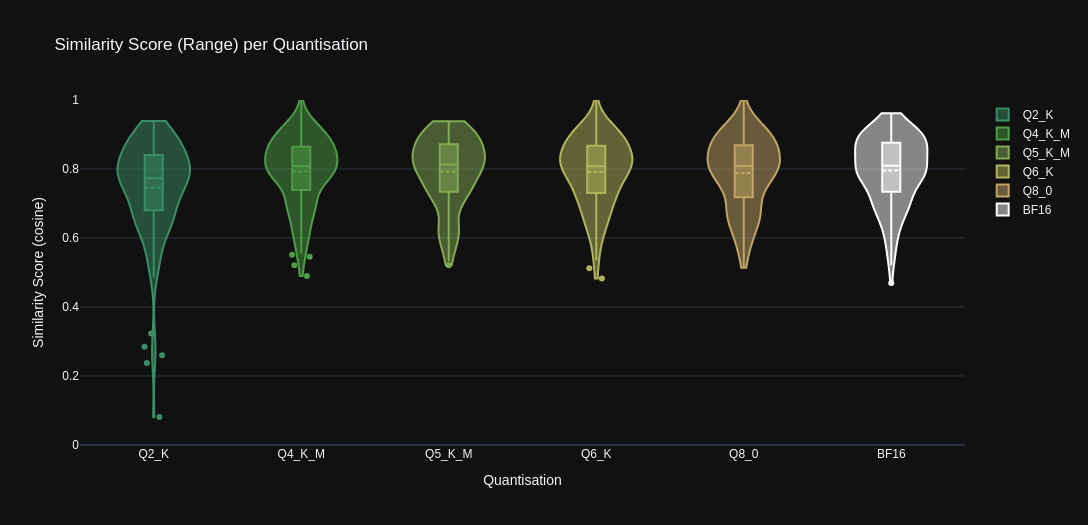
- Minimum scores
- Maximum scores
- Mean scores
- Score distribution (KDE)
- Outliers
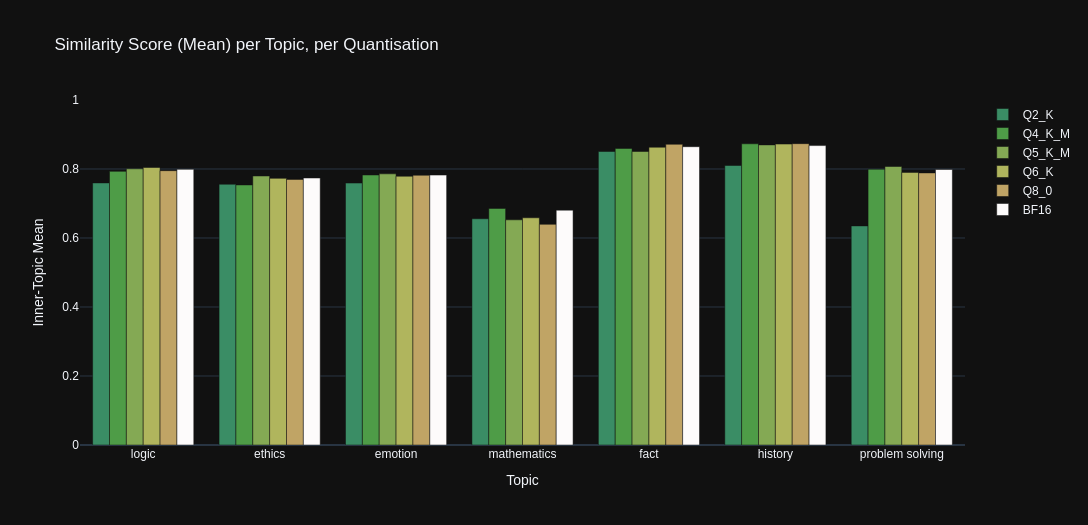
Mean
The mean graph below illustrates how the mean similarity scores (when grouped by 'topic') vary amongst the quantisation levels.
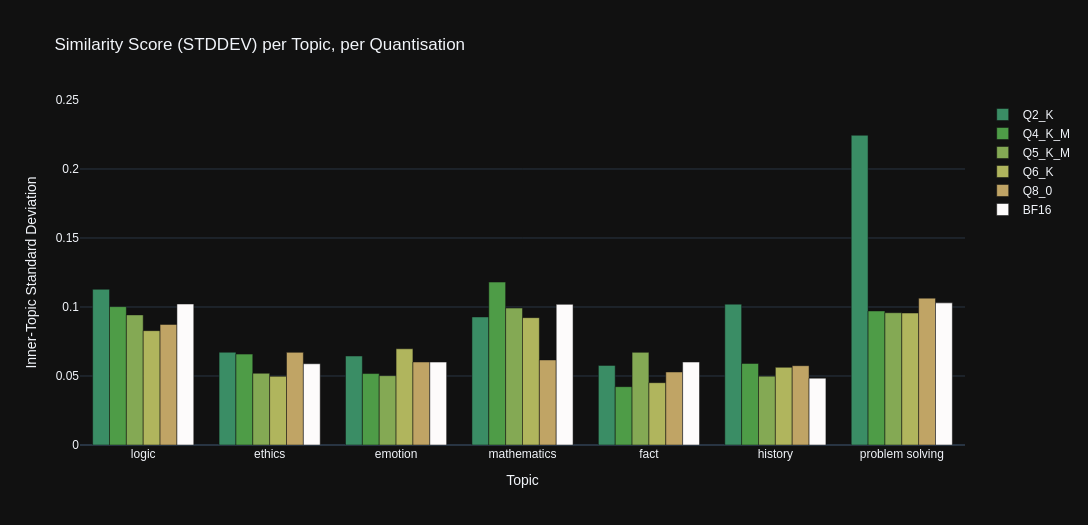
Standard Deviation
The standard deviation graph below illustrates the how spread of similarity scores vary amongst the quantisation levels, when grouped by the test dataset's 'topic' categories.
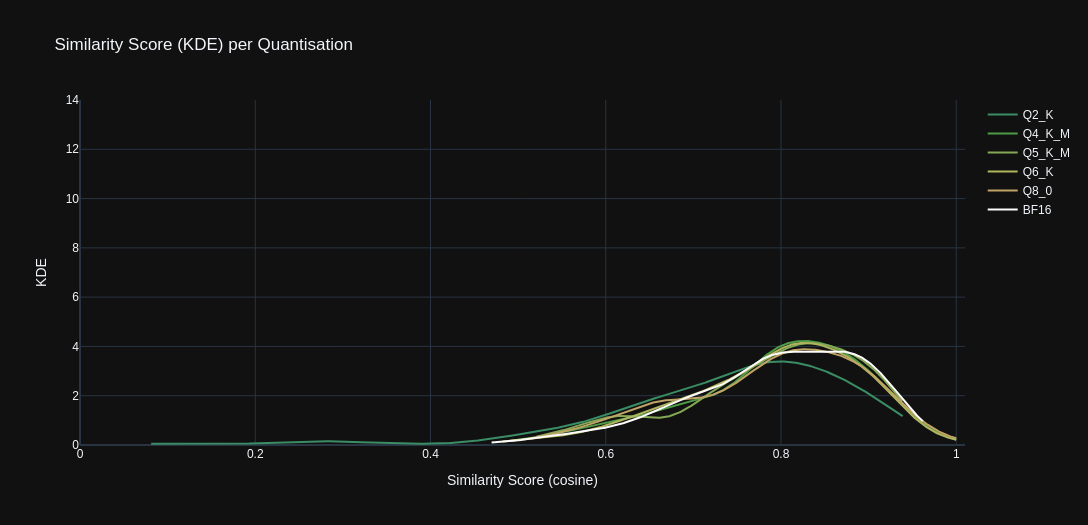
Kernel Density Estimate
The KDE graph below illustrates the how distribution of similarity scores vary amongst the quantisation levels.
- Downloads last month
- 61
2-bit
4-bit
5-bit
6-bit
8-bit
16-bit
Model tree for s3dev-ai/Falcon-H1-7B-Instruct-gguf
Base model
tiiuae/Falcon-H1-7B-Base