Instructions to use prism-ml/Bonsai-1.7B-gguf with libraries, inference providers, notebooks, and local apps. Follow these links to get started.
- Libraries
- llama-cpp-python
How to use prism-ml/Bonsai-1.7B-gguf with llama-cpp-python:
# !pip install llama-cpp-python from llama_cpp import Llama llm = Llama.from_pretrained( repo_id="prism-ml/Bonsai-1.7B-gguf", filename="Bonsai-1.7B-Q1_0.gguf", )
llm.create_chat_completion( messages = [ { "role": "user", "content": "What is the capital of France?" } ] ) - Notebooks
- Google Colab
- Kaggle
- Local Apps
- llama.cpp
How to use prism-ml/Bonsai-1.7B-gguf with llama.cpp:
Install from brew
brew install llama.cpp # Start a local OpenAI-compatible server with a web UI: llama-server -hf prism-ml/Bonsai-1.7B-gguf:Q1_0 # Run inference directly in the terminal: llama-cli -hf prism-ml/Bonsai-1.7B-gguf:Q1_0
Install from WinGet (Windows)
winget install llama.cpp # Start a local OpenAI-compatible server with a web UI: llama-server -hf prism-ml/Bonsai-1.7B-gguf:Q1_0 # Run inference directly in the terminal: llama-cli -hf prism-ml/Bonsai-1.7B-gguf:Q1_0
Use pre-built binary
# Download pre-built binary from: # https://github.com/ggerganov/llama.cpp/releases # Start a local OpenAI-compatible server with a web UI: ./llama-server -hf prism-ml/Bonsai-1.7B-gguf:Q1_0 # Run inference directly in the terminal: ./llama-cli -hf prism-ml/Bonsai-1.7B-gguf:Q1_0
Build from source code
git clone https://github.com/ggerganov/llama.cpp.git cd llama.cpp cmake -B build cmake --build build -j --target llama-server llama-cli # Start a local OpenAI-compatible server with a web UI: ./build/bin/llama-server -hf prism-ml/Bonsai-1.7B-gguf:Q1_0 # Run inference directly in the terminal: ./build/bin/llama-cli -hf prism-ml/Bonsai-1.7B-gguf:Q1_0
Use Docker
docker model run hf.co/prism-ml/Bonsai-1.7B-gguf:Q1_0
- LM Studio
- Jan
- vLLM
How to use prism-ml/Bonsai-1.7B-gguf with vLLM:
Install from pip and serve model
# Install vLLM from pip: pip install vllm # Start the vLLM server: vllm serve "prism-ml/Bonsai-1.7B-gguf" # Call the server using curl (OpenAI-compatible API): curl -X POST "http://localhost:8000/v1/chat/completions" \ -H "Content-Type: application/json" \ --data '{ "model": "prism-ml/Bonsai-1.7B-gguf", "messages": [ { "role": "user", "content": "What is the capital of France?" } ] }'Use Docker
docker model run hf.co/prism-ml/Bonsai-1.7B-gguf:Q1_0
- Ollama
How to use prism-ml/Bonsai-1.7B-gguf with Ollama:
ollama run hf.co/prism-ml/Bonsai-1.7B-gguf:Q1_0
- Unsloth Studio new
How to use prism-ml/Bonsai-1.7B-gguf with Unsloth Studio:
Install Unsloth Studio (macOS, Linux, WSL)
curl -fsSL https://unsloth.ai/install.sh | sh # Run unsloth studio unsloth studio -H 0.0.0.0 -p 8888 # Then open http://localhost:8888 in your browser # Search for prism-ml/Bonsai-1.7B-gguf to start chatting
Install Unsloth Studio (Windows)
irm https://unsloth.ai/install.ps1 | iex # Run unsloth studio unsloth studio -H 0.0.0.0 -p 8888 # Then open http://localhost:8888 in your browser # Search for prism-ml/Bonsai-1.7B-gguf to start chatting
Using HuggingFace Spaces for Unsloth
# No setup required # Open https://huggingface.co/spaces/unsloth/studio in your browser # Search for prism-ml/Bonsai-1.7B-gguf to start chatting
- Pi new
How to use prism-ml/Bonsai-1.7B-gguf with Pi:
Start the llama.cpp server
# Install llama.cpp: brew install llama.cpp # Start a local OpenAI-compatible server: llama-server -hf prism-ml/Bonsai-1.7B-gguf:Q1_0
Configure the model in Pi
# Install Pi: npm install -g @mariozechner/pi-coding-agent # Add to ~/.pi/agent/models.json: { "providers": { "llama-cpp": { "baseUrl": "http://localhost:8080/v1", "api": "openai-completions", "apiKey": "none", "models": [ { "id": "prism-ml/Bonsai-1.7B-gguf:Q1_0" } ] } } }Run Pi
# Start Pi in your project directory: pi
- Hermes Agent new
How to use prism-ml/Bonsai-1.7B-gguf with Hermes Agent:
Start the llama.cpp server
# Install llama.cpp: brew install llama.cpp # Start a local OpenAI-compatible server: llama-server -hf prism-ml/Bonsai-1.7B-gguf:Q1_0
Configure Hermes
# Install Hermes: curl -fsSL https://hermes-agent.nousresearch.com/install.sh | bash hermes setup # Point Hermes at the local server: hermes config set model.provider custom hermes config set model.base_url http://127.0.0.1:8080/v1 hermes config set model.default prism-ml/Bonsai-1.7B-gguf:Q1_0
Run Hermes
hermes
- Docker Model Runner
How to use prism-ml/Bonsai-1.7B-gguf with Docker Model Runner:
docker model run hf.co/prism-ml/Bonsai-1.7B-gguf:Q1_0
- Lemonade
How to use prism-ml/Bonsai-1.7B-gguf with Lemonade:
Pull the model
# Download Lemonade from https://lemonade-server.ai/ lemonade pull prism-ml/Bonsai-1.7B-gguf:Q1_0
Run and chat with the model
lemonade run user.Bonsai-1.7B-gguf-Q1_0
List all available models
lemonade list
Prism ML Website | Whitepaper | Demo & Examples | Colab Notebook | Discord
Bonsai-1.7B-GGUF-1bit
End-to-end 1-bit language model for llama.cpp (CUDA, Metal, CPU)
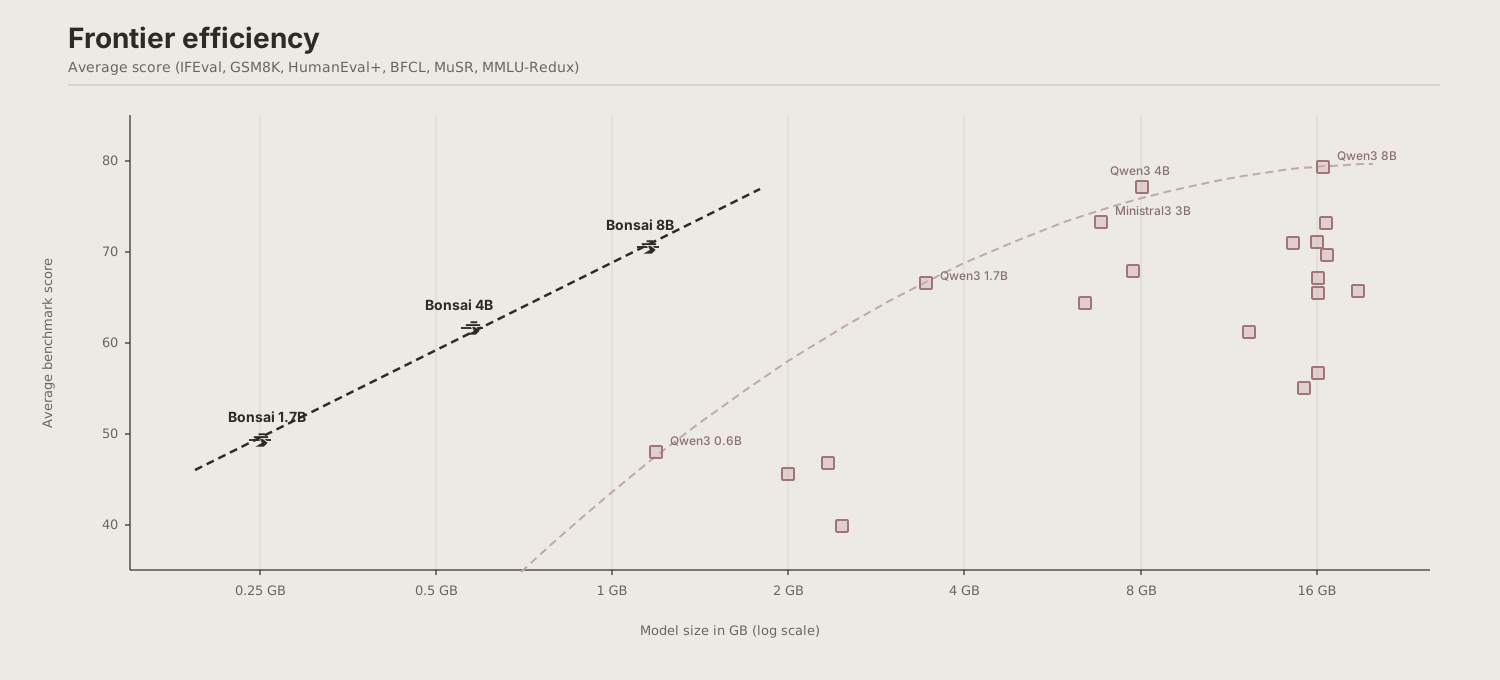
13.9x smaller than FP16 | 3.0x faster on RTX 4090 | runs on any device
Highlights
- Deployed footprint โ runs on virtually any device
- End-to-end 1-bit weights across embeddings, attention projections, MLP projections, and LM head
- GGUF Q1_0 (g128) format for 1-bit packing of weights with shared scales for each group (group size 128).
- Cross-platform: CUDA (RTX/datacenter), Metal (Mac), Swift (iPhone/iPad), Android
- MLX companion: also available as MLX 1-bit g128 for native Apple Silicon inference
Resources
- Google Colab โ try Bonsai in your browser, no setup required
- Whitepaper โ for more details on Bonsai, check out our whitepaper
- Demo repo โ comprehensive examples for serving, benchmarking, and integrating Bonsai
- Discord โ join the community for support, discussion, and updates
- 1-bit kernels: llama.cpp fork (CUDA + Metal) ยท MLX fork (Apple Silicon) ยท mlx-swift fork (iOS/macOS)
- Locally AI โ we have partnered with Locally AI for iPhone support
Model Overview
| Item | Specification |
|---|---|
| Parameters | 1.7B (~1.4B non-embedding) |
| Architecture | Qwen3-1.7B dense: GQA (16 query / 8 KV heads), SwiGLU MLP, RoPE, RMSNorm |
| Layers | 28 Transformer decoder blocks |
| Context length | 32,768 tokens |
| Vocab size | 151,936 |
| Weight format | GGUF Q1_0 |
| Deployed size | 0.24 GB (14.2x smaller than FP16) |
| 1-bit coverage | Embeddings, attention projections, MLP projections, LM head |
| License | Apache 2.0 |
Quantization Format: Q1_0
Each weight is a single bit: 0 maps to โscale, 1 maps to +scale. Every group of 128 weights shares one FP16 scale factor.
Effective bits per weight: 1.125 (1 sign bit + 16-bit scale amortized over 128 weights).
Memory Requirement
Parameter memory only (weights and scales loaded into memory):
| Format | Size | Reduction | Ratio |
|---|---|---|---|
| FP16 | 3.44 GB | โ | 1.0x |
| **GGUF Q1_0 ** | 0.24 GB | 93.0% | 14.2x |
| MLX 1-bit g128 | 0.27 GB | 92.2% | 12.8x |
The GGUF file on disk is 0.25 GB (~6.2 MB larger) because the format embeds the tokenizer, chat template, and model metadata alongside the weights.
Best Practices
Generation Parameters
| Parameter | Default | Suggested range |
|---|---|---|
| Temperature | 0.5 | 0.5 -- 0.7 |
| Top-k | 20 | 20 -- 40 |
| Top-p | 0.9 | 0.85 -- 0.95 |
| Repetition penalty | 1.0 | |
| Presence penalty | 0.0 |
System Prompt
You can use a simple system prompt such as:
You are a helpful assistant
Quickstart
llama.cpp (CUDA)
# Clone the PrismML fork of llama.cpp (includes Q1_0 kernels)
git clone https://github.com/PrismML-Eng/llama.cpp
cd llama.cpp
# Build with CUDA support
cmake -B build -DGGML_CUDA=ON && cmake --build build -j
# Run inference
./build/bin/llama-cli \
-m Bonsai-1.7B-Q1_0.gguf \
-p "Explain quantum computing in simple terms." \
-n 256 \
--temp 0.5 \
--top-p 0.85 \
--top-k 20 \
-ngl 99
llama.cpp (Metal / macOS)
# Clone the PrismML fork of llama.cpp (includes Q1_0 kernels)
git clone https://github.com/PrismML-Eng/llama.cpp
cd llama.cpp
# Build with Metal support (default on macOS)
cmake -B build && cmake --build build -j
# Run inference
./build/bin/llama-cli \
-m Bonsai-1.7B-Q1_0.gguf \
-p "Explain quantum computing in simple terms." \
-n 256 \
--temp 0.5 \
--top-p 0.85 \
--top-k 20 \
-ngl 99
llama.cpp Server
./build/bin/llama-server \
-m Bonsai-1.7B-Q1_0.gguf \
--host 0.0.0.0 \
--port 8080 \
-ngl 99
Open the web UI at http://127.0.0.1:8080, or see our llama.cpp fork for more examples.
Cross-Platform Throughput
| Platform | Backend | TG128 (tok/s) | FP16 TG (tok/s) | TG vs FP16 | PP512 (tok/s) | FP16 PP512 (tok/s) |
|---|---|---|---|---|---|---|
| RTX 4090 | llama.cpp CUDA | 674 | 224 | 3.0x | 31,899 | 30,630 |
| M4 Pro 48 GB | llama.cpp Metal | 250 | 65 | 3.8x | 2,305 | 2,291 |
Citation
If you use 1-bit Bonsai 1.7B, please cite:
@techreport{bonsai,
title = {Bonsai: End-to-End 1-bit Language Model Deployment
Across Apple, GPU, and Mobile Runtimes},
author = {Prism ML},
year = {2026},
month = {March},
url = {https://prismml.com}
}
Contact
For questions, feedback, or collaboration inquiries: contact@prismml.com
- Downloads last month
- 8,608
1-bit
Model tree for prism-ml/Bonsai-1.7B-gguf
Base model
prism-ml/Bonsai-1.7B-unpackedSpaces using prism-ml/Bonsai-1.7B-gguf 6
Collection including prism-ml/Bonsai-1.7B-gguf
Evaluation results
- Gsm8k on openai/gsm8k View evaluation results source leaderboard 66.3