Instructions to use easygoing0114/flan-t5-xxl-fused with libraries, inference providers, notebooks, and local apps. Follow these links to get started.
- Libraries
- llama-cpp-python
How to use easygoing0114/flan-t5-xxl-fused with llama-cpp-python:
# !pip install llama-cpp-python from llama_cpp import Llama llm = Llama.from_pretrained( repo_id="easygoing0114/flan-t5-xxl-fused", filename="flan_t5_xxl_TE-only_Q3_K_L.gguf", )
output = llm( "Once upon a time,", max_tokens=512, echo=True ) print(output)
- Notebooks
- Google Colab
- Kaggle
- Local Apps Settings
- llama.cpp
How to use easygoing0114/flan-t5-xxl-fused with llama.cpp:
Install from brew
brew install llama.cpp # Start a local OpenAI-compatible server with a web UI: llama-server -hf easygoing0114/flan-t5-xxl-fused:Q4_K_M # Run inference directly in the terminal: llama-cli -hf easygoing0114/flan-t5-xxl-fused:Q4_K_M
Install from WinGet (Windows)
winget install llama.cpp # Start a local OpenAI-compatible server with a web UI: llama-server -hf easygoing0114/flan-t5-xxl-fused:Q4_K_M # Run inference directly in the terminal: llama-cli -hf easygoing0114/flan-t5-xxl-fused:Q4_K_M
Use pre-built binary
# Download pre-built binary from: # https://github.com/ggerganov/llama.cpp/releases # Start a local OpenAI-compatible server with a web UI: ./llama-server -hf easygoing0114/flan-t5-xxl-fused:Q4_K_M # Run inference directly in the terminal: ./llama-cli -hf easygoing0114/flan-t5-xxl-fused:Q4_K_M
Build from source code
git clone https://github.com/ggerganov/llama.cpp.git cd llama.cpp cmake -B build cmake --build build -j --target llama-server llama-cli # Start a local OpenAI-compatible server with a web UI: ./build/bin/llama-server -hf easygoing0114/flan-t5-xxl-fused:Q4_K_M # Run inference directly in the terminal: ./build/bin/llama-cli -hf easygoing0114/flan-t5-xxl-fused:Q4_K_M
Use Docker
docker model run hf.co/easygoing0114/flan-t5-xxl-fused:Q4_K_M
- LM Studio
- Jan
- Ollama
How to use easygoing0114/flan-t5-xxl-fused with Ollama:
ollama run hf.co/easygoing0114/flan-t5-xxl-fused:Q4_K_M
- Unsloth Studio
How to use easygoing0114/flan-t5-xxl-fused with Unsloth Studio:
Install Unsloth Studio (macOS, Linux, WSL)
curl -fsSL https://unsloth.ai/install.sh | sh # Run unsloth studio unsloth studio -H 0.0.0.0 -p 8888 # Then open http://localhost:8888 in your browser # Search for easygoing0114/flan-t5-xxl-fused to start chatting
Install Unsloth Studio (Windows)
irm https://unsloth.ai/install.ps1 | iex # Run unsloth studio unsloth studio -H 0.0.0.0 -p 8888 # Then open http://localhost:8888 in your browser # Search for easygoing0114/flan-t5-xxl-fused to start chatting
Using HuggingFace Spaces for Unsloth
# No setup required # Open https://huggingface.co/spaces/unsloth/studio in your browser # Search for easygoing0114/flan-t5-xxl-fused to start chatting
- Atomic Chat new
- Docker Model Runner
How to use easygoing0114/flan-t5-xxl-fused with Docker Model Runner:
docker model run hf.co/easygoing0114/flan-t5-xxl-fused:Q4_K_M
- Lemonade
How to use easygoing0114/flan-t5-xxl-fused with Lemonade:
Pull the model
# Download Lemonade from https://lemonade-server.ai/ lemonade pull easygoing0114/flan-t5-xxl-fused:Q4_K_M
Run and chat with the model
lemonade run user.flan-t5-xxl-fused-Q4_K_M
List all available models
lemonade list
output = llm(
"Once upon a time,",
max_tokens=512,
echo=True
)
print(output)FLAN-T5-XXL Fused Model
Guide (External Site): English | Japanese
Why Use FP32 Text Encoder? (External Site): English | Japanese
This repository hosts a fused version of the FLAN-T5-XXL model, created by combining the split files from Google's FLAN-T5-XXL repository. The files have been merged for convenience, making it easier to integrate into AI applications, including image generation workflows.
Base Model: blue_pencil-flux1_v0.0.1
Key Features
- Fused for Simplicity: Combines split model files into a single, ready-to-use format.
- Optimized Variants: Available in FP32, FP16, FP8, and quantized GGUF formats to balance accuracy and resource usage.
- Enhanced Prompt Accuracy: Outperforms the standard T5-XXL v1.1 in generating precise outputs for image generation tasks.
Model Variants
| Model | Size | SSIM Similarity | Recommended |
|---|---|---|---|
| FP32 | 19 GB | 100.0% | ๐ |
| FP16 | 9.6 GB | 98.0% | โ |
| FP8 | 4.8 GB | 95.3% | ๐บ |
| Q8_0 | 5.1 GB | 97.6% | โ |
| Q6_K | 4.0 GB | 97.3% | ๐บ |
| Q5_K_M | 3.4 GB | 94.8% | |
| Q4_K_M | 2.9 GB | 96.4% |
Comparison Graph
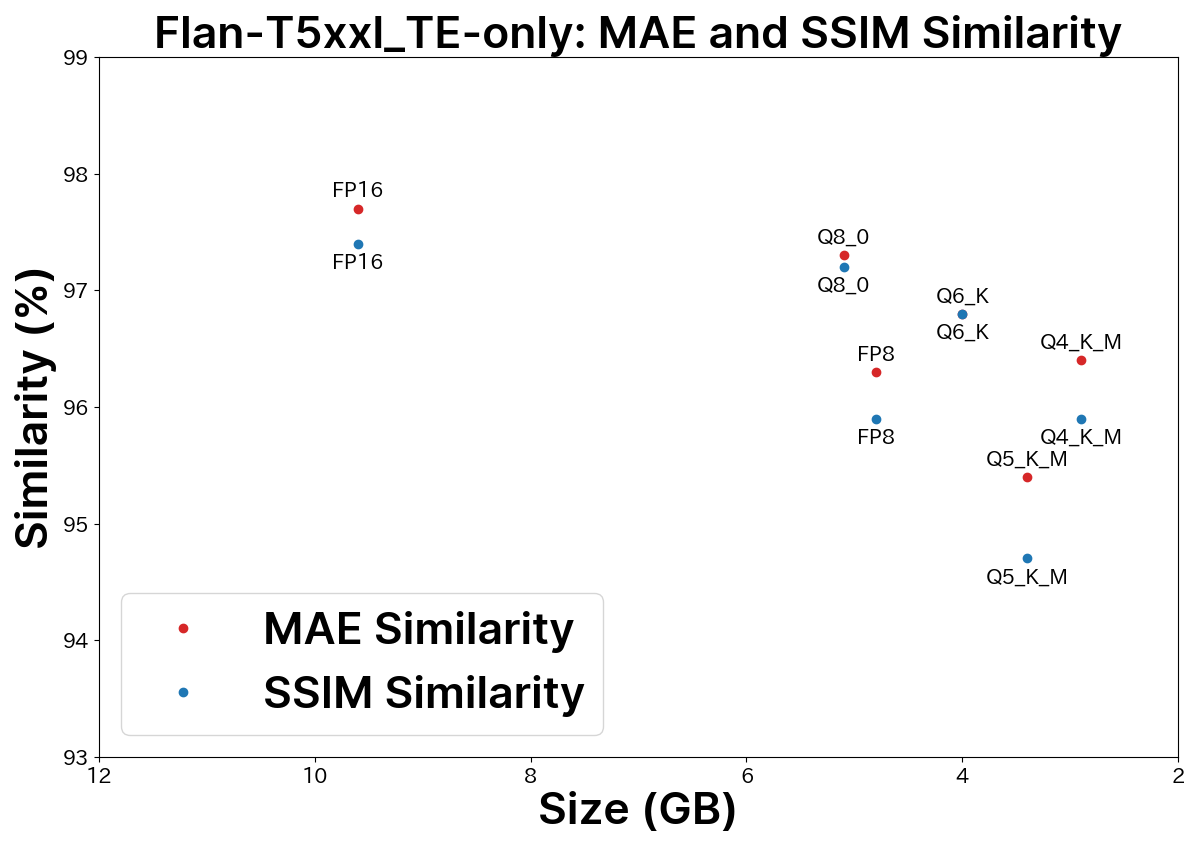
For a detailed comparison, refer to this blog post.
Usage Instructions
Place the downloaded model files in one of the following directories:
models/text_encodermodels/clipModels/CLIP
ComfyUI
When using Flux.1 in ComfyUI, load the text encoder with the DualCLIPLoader node.
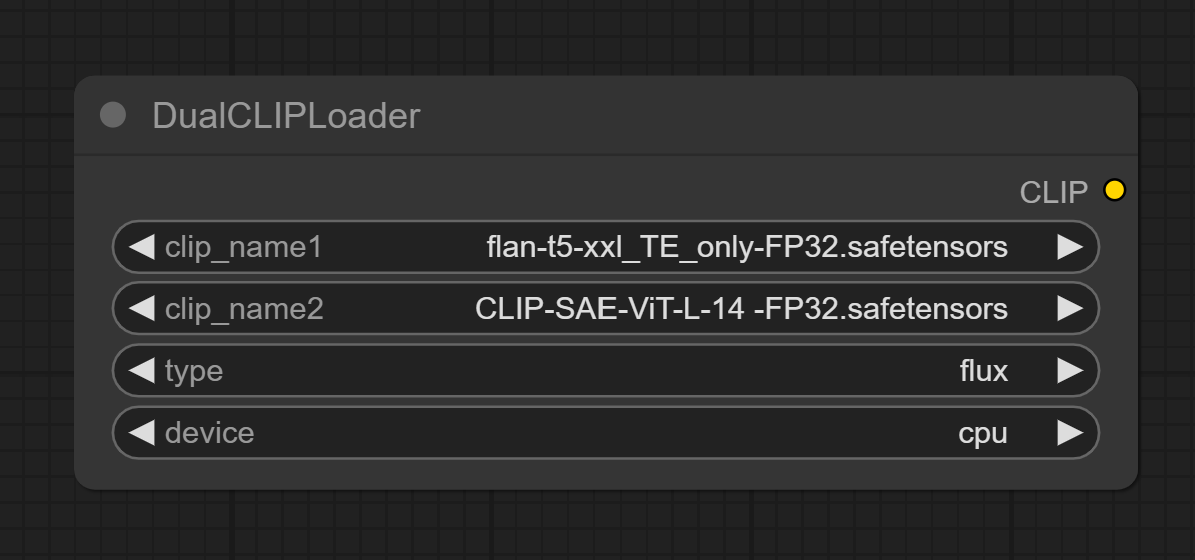
As of April 13, 2025, the default DualCLIPLoader node includes a device selection option, allowing you to choose where to load the model:
cudaโ VRAMcpuโ System RAM
Since Flux.1โs text encoder is large, setting the device to cpu and storing the model in system RAM often improves performance. Unless your system RAM is 16GB or less, keeping the model in system RAM is more effective than GGUF quantization. Thus, GGUF formats offer limited benefits in ComfyUI for most users due to sufficient RAM availability.
(More about ComfyUI settings.)
You can also use FP32 text encoders for optimal results by enabling the --fp32-text-enc argument at startup.
Stable Diffusion WebUI Forge
In Stable Diffusion WebUI Forge, select the FLAN-T5-XXL model instead of the default T5xxl_v1_1 text encoder.
To use the text encoder in FP32 format, launch Stable Diffusion WebUI Forge with the --clip-in-fp32 argument.
Comparison: FLAN-T5-XXL vs T5-XXL v1.1
These example images were generated using FLAN-T5-XXL and T5-XXL v1.1 models in Flux.1. FLAN-T5-XXL delivers more accurate responses to prompts.
Further Comparisons
License
- This model is distributed under the Apache 2.0 License.
- The uploader claims no ownership or rights over the model.
Update History
August 22, 2025
Add Why Use FP32 Text Encoder?
July 24, 2025
Re-upload of the GGUF model, reduction in model size, and correction of metadata.
July 6, 2025
Uploaded flan_t5_xxl_full_FP8 models.
April 20, 2025
Updated Stable Diffusion WebUI Forge FP32 launch argument.
April 15, 2025
Updated content to reflect ComfyUI updates.
March 20, 2025
Updated FLAN-T5-XXL model list and table.
- Downloads last month
- 958
3-bit
4-bit
5-bit
6-bit
8-bit
# !pip install llama-cpp-python from llama_cpp import Llama llm = Llama.from_pretrained( repo_id="easygoing0114/flan-t5-xxl-fused", filename="", )