
Instructions to use Sao10K/Fimbulvetr-11B-v2.1-16K with libraries, inference providers, notebooks, and local apps. Follow these links to get started.
- Libraries
- Transformers
How to use Sao10K/Fimbulvetr-11B-v2.1-16K with Transformers:
# Use a pipeline as a high-level helper from transformers import pipeline pipe = pipeline("text-generation", model="Sao10K/Fimbulvetr-11B-v2.1-16K")# Load model directly from transformers import AutoTokenizer, AutoModelForMultimodalLM tokenizer = AutoTokenizer.from_pretrained("Sao10K/Fimbulvetr-11B-v2.1-16K") model = AutoModelForMultimodalLM.from_pretrained("Sao10K/Fimbulvetr-11B-v2.1-16K") - Inference
- Notebooks
- Google Colab
- Kaggle
- Local Apps Settings
- vLLM
How to use Sao10K/Fimbulvetr-11B-v2.1-16K with vLLM:
Install from pip and serve model
# Install vLLM from pip: pip install vllm # Start the vLLM server: vllm serve "Sao10K/Fimbulvetr-11B-v2.1-16K" # Call the server using curl (OpenAI-compatible API): curl -X POST "http://localhost:8000/v1/completions" \ -H "Content-Type: application/json" \ --data '{ "model": "Sao10K/Fimbulvetr-11B-v2.1-16K", "prompt": "Once upon a time,", "max_tokens": 512, "temperature": 0.5 }'Use Docker
docker model run hf.co/Sao10K/Fimbulvetr-11B-v2.1-16K
- SGLang
How to use Sao10K/Fimbulvetr-11B-v2.1-16K with SGLang:
Install from pip and serve model
# Install SGLang from pip: pip install sglang # Start the SGLang server: python3 -m sglang.launch_server \ --model-path "Sao10K/Fimbulvetr-11B-v2.1-16K" \ --host 0.0.0.0 \ --port 30000 # Call the server using curl (OpenAI-compatible API): curl -X POST "http://localhost:30000/v1/completions" \ -H "Content-Type: application/json" \ --data '{ "model": "Sao10K/Fimbulvetr-11B-v2.1-16K", "prompt": "Once upon a time,", "max_tokens": 512, "temperature": 0.5 }'Use Docker images
docker run --gpus all \ --shm-size 32g \ -p 30000:30000 \ -v ~/.cache/huggingface:/root/.cache/huggingface \ --env "HF_TOKEN=<secret>" \ --ipc=host \ lmsysorg/sglang:latest \ python3 -m sglang.launch_server \ --model-path "Sao10K/Fimbulvetr-11B-v2.1-16K" \ --host 0.0.0.0 \ --port 30000 # Call the server using curl (OpenAI-compatible API): curl -X POST "http://localhost:30000/v1/completions" \ -H "Content-Type: application/json" \ --data '{ "model": "Sao10K/Fimbulvetr-11B-v2.1-16K", "prompt": "Once upon a time,", "max_tokens": 512, "temperature": 0.5 }' - Docker Model Runner
How to use Sao10K/Fimbulvetr-11B-v2.1-16K with Docker Model Runner:
docker model run hf.co/Sao10K/Fimbulvetr-11B-v2.1-16K
Trained with compute from Backyard.ai | Thanks to them and @dynafire for helping me out.
Fimbulvetr-v2 but extended to 16K with PoSE. A sane context value would be ~12K before it degrades.
Note:
- I left Rope Theta at 10K for this train, instead of expanding it like with Stheno 3.3. Solar did not play well with extended theta, grad norm / loss values went parabolic or plunged from 10000+ down. Unreliable pretty much, unlike Stheno 3.3's training run.
Notes:
- I noticed people having bad issues with quants. Be it GGUF or others, at 8 bit or less. Kind of a weird issue? I had little to no issues during testing unquanted.
- Slightly different results from base Fimbulvetr-v2, but during my tests they are similar enough. The vibes are still there.
- Formatting issues happen rarely. Sometimes. A reroll / regenerate fixes it from tests.
- I get consistent and reliable answers at ~11K context fine.
- Still coherent at up to 16K though! Just works not that well.
I recommend sticking up to 12K context, but loading the model at 16K for inference. It has a really accurate context up to 10K from multiple different extended long context tests. 16K works fine for roleplays, but not for more detailed tasks.
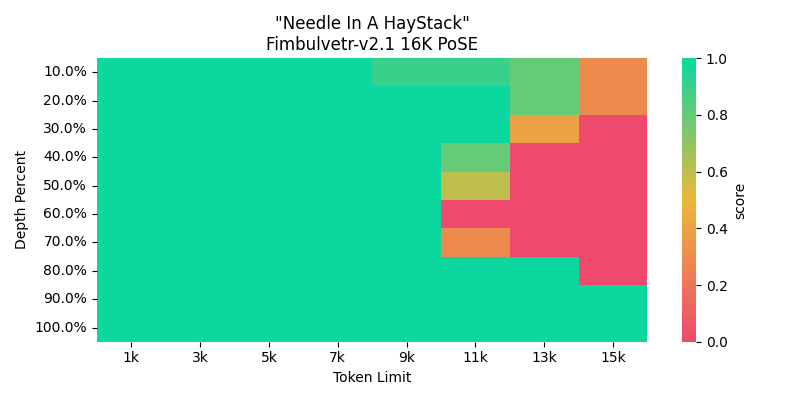
Red Needle in Haystack testing results for this specific one are usually due to weird result artifacts, like the model answering part of the key, or commenting extra. Basically, they got the result, but it's incomplete or there's additional stuff taken.
Something like ' 3211' or '3211 and' instead of '321142'. Weird. Hence why its coherent and semi-reliable for roleplays at 16K context.
- Downloads last month
- 43

Install from pip and serve model
# Install vLLM from pip: pip install vllm# Start the vLLM server: vllm serve "Sao10K/Fimbulvetr-11B-v2.1-16K"# Call the server using curl (OpenAI-compatible API): curl -X POST "http://localhost:8000/v1/completions" \ -H "Content-Type: application/json" \ --data '{ "model": "Sao10K/Fimbulvetr-11B-v2.1-16K", "prompt": "Once upon a time,", "max_tokens": 512, "temperature": 0.5 }'