Instructions to use RedHatAI/Qwen3-32B-speculator.eagle3 with libraries, inference providers, notebooks, and local apps. Follow these links to get started.
- Libraries
- Transformers
How to use RedHatAI/Qwen3-32B-speculator.eagle3 with Transformers:
# Use a pipeline as a high-level helper from transformers import pipeline pipe = pipeline("text-generation", model="RedHatAI/Qwen3-32B-speculator.eagle3", trust_remote_code=True)# Load model directly from transformers import Eagle3Speculator model = Eagle3Speculator.from_pretrained("RedHatAI/Qwen3-32B-speculator.eagle3", trust_remote_code=True, dtype="auto") - Notebooks
- Google Colab
- Kaggle
- Local Apps
- vLLM
How to use RedHatAI/Qwen3-32B-speculator.eagle3 with vLLM:
Install from pip and serve model
# Install vLLM from pip: pip install vllm # Start the vLLM server: vllm serve "RedHatAI/Qwen3-32B-speculator.eagle3" # Call the server using curl (OpenAI-compatible API): curl -X POST "http://localhost:8000/v1/completions" \ -H "Content-Type: application/json" \ --data '{ "model": "RedHatAI/Qwen3-32B-speculator.eagle3", "prompt": "Once upon a time,", "max_tokens": 512, "temperature": 0.5 }'Use Docker
docker model run hf.co/RedHatAI/Qwen3-32B-speculator.eagle3
- SGLang
How to use RedHatAI/Qwen3-32B-speculator.eagle3 with SGLang:
Install from pip and serve model
# Install SGLang from pip: pip install sglang # Start the SGLang server: python3 -m sglang.launch_server \ --model-path "RedHatAI/Qwen3-32B-speculator.eagle3" \ --host 0.0.0.0 \ --port 30000 # Call the server using curl (OpenAI-compatible API): curl -X POST "http://localhost:30000/v1/completions" \ -H "Content-Type: application/json" \ --data '{ "model": "RedHatAI/Qwen3-32B-speculator.eagle3", "prompt": "Once upon a time,", "max_tokens": 512, "temperature": 0.5 }'Use Docker images
docker run --gpus all \ --shm-size 32g \ -p 30000:30000 \ -v ~/.cache/huggingface:/root/.cache/huggingface \ --env "HF_TOKEN=<secret>" \ --ipc=host \ lmsysorg/sglang:latest \ python3 -m sglang.launch_server \ --model-path "RedHatAI/Qwen3-32B-speculator.eagle3" \ --host 0.0.0.0 \ --port 30000 # Call the server using curl (OpenAI-compatible API): curl -X POST "http://localhost:30000/v1/completions" \ -H "Content-Type: application/json" \ --data '{ "model": "RedHatAI/Qwen3-32B-speculator.eagle3", "prompt": "Once upon a time,", "max_tokens": 512, "temperature": 0.5 }' - Docker Model Runner
How to use RedHatAI/Qwen3-32B-speculator.eagle3 with Docker Model Runner:
docker model run hf.co/RedHatAI/Qwen3-32B-speculator.eagle3
Qwen3-32B-speculator.eagle3
Model Overview
- Verifier: Qwen/Qwen3-32B
- Speculative Decoding Algorithm: EAGLE-3
- Model Architecture: Eagle3Speculator
- Release Date: 09/17/2025
- Version: 1.0
- Model Developers: RedHat
This is a speculator model designed for use with Qwen/Qwen3-32B, based on the EAGLE-3 speculative decoding algorithm.
It was trained using the speculators library on a combination of the Aeala/ShareGPT_Vicuna_unfiltered and the train_sft split of HuggingFaceH4/ultrachat_200k datasets.
This model should be used with the Qwen/Qwen3-32B chat template, specifically through the /chat/completions endpoint.
Use with vLLM
vllm serve Qwen/Qwen3-32B \
-tp 2 \
--speculative-config '{
"model": "RedHatAI/Qwen3-32B-speculator.eagle3",
"num_speculative_tokens": 3,
"method": "eagle3"
}'
Evaluations
Use cases
| Use Case | Dataset | Number of Samples |
|---|---|---|
| Coding | HumanEval | 168 |
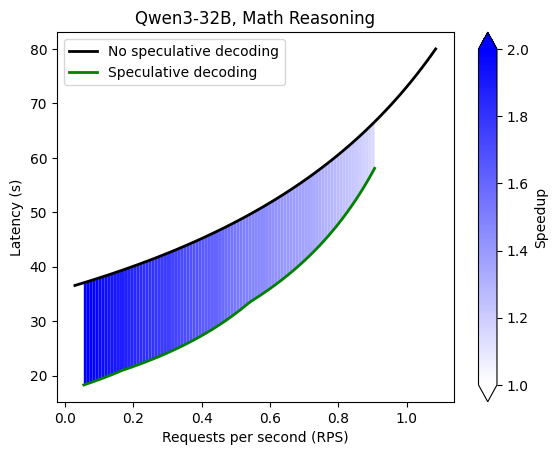
| Math Reasoning | gsm8k | 80 |
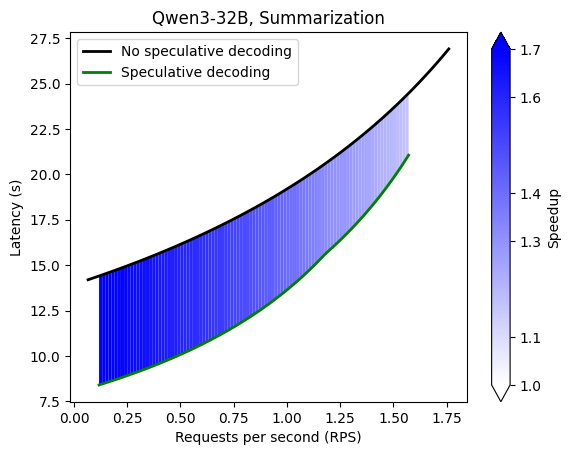
| Text Summarization | CNN/Daily Mail | 80 |
Acceptance lengths
| Use Case | k=1 | k=2 | k=3 | k=4 | k=5 | k=6 | k=7 |
|---|---|---|---|---|---|---|---|
| Coding | 1.67 | 2.06 | 2.29 | 2.39 | 2.47 | 2.50 | 2.53 |
| Math Reasoning | 1.73 | 2.21 | 2.49 | 2.69 | 2.80 | 2.83 | 3.08 |
| Text Summarization | 1.62 | 1.95 | 2.15 | 2.23 | 2.27 | 2.32 | 2.33 |
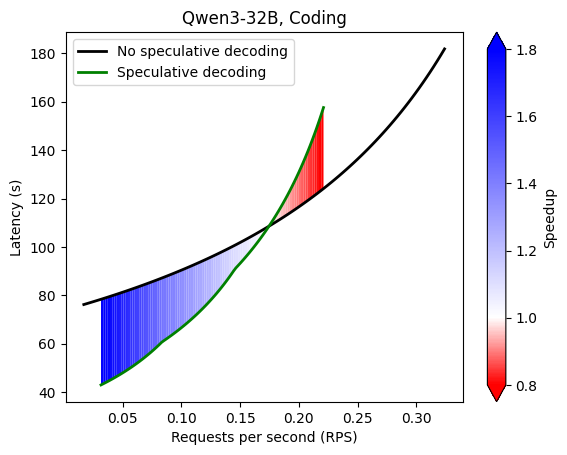
Performance benchmarking (2xA100)
Details
Configuration- temperature: 0.6
- top_p: 0.95
- top_k: 20
- repetitions: 3
- time per experiment: 10min
- hardware: 2xA100
- vLLM version: 0.11.0
- GuideLLM version: 0.3.0
Command
GUIDELLM__PREFERRED_ROUTE="chat_completions" \
guidellm benchmark \
--target "http://localhost:8000/v1" \
--data "RedHatAI/speculator_benchmarks" \
--data-args '{"data_files": "HumanEval.jsonl"}' \
--rate-type sweep \
--max-seconds 600 \
--output-path "Qwen3-32B-HumanEval.json" \
--backend-args '{"extra_body": {"chat_completions": {"temperature":0.6, "top_p":0.95, "top_k":20}}}'
GuideLLM interface changed, so for compatibility with the latest version (v0.6.0), please use the following command:
GUIDELLM__PREFERRED_ROUTE="chat_completions" \
guidellm benchmark \
--target "http://localhost:8000/v1" \
--data "RedHatAI/speculator_benchmarks" \
--data-args '{"data_files": "HumanEval.jsonl"}' \
--profile sweep \
--max-seconds 1800 \
--output-path "my_output.json" \
--backend-args '{"extras": {"body": {"temperature":0.6, "top_p":0.95, "top_k":20}}}'
- Downloads last month
- 705