Instructions to use GestaltLabs/Qwen3.6-35B-A3B-NSC-ACE-SABER-GGUF with libraries, inference providers, notebooks, and local apps. Follow these links to get started.
- Libraries
- llama-cpp-python
How to use GestaltLabs/Qwen3.6-35B-A3B-NSC-ACE-SABER-GGUF with llama-cpp-python:
# !pip install llama-cpp-python from llama_cpp import Llama llm = Llama.from_pretrained( repo_id="GestaltLabs/Qwen3.6-35B-A3B-NSC-ACE-SABER-GGUF", filename="Qwen3.6-35B-A3B-NSC-ACE-SABER-F16.gguf", )
llm.create_chat_completion( messages = [ { "role": "user", "content": [ { "type": "text", "text": "Describe this image in one sentence." }, { "type": "image_url", "image_url": { "url": "https://cdn.britannica.com/61/93061-050-99147DCE/Statue-of-Liberty-Island-New-York-Bay.jpg" } } ] } ] ) - Notebooks
- Google Colab
- Kaggle
- Local Apps Settings
- llama.cpp
How to use GestaltLabs/Qwen3.6-35B-A3B-NSC-ACE-SABER-GGUF with llama.cpp:
Install (macOS, Linux)
curl -LsSf https://llama.app/install.sh | sh # Start a local OpenAI-compatible server with a web UI: llama serve -hf GestaltLabs/Qwen3.6-35B-A3B-NSC-ACE-SABER-GGUF:Q4_K_M # Run inference directly in the terminal: llama cli -hf GestaltLabs/Qwen3.6-35B-A3B-NSC-ACE-SABER-GGUF:Q4_K_M
Install from WinGet (Windows)
winget install llama.cpp # Start a local OpenAI-compatible server with a web UI: llama serve -hf GestaltLabs/Qwen3.6-35B-A3B-NSC-ACE-SABER-GGUF:Q4_K_M # Run inference directly in the terminal: llama cli -hf GestaltLabs/Qwen3.6-35B-A3B-NSC-ACE-SABER-GGUF:Q4_K_M
Use pre-built binary
# Download pre-built binary from: # https://github.com/ggerganov/llama.cpp/releases # Start a local OpenAI-compatible server with a web UI: ./llama-server -hf GestaltLabs/Qwen3.6-35B-A3B-NSC-ACE-SABER-GGUF:Q4_K_M # Run inference directly in the terminal: ./llama-cli -hf GestaltLabs/Qwen3.6-35B-A3B-NSC-ACE-SABER-GGUF:Q4_K_M
Build from source code
git clone https://github.com/ggerganov/llama.cpp.git cd llama.cpp cmake -B build cmake --build build -j --target llama-server llama-cli # Start a local OpenAI-compatible server with a web UI: ./build/bin/llama-server -hf GestaltLabs/Qwen3.6-35B-A3B-NSC-ACE-SABER-GGUF:Q4_K_M # Run inference directly in the terminal: ./build/bin/llama-cli -hf GestaltLabs/Qwen3.6-35B-A3B-NSC-ACE-SABER-GGUF:Q4_K_M
Use Docker
docker model run hf.co/GestaltLabs/Qwen3.6-35B-A3B-NSC-ACE-SABER-GGUF:Q4_K_M
- LM Studio
- Jan
- vLLM
How to use GestaltLabs/Qwen3.6-35B-A3B-NSC-ACE-SABER-GGUF with vLLM:
Install from pip and serve model
# Install vLLM from pip: pip install vllm # Start the vLLM server: vllm serve "GestaltLabs/Qwen3.6-35B-A3B-NSC-ACE-SABER-GGUF" # Call the server using curl (OpenAI-compatible API): curl -X POST "http://localhost:8000/v1/chat/completions" \ -H "Content-Type: application/json" \ --data '{ "model": "GestaltLabs/Qwen3.6-35B-A3B-NSC-ACE-SABER-GGUF", "messages": [ { "role": "user", "content": [ { "type": "text", "text": "Describe this image in one sentence." }, { "type": "image_url", "image_url": { "url": "https://cdn.britannica.com/61/93061-050-99147DCE/Statue-of-Liberty-Island-New-York-Bay.jpg" } } ] } ] }'Use Docker
docker model run hf.co/GestaltLabs/Qwen3.6-35B-A3B-NSC-ACE-SABER-GGUF:Q4_K_M
- Ollama
How to use GestaltLabs/Qwen3.6-35B-A3B-NSC-ACE-SABER-GGUF with Ollama:
ollama run hf.co/GestaltLabs/Qwen3.6-35B-A3B-NSC-ACE-SABER-GGUF:Q4_K_M
- Unsloth Studio
How to use GestaltLabs/Qwen3.6-35B-A3B-NSC-ACE-SABER-GGUF with Unsloth Studio:
Install Unsloth Studio (macOS, Linux, WSL)
curl -fsSL https://unsloth.ai/install.sh | sh # Run unsloth studio unsloth studio -H 0.0.0.0 -p 8888 # Then open http://localhost:8888 in your browser # Search for GestaltLabs/Qwen3.6-35B-A3B-NSC-ACE-SABER-GGUF to start chatting
Install Unsloth Studio (Windows)
irm https://unsloth.ai/install.ps1 | iex # Run unsloth studio unsloth studio -H 0.0.0.0 -p 8888 # Then open http://localhost:8888 in your browser # Search for GestaltLabs/Qwen3.6-35B-A3B-NSC-ACE-SABER-GGUF to start chatting
Using HuggingFace Spaces for Unsloth
# No setup required # Open https://huggingface.co/spaces/unsloth/studio in your browser # Search for GestaltLabs/Qwen3.6-35B-A3B-NSC-ACE-SABER-GGUF to start chatting
- Pi
How to use GestaltLabs/Qwen3.6-35B-A3B-NSC-ACE-SABER-GGUF with Pi:
Start the llama.cpp server
# Install llama.cpp: brew install llama.cpp # Start a local OpenAI-compatible server: llama serve -hf GestaltLabs/Qwen3.6-35B-A3B-NSC-ACE-SABER-GGUF:Q4_K_M
Configure the model in Pi
# Install Pi: npm install -g @mariozechner/pi-coding-agent # Add to ~/.pi/agent/models.json: { "providers": { "llama-cpp": { "baseUrl": "http://localhost:8080/v1", "api": "openai-completions", "apiKey": "none", "models": [ { "id": "GestaltLabs/Qwen3.6-35B-A3B-NSC-ACE-SABER-GGUF:Q4_K_M" } ] } } }Run Pi
# Start Pi in your project directory: pi
- Hermes Agent new
How to use GestaltLabs/Qwen3.6-35B-A3B-NSC-ACE-SABER-GGUF with Hermes Agent:
Start the llama.cpp server
# Install llama.cpp: brew install llama.cpp # Start a local OpenAI-compatible server: llama serve -hf GestaltLabs/Qwen3.6-35B-A3B-NSC-ACE-SABER-GGUF:Q4_K_M
Configure Hermes
# Install Hermes: curl -fsSL https://hermes-agent.nousresearch.com/install.sh | bash hermes setup # Point Hermes at the local server: hermes config set model.provider custom hermes config set model.base_url http://127.0.0.1:8080/v1 hermes config set model.default GestaltLabs/Qwen3.6-35B-A3B-NSC-ACE-SABER-GGUF:Q4_K_M
Run Hermes
hermes
- Atomic Chat new
- Docker Model Runner
How to use GestaltLabs/Qwen3.6-35B-A3B-NSC-ACE-SABER-GGUF with Docker Model Runner:
docker model run hf.co/GestaltLabs/Qwen3.6-35B-A3B-NSC-ACE-SABER-GGUF:Q4_K_M
- Lemonade
How to use GestaltLabs/Qwen3.6-35B-A3B-NSC-ACE-SABER-GGUF with Lemonade:
Pull the model
# Download Lemonade from https://lemonade-server.ai/ lemonade pull GestaltLabs/Qwen3.6-35B-A3B-NSC-ACE-SABER-GGUF:Q4_K_M
Run and chat with the model
lemonade run user.Qwen3.6-35B-A3B-NSC-ACE-SABER-GGUF-Q4_K_M
List all available models
lemonade list
Install Unsloth Studio (Windows)
irm https://unsloth.ai/install.ps1 | iex
# Run unsloth studio
unsloth studio -H 0.0.0.0 -p 8888
# Then open http://localhost:8888 in your browser
# Search for GestaltLabs/Qwen3.6-35B-A3B-NSC-ACE-SABER-GGUF to start chattingUsing HuggingFace Spaces for Unsloth
# No setup required# Open https://huggingface.co/spaces/unsloth/studio in your browser
# Search for GestaltLabs/Qwen3.6-35B-A3B-NSC-ACE-SABER-GGUF to start chattingQwen3.6-35B-A3B-NSC-ACE-SABER GGUF
This repository hosts llama.cpp/GGUF builds for
GestaltLabs/Qwen3.6-35B-A3B-NSC-ACE-SABER. The source checkpoint is the full
safetensors model in GestaltLabs/Qwen3.6-35B-A3B-NSC-ACE-SABER.
The quantization suite is being built down to Q2_K. Higher quants preserve more of the SABER-selected distribution; lower quants are provided for smaller VRAM/RAM targets and should be evaluated against your own prompts.
Image/video sidecars: This repository now includes the restored Qwen3.6 multimodal config, processor/preprocessor files, tokenizer/chat template, safetensors index, and
model-vision-from-qwen3.6-base.safetensorsvisual tower sidecar. The existing.ggufbinaries were not rewritten in this metadata-copy pass.
Release Snapshot
| Item | Value |
|---|---|
| Source checkpoint | GestaltLabs/Qwen3.6-35B-A3B-NSC-ACE-SABER |
| Base model | Qwen/Qwen3.6-35B-A3B |
| Format | GGUF for llama.cpp-compatible runtimes |
| Quantization range | F16, Q8_0, Q6_K, Q5_K_M, Q5_K_S, Q4_K_M, Q4_K_S, Q3_K_L, Q3_K_M, Q3_K_S, Q2_K |
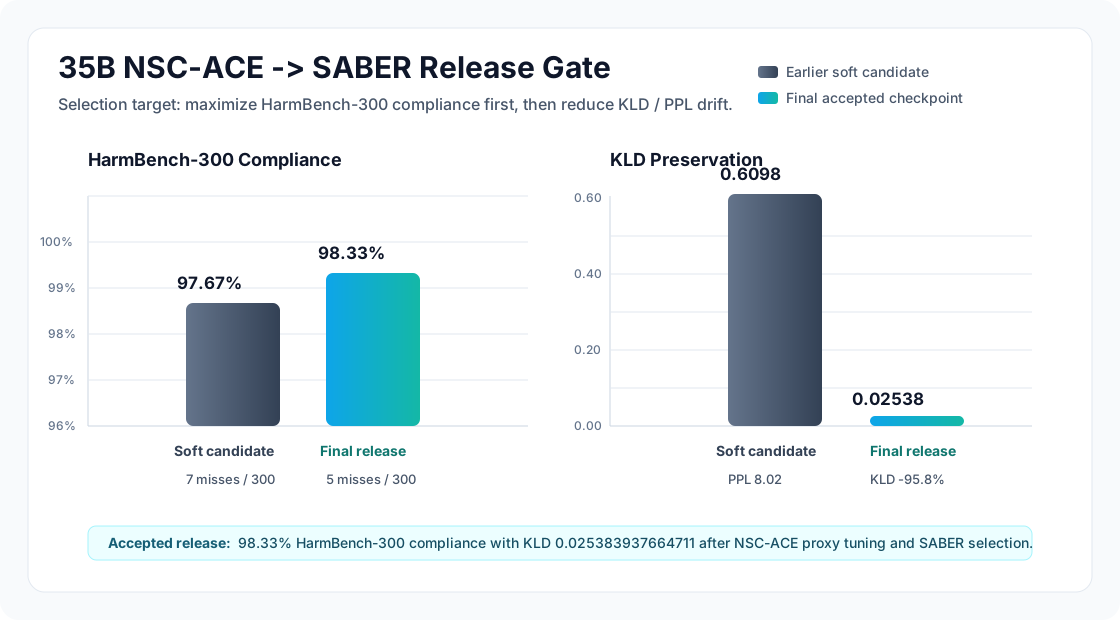
| Final source compliance | 98.33% on HarmBench-300 |
| Final source KLD | 0.025383937664711 |
Benchmark Plots
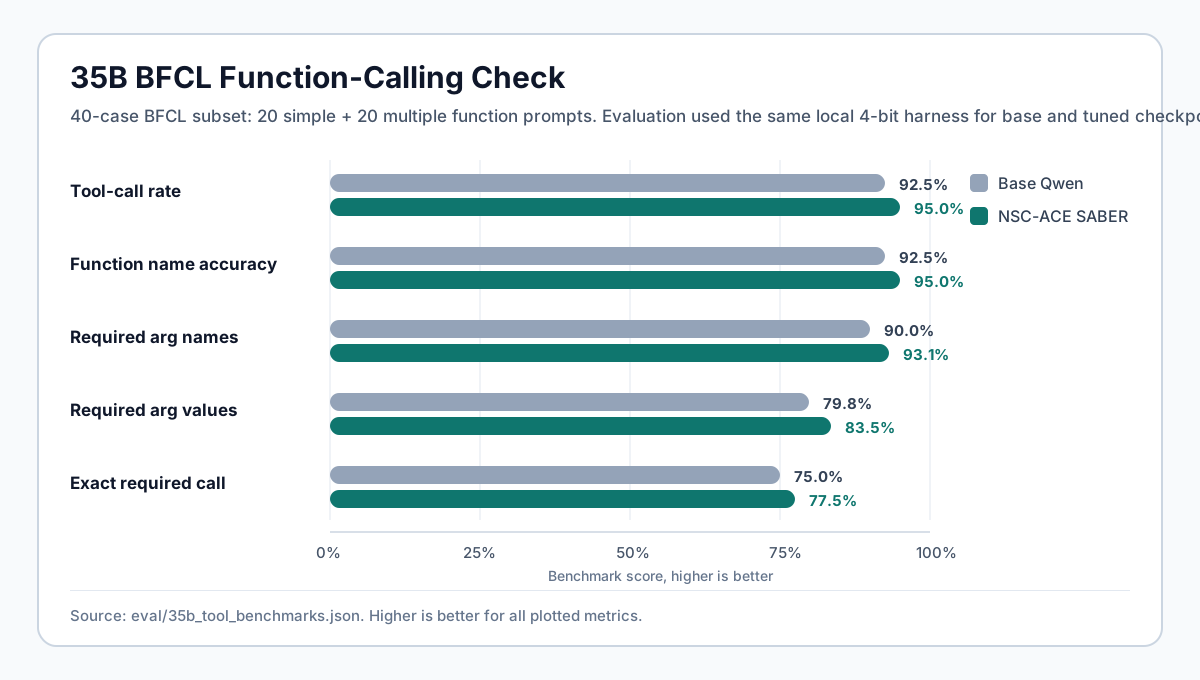
BFCL Tool-Calling Check
The source safetensors checkpoint was compared against Qwen/Qwen3.6-35B-A3B
on a 40-case BFCL subset: 20 simple and 20 multiple-function prompts. GGUF files
inherit from that checkpoint, but individual quants should be rechecked if exact
tool-call behavior matters.
| Metric | Base | NSC-ACE SABER source |
|---|---|---|
| Tool-call rate | 92.50% | 95.00% |
| Function name accuracy | 92.50% | 95.00% |
| Required argument name accuracy | 90.00% | 93.12% |
| Required argument value accuracy | 79.79% | 83.54% |
| Exact required-call accuracy | 75.00% | 77.50% |
Available Files
| File | Status | Notes |
|---|---|---|
Qwen3.6-35B-A3B-NSC-ACE-SABER-F16.gguf |
uploaded | Full GGUF conversion source / highest local fidelity |
Qwen3.6-35B-A3B-NSC-ACE-SABER-Q8_0.gguf |
uploaded | Near-full quality, large local file |
Qwen3.6-35B-A3B-NSC-ACE-SABER-Q6_K.gguf |
uploaded | High-quality local default if memory allows |
Qwen3.6-35B-A3B-NSC-ACE-SABER-Q5_K_M.gguf |
uploaded | Strong quality/size balance |
Qwen3.6-35B-A3B-NSC-ACE-SABER-Q5_K_S.gguf |
uploaded | Smaller Q5 option |
Qwen3.6-35B-A3B-NSC-ACE-SABER-Q4_K_M.gguf |
uploaded | Common balanced local target |
Qwen3.6-35B-A3B-NSC-ACE-SABER-Q4_K_S.gguf |
uploaded | Smaller Q4 option |
Qwen3.6-35B-A3B-NSC-ACE-SABER-Q3_K_L.gguf |
uploaded | Lower-memory Q3 option |
Qwen3.6-35B-A3B-NSC-ACE-SABER-Q3_K_M.gguf |
uploaded | Smaller Q3 balance |
Qwen3.6-35B-A3B-NSC-ACE-SABER-Q3_K_S.gguf |
uploaded | Small Q3 option |
Qwen3.6-35B-A3B-NSC-ACE-SABER-Q2_K.gguf |
uploaded | Minimum-size target; quality loss expected |
The uploader refreshes this card as each artifact finishes. Uploaded non-F16 files are deleted from the build pod after upload to stay under the pod volume quota.
Which Quant Should I Use?
| Quant | Best fit |
|---|---|
| F16 | Maximum fidelity when disk/RAM are not a concern |
| Q8_0 | Very high fidelity local inference |
| Q6_K | Recommended high-quality local starting point |
| Q5_K_M | Strong balance for quality and size |
| Q4_K_M | Practical default for constrained machines |
| Q3_K_M / Q3_K_S | Low-memory experiments |
| Q2_K | Smallest target; use only when memory is the hard constraint |
For agentic/tool-calling workloads, prefer Q6_K, Q5_K_M, or Q4_K_M when possible. Very low quants can affect formatting, argument fidelity, and refusal calibration.
What NSC-ACE Is
NSC-ACE means Neural Steering Committee for Agentic Co-Evolution. The source checkpoint was trained by generating multiple steered rollouts from the same model and rewarding convergence in tool-call structure across those latent modes. The goal is stronger agentic/tool-use behavior: stable function selection, argument filling, useful reasoning wrappers, and fewer repeated tool loops.
SABER was applied after NSC-ACE as a calibration stage. The release objective was to raise HarmBench-300 compliance while keeping KLD and PPL movement low.
Running With llama.cpp
llama-cli \
-m Qwen3.6-35B-A3B-NSC-ACE-SABER-Q5_K_M.gguf \
-c 32768 \
-ngl 999 \
-p "Write a compact tool plan for indexing a Python repo."
For OpenAI-compatible local serving:
llama-server \
-m Qwen3.6-35B-A3B-NSC-ACE-SABER-Q5_K_M.gguf \
-c 32768 \
-ngl 999 \
--jinja
Use a current llama.cpp build. Qwen3.6 support, chat-template handling, and tool-call behavior depend on runtime freshness.
Quantization Notes
- GGUFs are produced from the accepted full safetensors checkpoint.
- The source model's final release metrics are measured before quantization.
- Quantized files should be re-evaluated if exact compliance/KLD behavior matters.
- Lower bitrate files can degrade structured output before they obviously degrade prose quality.
Related Repositories
- Full safetensors checkpoint:
GestaltLabs/Qwen3.6-35B-A3B-NSC-ACE-SABER - Base model:
Qwen/Qwen3.6-35B-A3B
- Downloads last month
- 910
2-bit
3-bit
4-bit
5-bit
6-bit
8-bit
16-bit

Install Unsloth Studio (macOS, Linux, WSL)
# Run unsloth studio unsloth studio -H 0.0.0.0 -p 8888 # Then open http://localhost:8888 in your browser # Search for GestaltLabs/Qwen3.6-35B-A3B-NSC-ACE-SABER-GGUF to start chatting