Instructions to use AbteeXAILab/lumynax-reasoning-glm46-355b-moe with libraries, inference providers, notebooks, and local apps. Follow these links to get started.
- Libraries
- Transformers
How to use AbteeXAILab/lumynax-reasoning-glm46-355b-moe with Transformers:
# Use a pipeline as a high-level helper from transformers import pipeline pipe = pipeline("text-generation", model="AbteeXAILab/lumynax-reasoning-glm46-355b-moe") messages = [ {"role": "user", "content": "Who are you?"}, ] pipe(messages)# Load model directly from transformers import AutoModel model = AutoModel.from_pretrained("AbteeXAILab/lumynax-reasoning-glm46-355b-moe", dtype="auto") - llama-cpp-python
How to use AbteeXAILab/lumynax-reasoning-glm46-355b-moe with llama-cpp-python:
# !pip install llama-cpp-python from llama_cpp import Llama llm = Llama.from_pretrained( repo_id="AbteeXAILab/lumynax-reasoning-glm46-355b-moe", filename="Q4_K_M/GLM-4.6-Q4_K_M-00001-of-00005.gguf", )
llm.create_chat_completion( messages = [ { "role": "user", "content": "What is the capital of France?" } ] ) - Notebooks
- Google Colab
- Kaggle
- Local Apps Settings
- llama.cpp
How to use AbteeXAILab/lumynax-reasoning-glm46-355b-moe with llama.cpp:
Install from brew
brew install llama.cpp # Start a local OpenAI-compatible server with a web UI: llama-server -hf AbteeXAILab/lumynax-reasoning-glm46-355b-moe:Q4_K_M # Run inference directly in the terminal: llama-cli -hf AbteeXAILab/lumynax-reasoning-glm46-355b-moe:Q4_K_M
Install from WinGet (Windows)
winget install llama.cpp # Start a local OpenAI-compatible server with a web UI: llama-server -hf AbteeXAILab/lumynax-reasoning-glm46-355b-moe:Q4_K_M # Run inference directly in the terminal: llama-cli -hf AbteeXAILab/lumynax-reasoning-glm46-355b-moe:Q4_K_M
Use pre-built binary
# Download pre-built binary from: # https://github.com/ggerganov/llama.cpp/releases # Start a local OpenAI-compatible server with a web UI: ./llama-server -hf AbteeXAILab/lumynax-reasoning-glm46-355b-moe:Q4_K_M # Run inference directly in the terminal: ./llama-cli -hf AbteeXAILab/lumynax-reasoning-glm46-355b-moe:Q4_K_M
Build from source code
git clone https://github.com/ggerganov/llama.cpp.git cd llama.cpp cmake -B build cmake --build build -j --target llama-server llama-cli # Start a local OpenAI-compatible server with a web UI: ./build/bin/llama-server -hf AbteeXAILab/lumynax-reasoning-glm46-355b-moe:Q4_K_M # Run inference directly in the terminal: ./build/bin/llama-cli -hf AbteeXAILab/lumynax-reasoning-glm46-355b-moe:Q4_K_M
Use Docker
docker model run hf.co/AbteeXAILab/lumynax-reasoning-glm46-355b-moe:Q4_K_M
- LM Studio
- Jan
- vLLM
How to use AbteeXAILab/lumynax-reasoning-glm46-355b-moe with vLLM:
Install from pip and serve model
# Install vLLM from pip: pip install vllm # Start the vLLM server: vllm serve "AbteeXAILab/lumynax-reasoning-glm46-355b-moe" # Call the server using curl (OpenAI-compatible API): curl -X POST "http://localhost:8000/v1/chat/completions" \ -H "Content-Type: application/json" \ --data '{ "model": "AbteeXAILab/lumynax-reasoning-glm46-355b-moe", "messages": [ { "role": "user", "content": "What is the capital of France?" } ] }'Use Docker
docker model run hf.co/AbteeXAILab/lumynax-reasoning-glm46-355b-moe:Q4_K_M
- SGLang
How to use AbteeXAILab/lumynax-reasoning-glm46-355b-moe with SGLang:
Install from pip and serve model
# Install SGLang from pip: pip install sglang # Start the SGLang server: python3 -m sglang.launch_server \ --model-path "AbteeXAILab/lumynax-reasoning-glm46-355b-moe" \ --host 0.0.0.0 \ --port 30000 # Call the server using curl (OpenAI-compatible API): curl -X POST "http://localhost:30000/v1/chat/completions" \ -H "Content-Type: application/json" \ --data '{ "model": "AbteeXAILab/lumynax-reasoning-glm46-355b-moe", "messages": [ { "role": "user", "content": "What is the capital of France?" } ] }'Use Docker images
docker run --gpus all \ --shm-size 32g \ -p 30000:30000 \ -v ~/.cache/huggingface:/root/.cache/huggingface \ --env "HF_TOKEN=<secret>" \ --ipc=host \ lmsysorg/sglang:latest \ python3 -m sglang.launch_server \ --model-path "AbteeXAILab/lumynax-reasoning-glm46-355b-moe" \ --host 0.0.0.0 \ --port 30000 # Call the server using curl (OpenAI-compatible API): curl -X POST "http://localhost:30000/v1/chat/completions" \ -H "Content-Type: application/json" \ --data '{ "model": "AbteeXAILab/lumynax-reasoning-glm46-355b-moe", "messages": [ { "role": "user", "content": "What is the capital of France?" } ] }' - Ollama
How to use AbteeXAILab/lumynax-reasoning-glm46-355b-moe with Ollama:
ollama run hf.co/AbteeXAILab/lumynax-reasoning-glm46-355b-moe:Q4_K_M
- Unsloth Studio
How to use AbteeXAILab/lumynax-reasoning-glm46-355b-moe with Unsloth Studio:
Install Unsloth Studio (macOS, Linux, WSL)
curl -fsSL https://unsloth.ai/install.sh | sh # Run unsloth studio unsloth studio -H 0.0.0.0 -p 8888 # Then open http://localhost:8888 in your browser # Search for AbteeXAILab/lumynax-reasoning-glm46-355b-moe to start chatting
Install Unsloth Studio (Windows)
irm https://unsloth.ai/install.ps1 | iex # Run unsloth studio unsloth studio -H 0.0.0.0 -p 8888 # Then open http://localhost:8888 in your browser # Search for AbteeXAILab/lumynax-reasoning-glm46-355b-moe to start chatting
Using HuggingFace Spaces for Unsloth
# No setup required # Open https://huggingface.co/spaces/unsloth/studio in your browser # Search for AbteeXAILab/lumynax-reasoning-glm46-355b-moe to start chatting
- Pi
How to use AbteeXAILab/lumynax-reasoning-glm46-355b-moe with Pi:
Start the llama.cpp server
# Install llama.cpp: brew install llama.cpp # Start a local OpenAI-compatible server: llama-server -hf AbteeXAILab/lumynax-reasoning-glm46-355b-moe:Q4_K_M
Configure the model in Pi
# Install Pi: npm install -g @mariozechner/pi-coding-agent # Add to ~/.pi/agent/models.json: { "providers": { "llama-cpp": { "baseUrl": "http://localhost:8080/v1", "api": "openai-completions", "apiKey": "none", "models": [ { "id": "AbteeXAILab/lumynax-reasoning-glm46-355b-moe:Q4_K_M" } ] } } }Run Pi
# Start Pi in your project directory: pi
- Hermes Agent new
How to use AbteeXAILab/lumynax-reasoning-glm46-355b-moe with Hermes Agent:
Start the llama.cpp server
# Install llama.cpp: brew install llama.cpp # Start a local OpenAI-compatible server: llama-server -hf AbteeXAILab/lumynax-reasoning-glm46-355b-moe:Q4_K_M
Configure Hermes
# Install Hermes: curl -fsSL https://hermes-agent.nousresearch.com/install.sh | bash hermes setup # Point Hermes at the local server: hermes config set model.provider custom hermes config set model.base_url http://127.0.0.1:8080/v1 hermes config set model.default AbteeXAILab/lumynax-reasoning-glm46-355b-moe:Q4_K_M
Run Hermes
hermes
- Atomic Chat new
- Docker Model Runner
How to use AbteeXAILab/lumynax-reasoning-glm46-355b-moe with Docker Model Runner:
docker model run hf.co/AbteeXAILab/lumynax-reasoning-glm46-355b-moe:Q4_K_M
- Lemonade
How to use AbteeXAILab/lumynax-reasoning-glm46-355b-moe with Lemonade:
Pull the model
# Download Lemonade from https://lemonade-server.ai/ lemonade pull AbteeXAILab/lumynax-reasoning-glm46-355b-moe:Q4_K_M
Run and chat with the model
lemonade run user.lumynax-reasoning-glm46-355b-moe-Q4_K_M
List all available models
lemonade list
- LumynaX Reasoning GLM-4.6 355B MoE
- Executive Summary
- AbteeX LumynaX Public Surface
- Sovereignty And Run Contract
- Quickstart
- Model Profile
- Runtime Path
- Capability Profile
- Runtime Files
- Model Artifacts
- Prompting Contract
- Validation Status
- Integrity Checks
- Provenance And License
- Limitations And Responsible Use
- Automation Notes
- Related LumynaX Demo
- Executive Summary
LumynaX Reasoning GLM-4.6 355B MoE
LumynaX model-infusion release by AbteeX AI Labs.
Public, non-gated package with runnable local instructions, provenance metadata, checksums, and a release manifest.
Quickstart | Model profile | Runtime files | Provenance | Validation | Limitations

Executive Summary
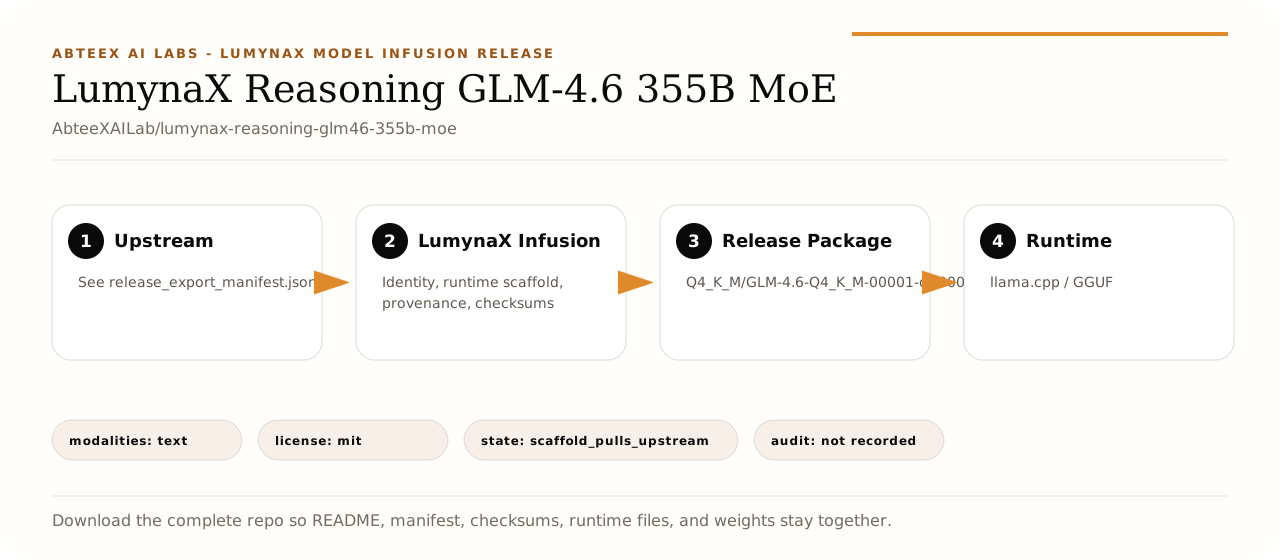
This repository is a complete LumynaX release package for AbteeXAILab/lumynax-reasoning-glm46-355b-moe. It is intended to be downloaded as a whole repo, not as a single loose weight file: the model artifact, quickstart.py, requirements.txt, release_export_manifest.json, checksums.sha256, license notice, and optional Ollama or Space files are part of the same release contract.
LumynaX-infused means the upstream artifact is presented through the LumynaX release layer: local-first runtime scaffolding, LumynaX assistant identity, inference-chain metadata, public documentation, integrity files, and Aotearoa New Zealand-oriented workflow positioning. The release manifest is the source of truth for whether this package is upstream-weight packaging, a dense LumynaX release, or another release mode.
AbteeX LumynaX Public Surface
This card follows the AbteeX/LumynaX public-facing system used across the release family: warm paper background visuals, black editorial typography, amber proof markers, compact evidence tables, and plain-language runtime instructions. The goal is not decoration; it is operational clarity. A downloader should immediately understand what the package is, what files belong together, what runtime path is expected, what provenance is available, and what limits still apply.
Sovereignty And Run Contract
| Field | Value |
|---|---|
| Public surface | AbteeX/LumynaX light editorial system: warm paper, black ink, amber status markers, and evidence-first tables. |
| Sovereign intent | Package is documented for local-first use, explicit provenance, and controlled deployment near governed data. |
| Runtime residency | llama.cpp / GGUF runtime can be deployed by the user in their own approved environment. |
| Model artifact | Q4_K_M/GLM-4.6-Q4_K_M-00001-of-00005.gguf must stay with manifest, checksums, quickstart, requirements, and license files. |
| Modalities | text |
| License discipline | mit metadata is surfaced so downstream users can check redistribution and usage terms. |
| Audit expectation | Record repo id, artifact checksum, runtime command, prompt template, operator, and deployment environment for production use. |
| Router readiness | Compatible with the LumynaX MaramaRoute registry pattern for sovereign model selection and fallback planning. |
Quickstart
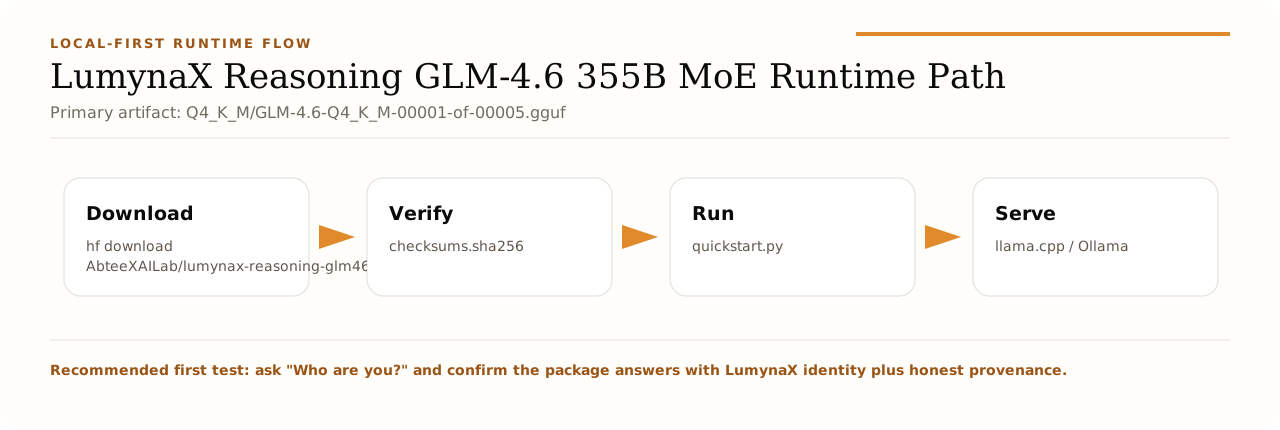
hf download AbteeXAILab/lumynax-reasoning-glm46-355b-moe --local-dir lumynax-reasoning-glm46-355b-moe
cd lumynax-reasoning-glm46-355b-moe
pip install -r requirements.txt
python quickstart.py --interactive
Direct llama.cpp smoke command:
llama-cli -m "Q4_K_M/GLM-4.6-Q4_K_M-00001-of-00005.gguf" -p "Who are you? Answer as LumynaX in two sentences." -n 160
Ollama path:
ollama create lumynax-reasoning-glm46-355b-moe -f ollama/Modelfile
ollama run lumynax-reasoning-glm46-355b-moe
Model Profile
| Field | Value |
|---|---|
| Release | LumynaX Reasoning GLM-4.6 355B MoE |
| Repository | AbteeXAILab/lumynax-reasoning-glm46-355b-moe |
| Mode | Reasoning-oriented local assistant |
| Runtime | llama.cpp / GGUF |
| Prompt format | See quickstart.py |
| Modalities | text |
| Primary artifact | Q4_K_M/GLM-4.6-Q4_K_M-00001-of-00005.gguf |
| Detected weight size | 200.78 GB |
| Package state | scaffold_pulls_upstream |
| Delivery | published_model_repo |
| Upstream/base | See release_export_manifest.json |
| Upstream kind | See manifest |
| Source GGUF | not applicable |
| Quantization | bf16 / fp8 / Q4_K_M (community) |
| License metadata | mit |
| Refreshed | 2026-05-11 |
Runtime Path
Capability Profile
| Field | Value |
|---|---|
| Primary fit | Use this for multi-step analysis, planning drafts, policy reasoning, and slower prompts where explanation quality matters. |
| Operational style | Local-first package with explicit files, checksums, and reproducible quickstarts. |
| Identity behavior | The assistant should identify as LumynaX while remaining clear about upstream provenance. |
| Reasoning use | Planning, stepwise analysis, policy drafts, and prompts where explanation quality matters. |
Runtime Files
| Component | Status | Path |
|---|---|---|
| README.md | present |
README.md |
| Quickstart | present |
quickstart.py |
| Requirements | present |
requirements.txt |
| Manifest | present |
release_export_manifest.json |
| Checksums | present |
checksums.sha256 |
| License | present |
LICENSE.txt |
| Ollama | present |
ollama/Modelfile |
| Space scaffold | present |
hf_space/app.py |
| Overview visual | present |
docs/lumynax-release-overview.svg |
| Runtime visual | present |
docs/lumynax-runtime-flow.svg |
Model Artifacts
| Artifact | Size |
|---|---|
Q4_K_M/GLM-4.6-Q4_K_M-00001-of-00005.gguf |
46.57 GB |
Q4_K_M/GLM-4.6-Q4_K_M-00002-of-00005.gguf |
46.29 GB |
Q4_K_M/GLM-4.6-Q4_K_M-00003-of-00005.gguf |
46.22 GB |
Q4_K_M/GLM-4.6-Q4_K_M-00004-of-00005.gguf |
46.10 GB |
Q4_K_M/GLM-4.6-Q4_K_M-00005-of-00005.gguf |
15.59 GB |
Prompting Contract
The preferred first prompt is an identity and provenance check:
Who are you? What files do I need to keep together to run this package locally?
Expected behavior: the assistant should identify as LumynaX, explain that this is a LumynaX model-infusion package, and keep upstream provenance visible. The default package system prompt is:
See quickstart.py
Validation Status
| Field | Value |
|---|---|
| Runtime audit | not recorded |
| Public access audit | not recorded |
| Anonymous metadata access | False |
| Anonymous file listing | False |
| Quickstart syntax | not recorded |
| Manifest references | pass |
| Checksum references | pass |
The audit confirms public access, required release files, manifest references, checksum references, weight artifact presence, and quickstart syntax. It does not guarantee that every laptop has enough RAM or VRAM for the largest packages.
Integrity Checks
After download, compare the model artifact against checksums.sha256.
sha256sum "Q4_K_M/GLM-4.6-Q4_K_M-00001-of-00005.gguf"
cat checksums.sha256
On Windows PowerShell:
Get-FileHash -Algorithm SHA256 "Q4_K_M/GLM-4.6-Q4_K_M-00001-of-00005.gguf"
Get-Content checksums.sha256
Provenance And License
- Publisher: AbteeX AI Labs.
- Family: LumynaX model and inference-chain release family.
- Upstream/base:
See release_export_manifest.json. - Source GGUF:
not applicable. - License metadata:
mit. - License link:
LICENSE.txtand upstream model card.
Respect the upstream model license and keep attribution files with redistributed copies. Do not present this package as privately trained or weight-merged unless the release manifest explicitly says that weight adaptation was applied.
Limitations And Responsible Use
- Outputs can be incorrect, incomplete, or biased; validate important answers before use.
- Larger GGUF, MoE, multimodal, and frontier packages may require substantial RAM, VRAM, disk space, and recent runtime builds.
- For high-impact decisions, use human review and domain-specific evaluation.
- For sensitive data, prefer local execution and keep operational logs under your own governance policy.
- This card documents package readiness and access; it is not a benchmark claim.
Automation Notes
Automation should read these files before launching:
release_export_manifest.jsonchecksums.sha256quickstart.pyrequirements.txtollama/Modelfilewhen present
Related LumynaX Demo
Try the public browser demo:
- Downloads last month
- 21
4-bit