
Instructions to use thesven/microsoft_WizardLM-2-7B-GGUF with libraries, inference providers, notebooks, and local apps. Follow these links to get started.
- Libraries
- llama-cpp-python
How to use thesven/microsoft_WizardLM-2-7B-GGUF with llama-cpp-python:
# !pip install llama-cpp-python from llama_cpp import Llama llm = Llama.from_pretrained( repo_id="thesven/microsoft_WizardLM-2-7B-GGUF", filename="microsoft_WizardLM-2-7B-GGUF-IQ1_S.gguf", )
llm.create_chat_completion( messages = "No input example has been defined for this model task." )
- Notebooks
- Google Colab
- Kaggle
- Local Apps
- llama.cpp
How to use thesven/microsoft_WizardLM-2-7B-GGUF with llama.cpp:
Install from brew
brew install llama.cpp # Start a local OpenAI-compatible server with a web UI: llama-server -hf thesven/microsoft_WizardLM-2-7B-GGUF:Q4_K_M # Run inference directly in the terminal: llama-cli -hf thesven/microsoft_WizardLM-2-7B-GGUF:Q4_K_M
Install from WinGet (Windows)
winget install llama.cpp # Start a local OpenAI-compatible server with a web UI: llama-server -hf thesven/microsoft_WizardLM-2-7B-GGUF:Q4_K_M # Run inference directly in the terminal: llama-cli -hf thesven/microsoft_WizardLM-2-7B-GGUF:Q4_K_M
Use pre-built binary
# Download pre-built binary from: # https://github.com/ggerganov/llama.cpp/releases # Start a local OpenAI-compatible server with a web UI: ./llama-server -hf thesven/microsoft_WizardLM-2-7B-GGUF:Q4_K_M # Run inference directly in the terminal: ./llama-cli -hf thesven/microsoft_WizardLM-2-7B-GGUF:Q4_K_M
Build from source code
git clone https://github.com/ggerganov/llama.cpp.git cd llama.cpp cmake -B build cmake --build build -j --target llama-server llama-cli # Start a local OpenAI-compatible server with a web UI: ./build/bin/llama-server -hf thesven/microsoft_WizardLM-2-7B-GGUF:Q4_K_M # Run inference directly in the terminal: ./build/bin/llama-cli -hf thesven/microsoft_WizardLM-2-7B-GGUF:Q4_K_M
Use Docker
docker model run hf.co/thesven/microsoft_WizardLM-2-7B-GGUF:Q4_K_M
- LM Studio
- Jan
- Ollama
How to use thesven/microsoft_WizardLM-2-7B-GGUF with Ollama:
ollama run hf.co/thesven/microsoft_WizardLM-2-7B-GGUF:Q4_K_M
- Unsloth Studio new
How to use thesven/microsoft_WizardLM-2-7B-GGUF with Unsloth Studio:
Install Unsloth Studio (macOS, Linux, WSL)
curl -fsSL https://unsloth.ai/install.sh | sh # Run unsloth studio unsloth studio -H 0.0.0.0 -p 8888 # Then open http://localhost:8888 in your browser # Search for thesven/microsoft_WizardLM-2-7B-GGUF to start chatting
Install Unsloth Studio (Windows)
irm https://unsloth.ai/install.ps1 | iex # Run unsloth studio unsloth studio -H 0.0.0.0 -p 8888 # Then open http://localhost:8888 in your browser # Search for thesven/microsoft_WizardLM-2-7B-GGUF to start chatting
Using HuggingFace Spaces for Unsloth
# No setup required # Open https://huggingface.co/spaces/unsloth/studio in your browser # Search for thesven/microsoft_WizardLM-2-7B-GGUF to start chatting
- Docker Model Runner
How to use thesven/microsoft_WizardLM-2-7B-GGUF with Docker Model Runner:
docker model run hf.co/thesven/microsoft_WizardLM-2-7B-GGUF:Q4_K_M
- Lemonade
How to use thesven/microsoft_WizardLM-2-7B-GGUF with Lemonade:
Pull the model
# Download Lemonade from https://lemonade-server.ai/ lemonade pull thesven/microsoft_WizardLM-2-7B-GGUF:Q4_K_M
Run and chat with the model
lemonade run user.microsoft_WizardLM-2-7B-GGUF-Q4_K_M
List all available models
lemonade list
Install from WinGet (Windows)
winget install llama.cpp
# Start a local OpenAI-compatible server with a web UI:
llama-server -hf thesven/microsoft_WizardLM-2-7B-GGUF:# Run inference directly in the terminal:
llama-cli -hf thesven/microsoft_WizardLM-2-7B-GGUF:Use pre-built binary
# Download pre-built binary from:
# https://github.com/ggerganov/llama.cpp/releases# Start a local OpenAI-compatible server with a web UI:
./llama-server -hf thesven/microsoft_WizardLM-2-7B-GGUF:# Run inference directly in the terminal:
./llama-cli -hf thesven/microsoft_WizardLM-2-7B-GGUF:Build from source code
git clone https://github.com/ggerganov/llama.cpp.git
cd llama.cpp
cmake -B build
cmake --build build -j --target llama-server llama-cli# Start a local OpenAI-compatible server with a web UI:
./build/bin/llama-server -hf thesven/microsoft_WizardLM-2-7B-GGUF:# Run inference directly in the terminal:
./build/bin/llama-cli -hf thesven/microsoft_WizardLM-2-7B-GGUF:Use Docker
docker model run hf.co/thesven/microsoft_WizardLM-2-7B-GGUF:Quantization Description
This repo contains a GGUF Quantized versions of the WizardLM-2-7B model

Prompt Template
### System: {system_message}
### Human: {prompt}
### Assistant:
Stop Token
</s>
Weights sourced from: lucyknada/microsoft_WizardLM-2-7B
Original Model Card
🤗 HF Repo •🐱 Github Repo • 🐦 Twitter • 📃 [WizardLM] • 📃 [WizardCoder] • 📃 [WizardMath]
👋 Join our Discord
News 🔥🔥🔥 [2024/04/15]
We introduce and opensource WizardLM-2, our next generation state-of-the-art large language models, which have improved performance on complex chat, multilingual, reasoning and agent. New family includes three cutting-edge models: WizardLM-2 8x22B, WizardLM-2 70B, and WizardLM-2 7B.
- WizardLM-2 8x22B is our most advanced model, demonstrates highly competitive performance compared to those leading proprietary works and consistently outperforms all the existing state-of-the-art opensource models.
- WizardLM-2 70B reaches top-tier reasoning capabilities and is the first choice in the same size.
- WizardLM-2 7B is the fastest and achieves comparable performance with existing 10x larger opensource leading models.
For more details of WizardLM-2 please read our release blog post and upcoming paper.
Model Details
- Model name: WizardLM-2 7B
- Developed by: WizardLM@Microsoft AI
- Base model: mistralai/Mistral-7B-v0.1
- Parameters: 7B
- Language(s): Multilingual
- Blog: Introducing WizardLM-2
- Repository: https://github.com/nlpxucan/WizardLM
- Paper: WizardLM-2 (Upcoming)
- License: Apache2.0
Model Capacities
MT-Bench
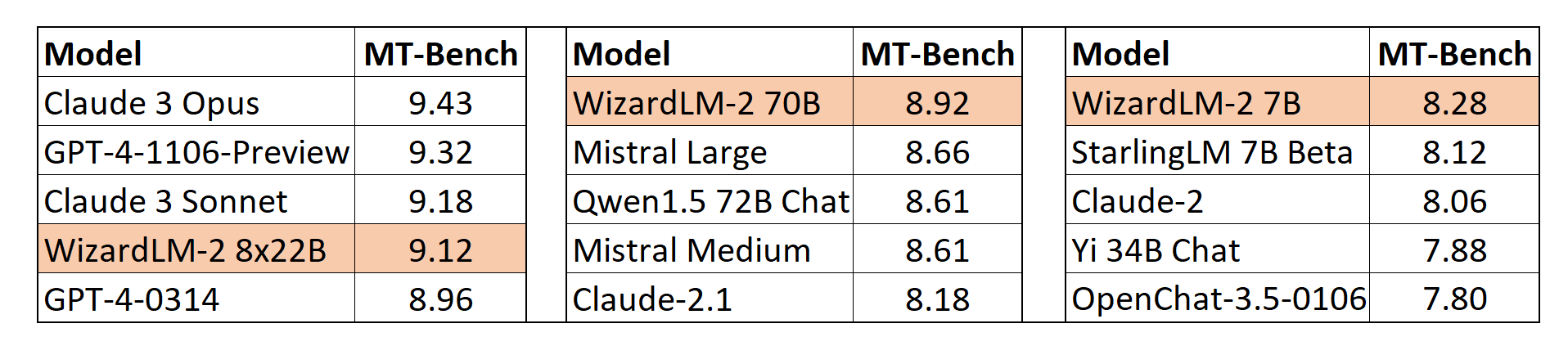
We also adopt the automatic MT-Bench evaluation framework based on GPT-4 proposed by lmsys to assess the performance of models. The WizardLM-2 8x22B even demonstrates highly competitive performance compared to the most advanced proprietary models. Meanwhile, WizardLM-2 7B and WizardLM-2 70B are all the top-performing models among the other leading baselines at 7B to 70B model scales.
Human Preferences Evaluation
We carefully collected a complex and challenging set consisting of real-world instructions, which includes main requirements of humanity, such as writing, coding, math, reasoning, agent, and multilingual. We report the win:loss rate without tie:
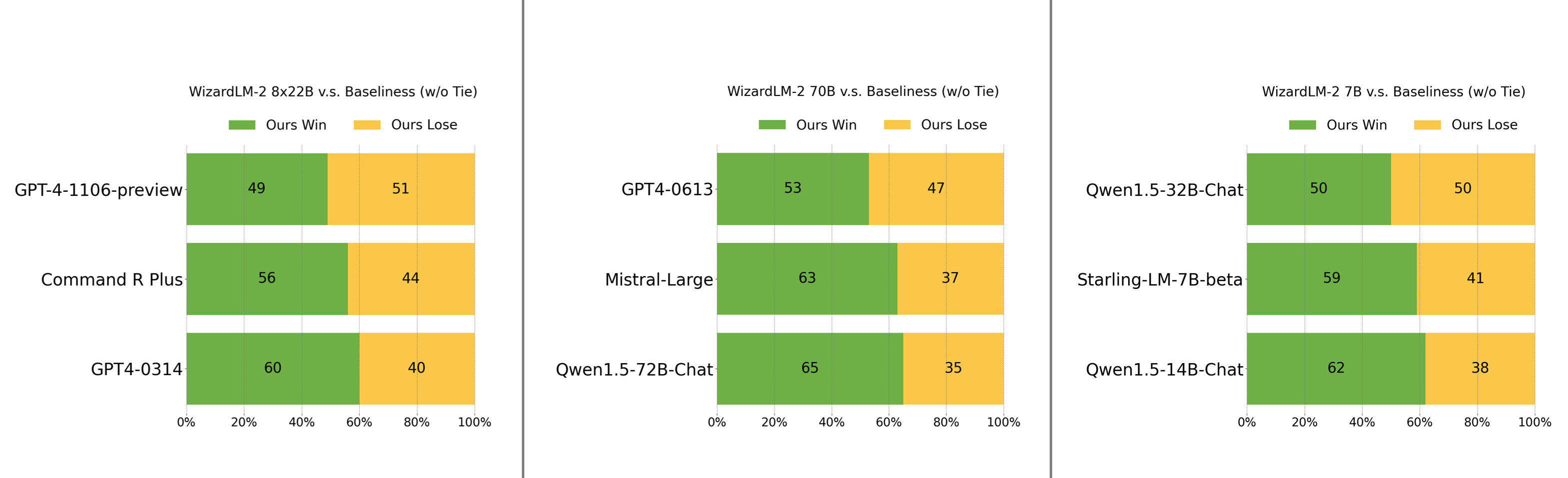
- WizardLM-2 8x22B is just slightly falling behind GPT-4-1106-preview, and significantly stronger than Command R Plus and GPT4-0314.
- WizardLM-2 70B is better than GPT4-0613, Mistral-Large, and Qwen1.5-72B-Chat.
- WizardLM-2 7B is comparable with Qwen1.5-32B-Chat, and surpasses Qwen1.5-14B-Chat and Starling-LM-7B-beta.
Method Overview
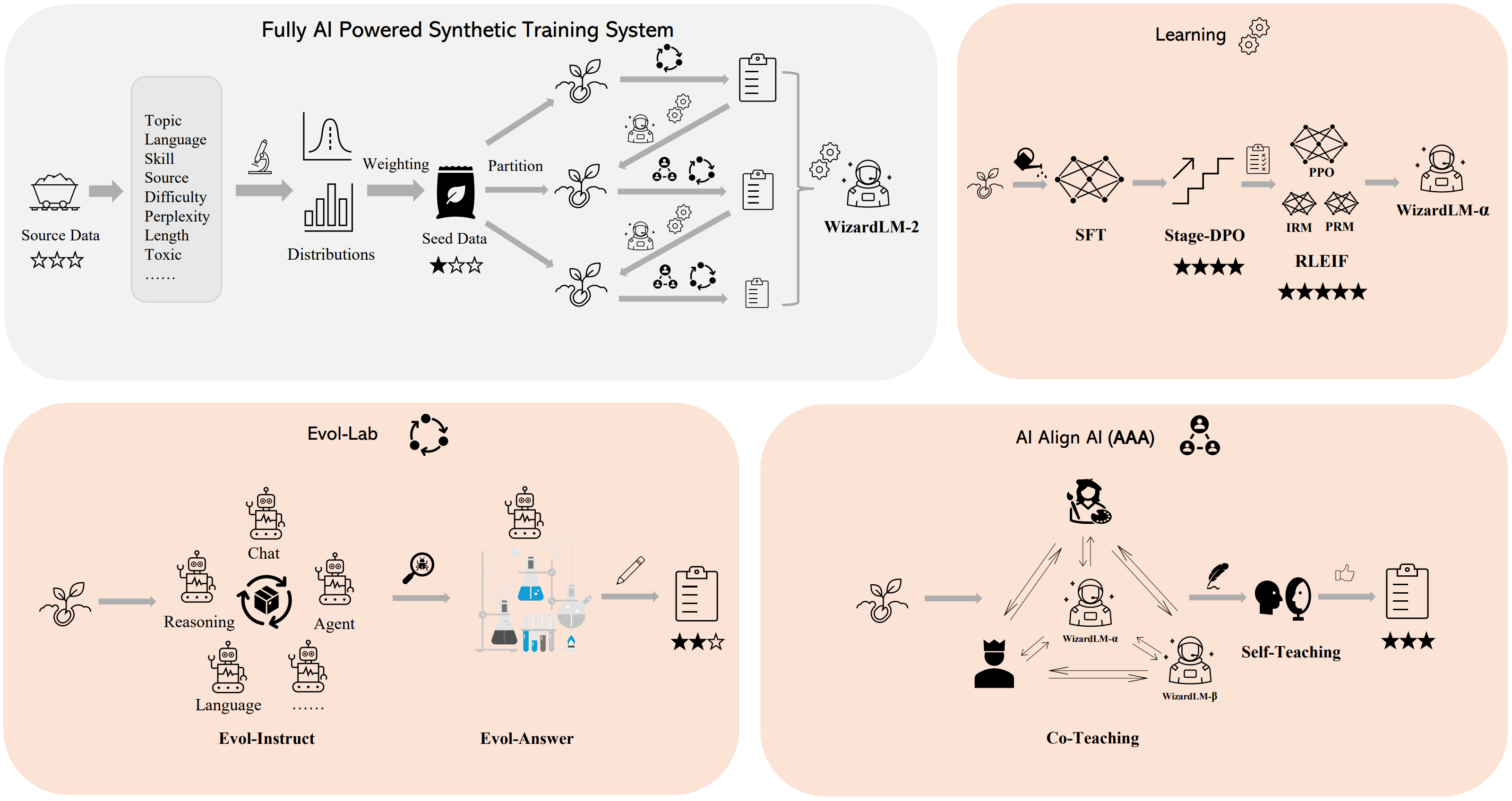
We built a fully AI powered synthetic training system to train WizardLM-2 models, please refer to our blog for more details of this system.
Usage
❗Note for model system prompts usage:
WizardLM-2 adopts the prompt format from Vicuna and supports multi-turn conversation. The prompt should be as following:
A chat between a curious user and an artificial intelligence assistant. The assistant gives helpful,
detailed, and polite answers to the user's questions. USER: Hi ASSISTANT: Hello.</s>
USER: Who are you? ASSISTANT: I am WizardLM.</s>......
Inference WizardLM-2 Demo Script
We provide a WizardLM-2 inference demo code on our github
- Downloads last month
- 91
1-bit
2-bit
3-bit
4-bit
5-bit
6-bit
8-bit
16-bit


Install from brew
# Start a local OpenAI-compatible server with a web UI: llama-server -hf thesven/microsoft_WizardLM-2-7B-GGUF:# Run inference directly in the terminal: llama-cli -hf thesven/microsoft_WizardLM-2-7B-GGUF: