---
license: apache-2.0
language:
- zh
- en
library_name: transformers
pipeline_tag: text-generation
tags:
- minicpm
- minicpm5
- llama
- text-generation
- long-context
- tool-calling
- on-device
- edge-ai
datasets:
- openbmb/Ultra-FineWeb
- openbmb/Ultra-FineWeb-L3
- openbmb/UltraData-Math
- openbmb/UltraData-SFT-2605
---
MiniCPM 技术报告 |
GitHub 仓库 |
UltraData |
MiniCPM 桌宠 |
在线 Demo
English |
中文
## 亮点
我们正式发布 **MiniCPM5-1B**,这是 **MiniCPM5** 系列的首个模型。它是一款面向端侧、本地部署和资源受限场景的 1B 稠密 Transformer,能够达到同尺寸开源模型 SOTA 水平。
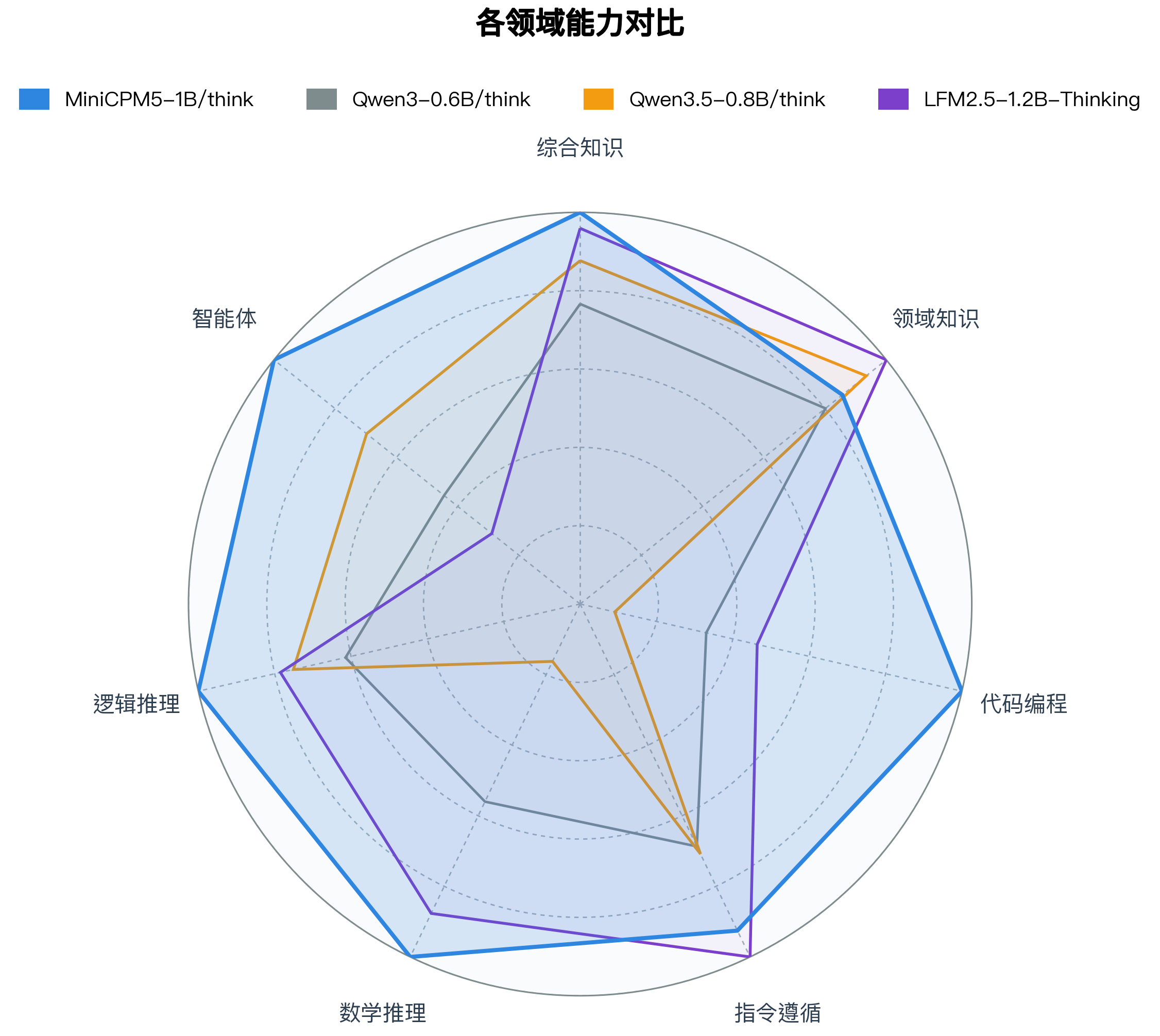
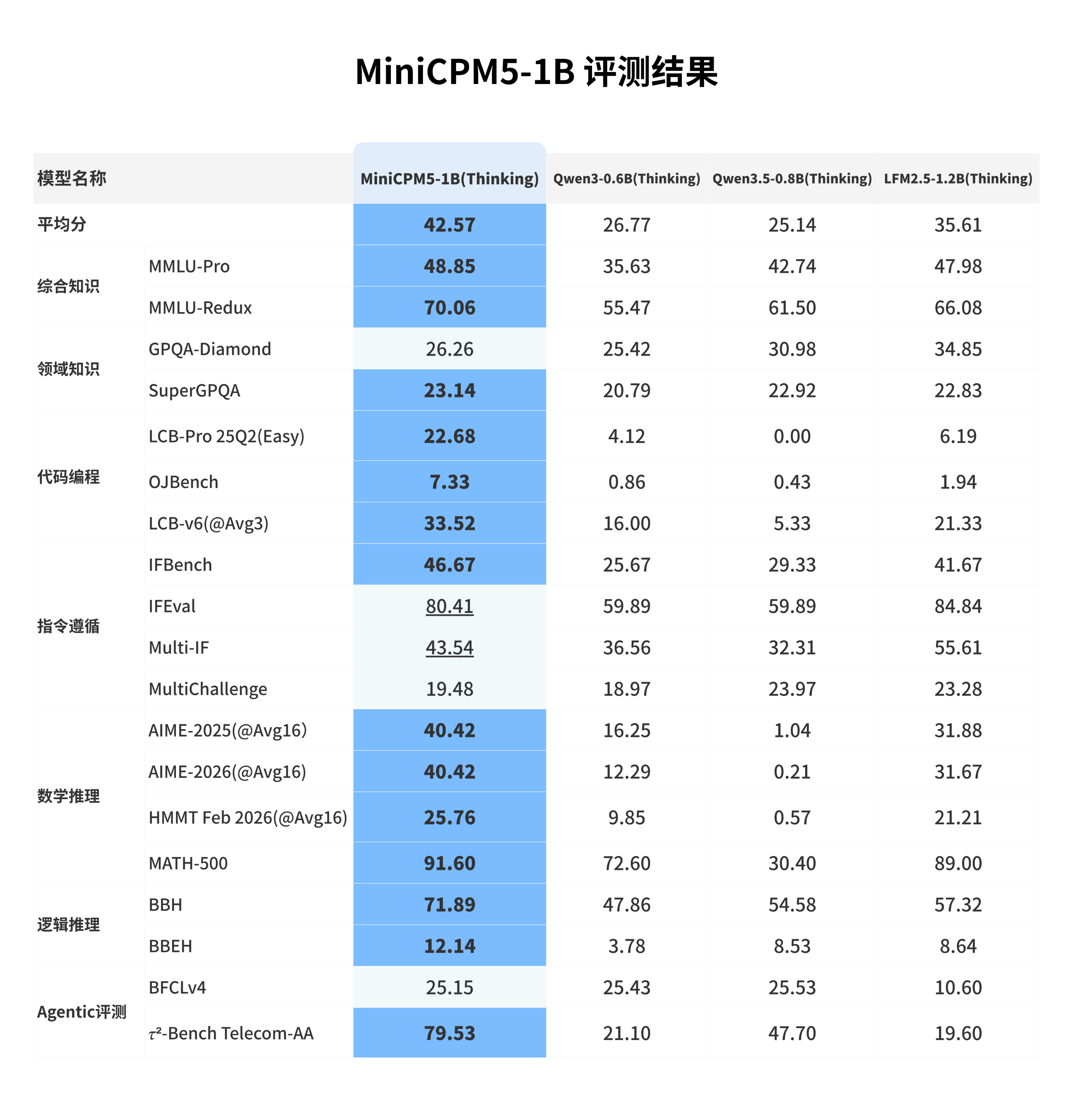
🏆 **同尺寸开源模型 SOTA**:与同尺寸优秀开源模型相比,MiniCPM5-1B 在该对比范围内达到 SOTA 水平,优势主要体现在 Agentic 工具调用、代码生成和高难推理。
🧠 **双模式推理**:内置 `` chat template,可通过 `enable_thinking` 在思考模式和非思考模式之间切换。同一份权重既可以作为快速助手,也可以承担更复杂的推理任务。
🛠️ **部署 / 微调资源**:MiniCPM GitHub 仓库提供面向主要推理后端和微调框架的单页 cookbook,并配套 Agent Skills,方便复现部署和微调流程。
🐱 **桌宠**:我们也提供了由 MiniCPM5-1B 本地驱动的桌宠应用。
## 模型列表
你可以按运行环境选择对应模型格式:
- **[MiniCPM5-1B](https://huggingface.co/openbmb/MiniCPM5-1B)** · [ModelScope](https://www.modelscope.cn/models/OpenBMB/MiniCPM5-1B) · BF16 正式版(经 RL + OPD 后训练) **👈 当前页面**
- **[MiniCPM5-1B-SFT](https://huggingface.co/openbmb/MiniCPM5-1B-SFT)** · [ModelScope](https://www.modelscope.cn/models/OpenBMB/MiniCPM5-1B-SFT) · BF16 SFT 单独 checkpoint(RL / OPD 之前)
- **[MiniCPM5-1B-Base](https://huggingface.co/openbmb/MiniCPM5-1B-Base)** · [ModelScope](https://www.modelscope.cn/models/OpenBMB/MiniCPM5-1B-Base) · BF16 base checkpoint(仅预训练)
- **[MiniCPM5-1B-GGUF](https://huggingface.co/openbmb/MiniCPM5-1B-GGUF)** · [ModelScope](https://www.modelscope.cn/models/OpenBMB/MiniCPM5-1B-GGUF) · GGUF,适用于 llama.cpp / Ollama / LM Studio
- **[MiniCPM5-1B-MLX](https://huggingface.co/openbmb/MiniCPM5-1B-MLX)** · [ModelScope](https://www.modelscope.cn/models/OpenBMB/MiniCPM5-1B-MLX) · MLX / 4bit,适用于 Apple Silicon
## 模型信息
MiniCPM5-1B 具有以下特性:
- **类型**:Causal Language Model
- **架构**:标准 `LlamaForCausalLM`
- **参数数量**:1,080,632,832
- **非嵌入参数数量**:679,552,512
- **层数**:24
- **注意力头(GQA)**:16 个 Q heads / 2 个 KV heads
- **上下文长度**:131,072
## 简介
MiniCPM5-1B 是 MiniCPM5 系列的首个模型,面向本地助手、coding agent、工具调用流程以及需要紧凑模型的推理场景。它在较小部署成本下提供原生长上下文能力,并通过同一份权重支持 Think / No Think 两种对话模式。
## 评测结果
我们选取 **LFM2.5-1.2B-Thinking**、**Qwen3-0.6B/think**、**Qwen3.5-0.8B/think** 等同尺寸优秀开源模型进行横向比较。这些模型本身已经很强;在这组对比中,MiniCPM5-1B 达到同尺寸开源模型 SOTA 水平,优势主要体现在工具调用、代码生成和高难推理上,也更适合承担本地 coding agent、工具助手和推理助手的角色。
## 训练流程
MiniCPM5-1B 的训练过程是 **[UltraData 分级数据管理体系](https://arxiv.org/pdf/2602.09003)** 的一次完整实践,覆盖 base training、mid-training 与后训练三个阶段。
**Base training** 采用逐级推进的训练配方,包含 stable training 与 decay training,用于建立基础语言能力与训练稳定性。随后进入 **mid-training**,进一步强化目标能力并适配数据分布。训练语料来自我们同步开源的 [Ultra-FineWeb](https://huggingface.co/datasets/openbmb/Ultra-FineWeb)、[Ultra-FineWeb-L3](https://huggingface.co/datasets/openbmb/Ultra-FineWeb-L3) 与 [UltraData-Math](https://huggingface.co/datasets/openbmb/UltraData-Math)。
**后训练阶段**分为 **SFT**、**RL** 与 **OPD** 三步。我们先使用 **200B tokens deep-thinking SFT** 与 **200B tokens hybrid-thinking SFT** 建立深度思考、混合思考和通用对话能力,相关 SFT 数据已同步开源为 [UltraData-SFT-2605](https://huggingface.co/datasets/openbmb/UltraData-SFT-2605)。随后针对数学、代码、闭卷问答和写作等方向训练专用 **RL teacher**,并通过 **On-Policy Distillation (OPD)** 将这些 teacher 的能力蒸馏回同一个发布模型。

### RL + OPD 带来了什么?
**RL + OPD** 是 MiniCPM5-1B 后训练中的关键环节。在数学、代码、指令跟随三类任务上,RL + OPD 将平均分提升 **↑16 分**,同时将回复触顶 max-tokens 预算的比例降低 **↓29 个百分点**。下方图示展示 Reasoning RL 两阶段流程、分数提升和超长率下降。
**RL** 阶段组合了推理、闭卷问答、写作、指令跟随、长上下文理解和通用对话等多类互补训练信号。Reasoning RL 基于 [DAPO-Math-17k](https://huggingface.co/datasets/BytedTsinghua-SIA/DAPO-Math-17k) (借鉴 [JustRL](https://arxiv.org/pdf/2512.16649) 极简配方思想),并采用两阶段长度调度,以减少过长回复的同时提升推理准确性。我们还使用 [TriviaQA](https://huggingface.co/datasets/mandarjoshi/trivia_qa)、[NQ-Open](https://huggingface.co/datasets/google-research-datasets/nq_open)、[LongWriter-Zero-RLData](https://huggingface.co/datasets/THU-KEG/LongWriter-Zero-RLData)、合成可验证 RLVR 数据与 pair-wise RLHF 信号,提升可靠性、指令跟随和用户体验。

**OPD** 阶段参考 Thinking Machines Lab 的 [On-Policy Distillation](https://thinkingmachines.ai/blog/on-policy-distillation/) 思路,并结合 [Rethinking On-Policy Distillation](https://arxiv.org/pdf/2604.13016) 做了实现改进。我们在强化学习框架中使用反向 KL 散度作为优势估计值,替代原有的 verification-based advantage;同时在 response 序列的每个位置分别对学生模型和教师模型 logits 做双边 top-k 采样,取并集后计算反向 KL 散度,以平衡监督信号准确性和训练效率。OPD 直接复用各 RL teacher 训练时的同分布 prompt 作为蒸馏数据,无需额外构造语料。


## 快速上手
### vLLM
```bash
pip install "vllm>=0.21"
vllm serve openbmb/MiniCPM5-1B --port 8000
```
```bash
curl http://localhost:8000/v1/chat/completions \
-H "Content-Type: application/json" \
-d '{
"model": "openbmb/MiniCPM5-1B",
"messages": [{"role": "user", "content": "你是谁?可以简单介绍一下自己吗?"}],
"max_tokens": 128,
"temperature": 0.7
}'
```
### SGLang
```bash
pip install "sglang[srt]>=0.5.12"
python -m sglang.launch_server --model-path openbmb/MiniCPM5-1B --port 30000
```
```bash
curl http://localhost:30000/v1/chat/completions \
-H "Content-Type: application/json" \
-d '{
"model": "openbmb/MiniCPM5-1B",
"messages": [{"role": "user", "content": "你是谁?可以简单介绍一下自己吗?"}],
"max_tokens": 128,
"temperature": 0.7
}'
```
### Transformers
```bash
pip install -U "transformers>=5.6" accelerate torch
```
```python
from transformers import AutoModelForCausalLM, AutoTokenizer
model_id = "openbmb/MiniCPM5-1B"
tokenizer = AutoTokenizer.from_pretrained(model_id)
model = AutoModelForCausalLM.from_pretrained(
model_id,
torch_dtype="auto",
device_map="auto",
)
messages = [{"role": "user", "content": "你是谁?可以简单介绍一下自己吗?"}]
inputs = tokenizer.apply_chat_template(
messages,
tokenize=True,
add_generation_prompt=True,
enable_thinking=False,
return_dict=True,
return_tensors="pt",
).to(model.device)
outputs = model.generate(**inputs, max_new_tokens=128)
print(tokenizer.decode(outputs[0][inputs["input_ids"].shape[-1]:], skip_special_tokens=True))
```
推荐的 chat template 采样参数:
| 模式 | 推荐采样参数 | 启用方式 |
| --- | --- | --- |
| **Think** | `temperature=0.9, top_p=0.95` | `enable_thinking=True` |
| **No Think** | `temperature=0.7, top_p=0.95` | `enable_thinking=False` |
## 工具调用
工具调用**推荐使用 SGLang**。MiniCPM5-1B 以 XML 格式产出工具调用,SGLang 内置的 `minicpm5` parser 会自动将其转换为 OpenAI 兼容的 `tool_calls` 字段。
```bash
python -m sglang.launch_server --model-path openbmb/MiniCPM5-1B --port 30000 \
--tool-call-parser minicpm5 # 或:--tool-call-parser auto
```
## GitHub Cookbooks 与 Agent Skills
MiniCPM5-1B 使用**标准 `LlamaForCausalLM` 架构**,主流推理引擎可直接加载,**无需自定义算子,也无模型代码 fork**。逐步部署和微调说明请参考下方 GitHub cookbooks;Agent Skills 作为 GitHub 资源提供给使用 Cursor / Claude Code 类 coding agent 的用户。
### 部署
| 后端 | 模型格式 / 适用场景 | Cookbook | Agent Skill |
| --- | --- | --- | --- |
| Transformers | BF16 / FP16,本地 Python 推理,GPU + CPU | [transformers.md](https://github.com/OpenBMB/MiniCPM/blob/main/docs/deployment/transformers.md) | [minicpm5-deploy-transformers](https://github.com/OpenBMB/MiniCPM/blob/main/skills/minicpm5-deploy-transformers/SKILL.md) |
| vLLM | BF16 / FP16 OpenAI server | [vllm.md](https://github.com/OpenBMB/MiniCPM/blob/main/docs/deployment/vllm.md) | [minicpm5-deploy-vllm](https://github.com/OpenBMB/MiniCPM/blob/main/skills/minicpm5-deploy-vllm/SKILL.md) |
| SGLang | BF16 / FP16 OpenAI server,推荐用于 tool calling | [sglang.md](https://github.com/OpenBMB/MiniCPM/blob/main/docs/deployment/sglang.md) | [minicpm5-deploy-sglang](https://github.com/OpenBMB/MiniCPM/blob/main/skills/minicpm5-deploy-sglang/SKILL.md) |
| llama.cpp | GGUF,CPU/GPU 本地推理 | [llama_cpp.md](https://github.com/OpenBMB/MiniCPM/blob/main/docs/deployment/llama_cpp.md) | [minicpm5-deploy-llama-cpp](https://github.com/OpenBMB/MiniCPM/blob/main/skills/minicpm5-deploy-llama-cpp/SKILL.md) |
| Ollama | GGUF,本地端侧运行 | [ollama.md](https://github.com/OpenBMB/MiniCPM/blob/main/docs/deployment/ollama.md) | [minicpm5-deploy-ollama](https://github.com/OpenBMB/MiniCPM/blob/main/skills/minicpm5-deploy-ollama/SKILL.md) |
| LM Studio | GGUF,Mac 桌面应用与 OpenAI server | [lmstudio.md](https://github.com/OpenBMB/MiniCPM/blob/main/docs/deployment/lmstudio.md) | [minicpm5-deploy-lmstudio](https://github.com/OpenBMB/MiniCPM/blob/main/skills/minicpm5-deploy-lmstudio/SKILL.md) |
| MLX | MLX / 4bit,Apple Silicon 本地推理 | [mlx.md](https://github.com/OpenBMB/MiniCPM/blob/main/docs/deployment/mlx.md) | [minicpm5-deploy-mlx](https://github.com/OpenBMB/MiniCPM/blob/main/skills/minicpm5-deploy-mlx/SKILL.md) |
| ArcLight | GGUF 本地端侧 / CPU / 桌面 / 服务器 | [arclight.md](https://github.com/OpenBMB/MiniCPM/blob/main/docs/deployment/arclight.md) | [minicpm5-deploy-arclight](https://github.com/OpenBMB/MiniCPM/blob/main/skills/minicpm5-deploy-arclight/SKILL.md) |
### 微调
| 框架 | 适用场景 | Cookbook | Agent Skill |
| --- | --- | --- | --- |
| TRL + PEFT | LoRA / SFT 微调 | [trl.md](https://github.com/OpenBMB/MiniCPM/blob/main/docs/finetune/trl.md) | [minicpm5-finetune-trl](https://github.com/OpenBMB/MiniCPM/blob/main/skills/minicpm5-finetune-trl/SKILL.md) |
| LLaMA-Factory | 微调 | [llamafactory.md](https://github.com/OpenBMB/MiniCPM/blob/main/docs/finetune/llamafactory.md) | [minicpm5-finetune-llamafactory](https://github.com/OpenBMB/MiniCPM/blob/main/skills/minicpm5-finetune-llamafactory/SKILL.md) |
| ms-swift | 微调 | [ms_swift.md](https://github.com/OpenBMB/MiniCPM/blob/main/docs/finetune/ms_swift.md) | [minicpm5-finetune-ms-swift](https://github.com/OpenBMB/MiniCPM/blob/main/skills/minicpm5-finetune-ms-swift/SKILL.md) |
| unsloth | 微调 | [unsloth.md](https://github.com/OpenBMB/MiniCPM/blob/main/docs/finetune/unsloth.md) | [minicpm5-finetune-unsloth](https://github.com/OpenBMB/MiniCPM/blob/main/skills/minicpm5-finetune-unsloth/SKILL.md) |
| xtuner | 微调 | [xtuner.md](https://github.com/OpenBMB/MiniCPM/blob/main/docs/finetune/xtuner.md) | [minicpm5-finetune-xtuner](https://github.com/OpenBMB/MiniCPM/blob/main/skills/minicpm5-finetune-xtuner/SKILL.md) |
### 其他支持的框架
除上文列出的部署与微调框架外,MiniCPM5-1B 也支持通过 FlagOS 进行多芯片部署。
#### FlagOS 介绍
为解决不同 AI 芯片大规模落地应用,北京智源研究院联合众多科研机构、芯片企业、系统厂商、算法和软件相关单位等国内外机构共同发起并创立了 FlagOS 开源社区。
FlagOS 社区致力于打造面向多种 AI 芯片的统一、开源的系统软件栈,包括大型算子库、统一AI编译器、并行训推框架、统一通信库等核心开源项目,构建「模型-系统-芯片」三层贯通的开放技术生态,通过“一次开发跨芯迁移”释放硬件计算潜力,打破不同芯片软件栈之间生态隔离,有效降低开发者的迁移成本。FlagOS 社区构建人工智能软硬件生态,突破单一闭源垄断,推动AI硬件技术大范围落地发展,立足中国、拥抱全球合作。
官网速递:[https://flagos.io](https://flagos.io/)
FlagOS 多 AI 芯片支持与使用方式
#### FlagOS 多 AI 芯片支持
基于 FlagOS 极短时间内适配 MiniCPM5-1B 到 9 种不同的 AI 芯片,得益于众智 FlagOS 的多芯片统一 AI 系统软件栈的能力。目前,在 FlagOS 团队构建的面向多架构人工智能芯片的大模型自动迁移、适配与发布平台 FlagRelease 上,已发布 MiniCPM5-1B 的多芯片版本。细节如下:
|Vendor|ModelScope|Huggingface|
|---|---|---|
|Nvidia|[MiniCPM5-1B-nvidia-FlagOS](https://www.modelscope.cn/models/FlagRelease/MiniCPM5-1B-nvidia-FlagOS)|[MiniCPM5-1B-nvidia-FlagOS](https://huggingface.co/FlagRelease/MiniCPM5-1B-nvidia-FlagOS)|
|Hygon|[MiniCPM5-1B-hygon-FlagOS](https://www.modelscope.cn/models/FlagRelease/MiniCPM5-1B-hygon-FlagOS)|[MiniCPM5-1B-hygon-FlagOS](https://huggingface.co/FlagRelease/MiniCPM5-1B-hygon-FlagOS)|
|Metax|[MiniCPM5-1B-metax-FlagOS](https://www.modelscope.cn/models/FlagRelease/MiniCPM5-1B-metax-FlagOS)|[MiniCPM5-1B-metax-FlagOS](https://huggingface.co/FlagRelease/MiniCPM5-1B-metax-FlagOS)|
|Iluvatar|[MiniCPM5-1B-iluvatar-FlagOS](https://www.modelscope.cn/models/FlagRelease/MiniCPM5-1B-iluvatar-FlagOS)|[MiniCPM5-1B-iluvatar-FlagOS](https://huggingface.co/FlagRelease/MiniCPM5-1B-iluvatar-FlagOS)|
|Zhenwu|[MiniCPM5-1B-zhenwu-FlagOS](https://www.modelscope.cn/models/FlagRelease/MiniCPM5-1B-zhenwu-FlagOS)|[MiniCPM5-1B-zhenwu-FlagOS](https://huggingface.co/FlagRelease/MiniCPM5-1B-zhenwu-FlagOS)|
|Mthreads|[MiniCPM5-1B-mthreads-FlagOS](https://www.modelscope.cn/models/FlagRelease/MiniCPM5-1B-mthreads-FlagOS)|[MiniCPM5-1B-mthreads-FlagOS](https://huggingface.co/FlagRelease/MiniCPM5-1B-mthreads-FlagOS)|
|Kunlunxin|[MiniCPM5-1B-kunlunxin-FlagOS](https://www.modelscope.cn/models/FlagRelease/MiniCPM5-1B-kunlunxin-FlagOS)|[MiniCPM5-1B-kunlunxin-FlagOS](https://huggingface.co/FlagRelease/MiniCPM5-1B-kunlunxin-FlagOS)|
|Ascend|[MiniCPM5-1B-ascend-FlagOS](https://modelscope.cn/models/FlagRelease/MiniCPM5-1B-ascend-FlagOS)|[MiniCPM5-1B-ascend-FlagOS](https://huggingface.co/FlagRelease/MiniCPM5-1B-ascend-FlagOS)|
|ARM-v9|[MiniCPM5-1B-Armv9-FlagOS](https://modelscope.cn/models/FlagRelease/MiniCPM5-1B-Armv9-FlagOS)|[MiniCPM5-1B-Armv9-FlagOS](https://huggingface.co/FlagRelease/MiniCPM5-1B-Armv9-FlagOS)|
#### FlagOS 使用方式
##### 使用 FlagOS 在 Nvidia 体验性能加速
###### From FlagRelease(**推荐**)
FlagRelease是FlagOS团队构建的一套面向多架构人工智能芯片的大模型自动迁移、适配与发布平台,已发布MiniCPM-1B的多芯片版本。FlagRelase已内置相关软件包,无需用户安装。
###### FlagRelease 镜像关键版本信息
###### FlagRelease 使用速递
|Vendor|ModelScope|Huggingface|
|---|---|---|
|Nvidia|[MiniCPM5-1B-nvidia-FlagOS](https://www.modelscope.cn/models/FlagRelease/MiniCPM5-1B-nvidia-FlagOS)|[MiniCPM5-1B-nvidia-FlagOS](https://huggingface.co/FlagRelease/MiniCPM5-1B-nvidia-FlagOS)|
|Hygon|[MiniCPM5-1B-hygon-FlagOS](https://www.modelscope.cn/models/FlagRelease/MiniCPM5-1B-hygon-FlagOS)|[MiniCPM5-1B-hygon-FlagOS](https://huggingface.co/FlagRelease/MiniCPM5-1B-hygon-FlagOS)|
|Metax|[MiniCPM5-1B-metax-FlagOS](https://www.modelscope.cn/models/FlagRelease/MiniCPM5-1B-metax-FlagOS)|[MiniCPM5-1B-metax-FlagOS](https://huggingface.co/FlagRelease/MiniCPM5-1B-metax-FlagOS)|
|Iluvatar|[MiniCPM5-1B-iluvatar-FlagOS](https://www.modelscope.cn/models/FlagRelease/MiniCPM5-1B-iluvatar-FlagOS)|[MiniCPM5-1B-iluvatar-FlagOS](https://huggingface.co/FlagRelease/MiniCPM5-1B-iluvatar-FlagOS)|
|Zhenwu|[MiniCPM5-1B-zhenwu-FlagOS](https://www.modelscope.cn/models/FlagRelease/MiniCPM5-1B-zhenwu-FlagOS)|[MiniCPM5-1B-zhenwu-FlagOS](https://huggingface.co/FlagRelease/MiniCPM5-1B-zhenwu-FlagOS)|
|Mthreads|[MiniCPM5-1B-mthreads-FlagOS](https://www.modelscope.cn/models/FlagRelease/MiniCPM5-1B-mthreads-FlagOS)|[MiniCPM5-1B-mthreads-FlagOS](https://huggingface.co/FlagRelease/MiniCPM5-1B-mthreads-FlagOS)|
|Kunlunxin|[MiniCPM5-1B-kunlunxin-FlagOS](https://www.modelscope.cn/models/FlagRelease/MiniCPM5-1B-kunlunxin-FlagOS)|[MiniCPM5-1B-kunlunxin-FlagOS](https://huggingface.co/FlagRelease/MiniCPM5-1B-kunlunxin-FlagOS)|
|Ascend|[MiniCPM5-1B-ascend-FlagOS](https://modelscope.cn/models/FlagRelease/MiniCPM5-1B-ascend-FlagOS)|[MiniCPM5-1B-ascend-FlagOS](https://huggingface.co/FlagRelease/MiniCPM5-1B-ascend-FlagOS)|
|ARM-v9|[MiniCPM5-1B-Armv9-FlagOS](https://modelscope.cn/models/FlagRelease/MiniCPM5-1B-Armv9-FlagOS)|[MiniCPM5-1B-Armv9-FlagOS](https://huggingface.co/FlagRelease/MiniCPM5-1B-Armv9-FlagOS)|
###### 从零开始
- 依赖Python3.12, GLIBC_2.39, GLIBCXX_3.4.33, CXXABI_1.3.15 环境
###### Vllm 版本
###### 安装 FlagOS 算子库
官方仓库:https://github.com/flagos-ai/FlagGems
```PowerShell
pip install flag-gems==4.2.1rc0
pip install triton==3.5.1
```
###### 开启加速
通过在vllm执行推理的源码中增加flagGems的导入即可开启flagGems加速
```Bash
import flag_gems
flag_gems.enable(record=True, once=True, path="/root/gems.txt")
```
```Bash
vllm serve ${model_path} \
--trust-remote-code \
--dtype bfloat16 \
--enforce-eager \
--port ${Port} \
--served-model-name ${model_name} \
--gpu-memory-utilization 0.85
```
##### 使用 FlagOS 统一多芯片后端插件
**[vllm-plugin-FL](https://github.com/flagos-ai/vllm-plugin-FL)** 是一个为 **vLLM** 推理/服务框架构建的插件,它基于 **FlagOS 的统一多芯片后端**开发,旨在扩展 vLLM 在多种硬件环境下的功能和性能表现。
###### vllm-plugin-FL 使用
|厂商|从零开始|从 FlagRelease 开始||
|---|---|---|---|
|英伟达|[vllm-plugin-FL/MiniCPM5-1B](https://github.com/flagos-ai/vllm-plugin-FL/blob/main/examples/minicpm/README.md)|[MiniCPM5-1B-ModelScope](https://www.modelscope.cn/models/FlagRelease/MiniCPM5-1B-nvidia-FlagOS)|[MiniCPM5-1B-nvidia-FlagOS](https://huggingface.co/FlagRelease/MiniCPM5-1B-nvidia-FlagOS)|
## 桌宠
我们也发布了 **[OpenBMB/MiniCPM-Desk-Pet](https://github.com/OpenBMB/MiniCPM-Desk-Pet)**,一个由 MiniCPM5-1B 本地驱动的桌宠应用。它支持 Apple Silicon / NVIDIA GPU / CPU 路线,可以与 Cursor、Claude Code、Codex 等 coding agent 联动,并支持 LoRA 人格切换。
 ## 局限性与负责任使用
MiniCPM5-1B 是一个基于训练数据统计规律生成文本的语言模型,可能生成不准确、有偏见或不安全的内容。在高风险场景中使用前,应对模型输出进行审查和验证。
用户需要自行评估模型输出,配置必要的安全防护,并遵守适用法律法规和平台政策。
## 开源协议
MiniCPM 模型权重与相关代码依照 [Apache-2.0](https://github.com/OpenBMB/MiniCPM/blob/main/LICENSE) 协议发布。
## 引用
如果觉得我们的工作有帮助,请引用:
```bibtex
@article{minicpm4,
title={Minicpm4: Ultra-efficient llms on end devices},
author={MiniCPM, Team},
journal={arXiv preprint arXiv:2506.07900},
year={2025}
}
```
## 局限性与负责任使用
MiniCPM5-1B 是一个基于训练数据统计规律生成文本的语言模型,可能生成不准确、有偏见或不安全的内容。在高风险场景中使用前,应对模型输出进行审查和验证。
用户需要自行评估模型输出,配置必要的安全防护,并遵守适用法律法规和平台政策。
## 开源协议
MiniCPM 模型权重与相关代码依照 [Apache-2.0](https://github.com/OpenBMB/MiniCPM/blob/main/LICENSE) 协议发布。
## 引用
如果觉得我们的工作有帮助,请引用:
```bibtex
@article{minicpm4,
title={Minicpm4: Ultra-efficient llms on end devices},
author={MiniCPM, Team},
journal={arXiv preprint arXiv:2506.07900},
year={2025}
}
```