---
license: apache-2.0
pipeline_tag: image-text-to-text
tags:
- ERNIE4.5
- PaddleOCR
- PaddlePaddle
- image-to-text
- ocr
- document-parse
- layout
- table
- formula
- chart
- seal
- spotting
base_model: PaddlePaddle/PaddleOCR-VL-1.6
language:
- en
- zh
- multilingual
library_name: PaddleOCR
---
PaddleOCR-VL-1.6: Expanding the Frontier of Document Parsing with Under-Optimized Region Refinement and Progressive Post-Training
[](https://github.com/PaddlePaddle/PaddleOCR)
[](https://huggingface.co/PaddlePaddle/PaddleOCR-VL-1.6)
[](https://modelscope.cn/models/PaddlePaddle/PaddleOCR-VL-1.6)
[](https://huggingface.co/spaces/PaddlePaddle/PaddleOCR-VL-1.6_Online_Demo)
[](https://modelscope.cn/studios/PaddlePaddle/PaddleOCR-VL-1.6_Online_Demo/summary)
[](https://discord.gg/JPmZXDsEEK)
[](https://x.com/PaddlePaddle)
[](./LICENSE)
**🔥 [Official Website](https://www.paddleocr.com)**
## Introduction
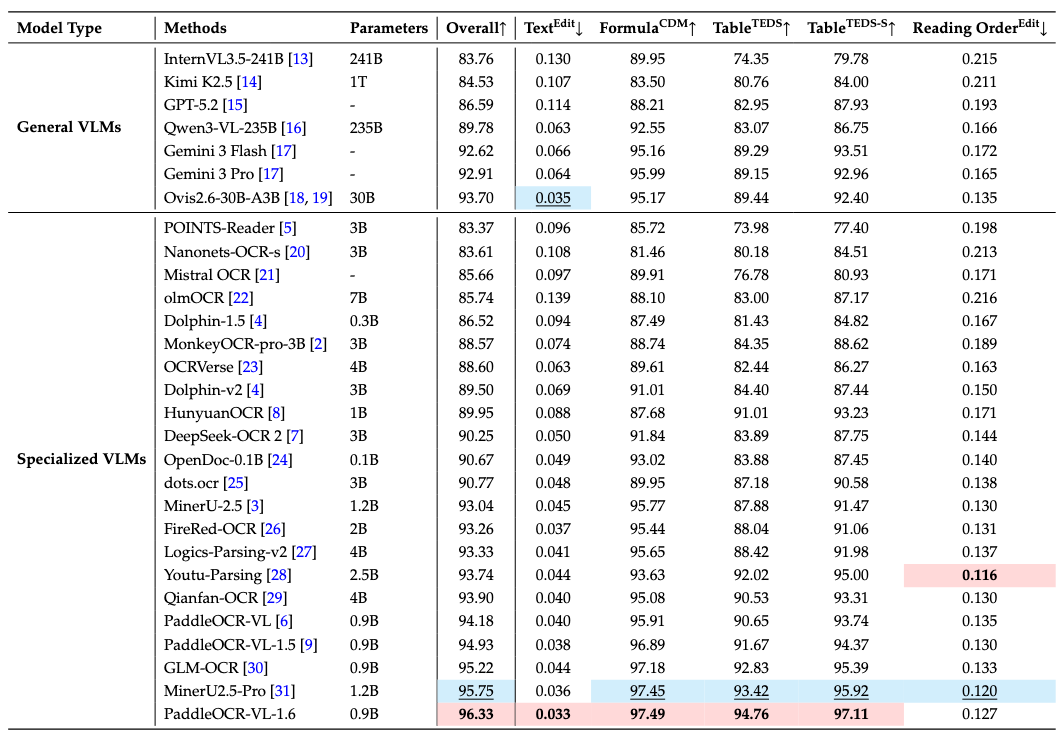
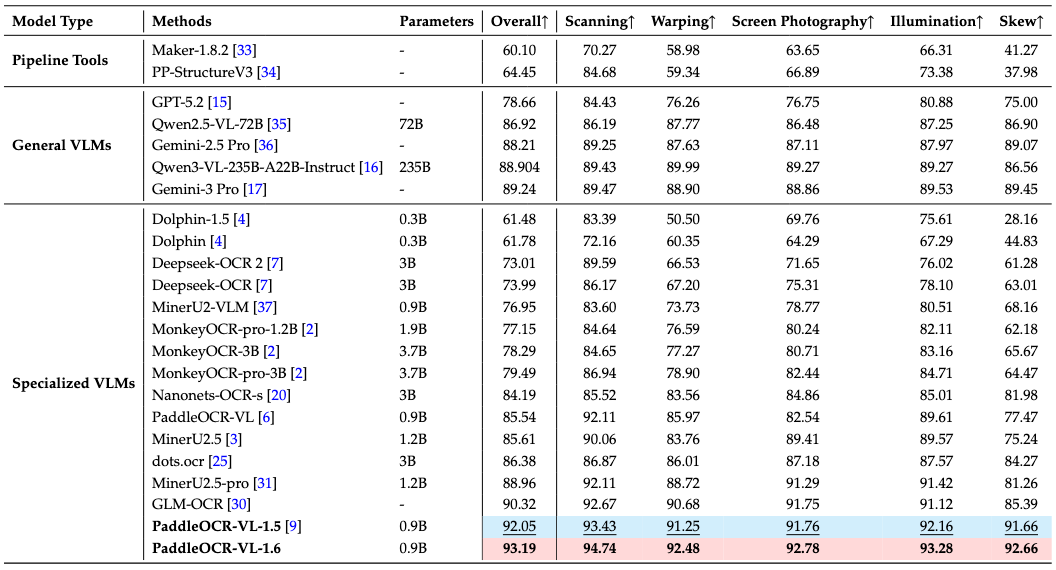
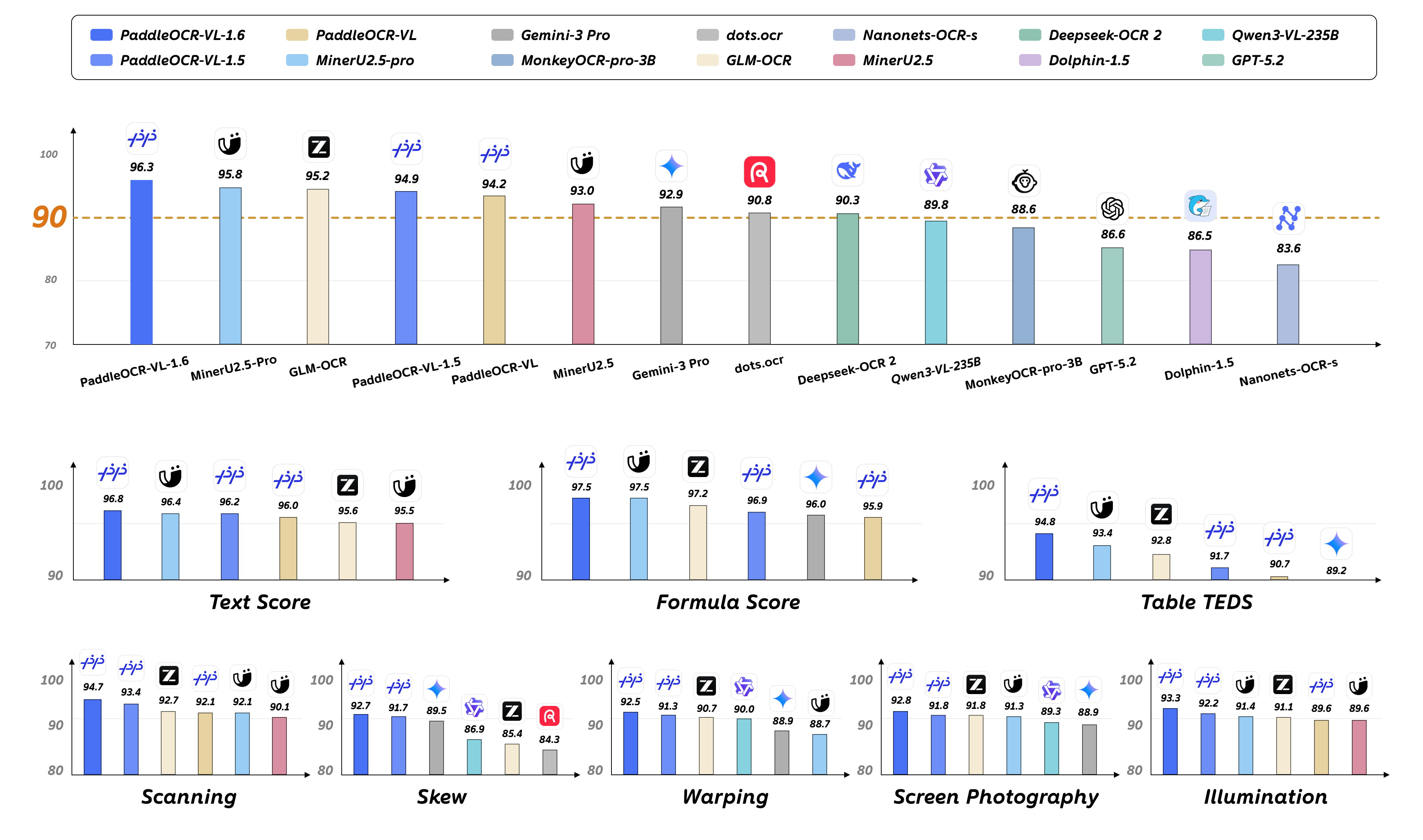
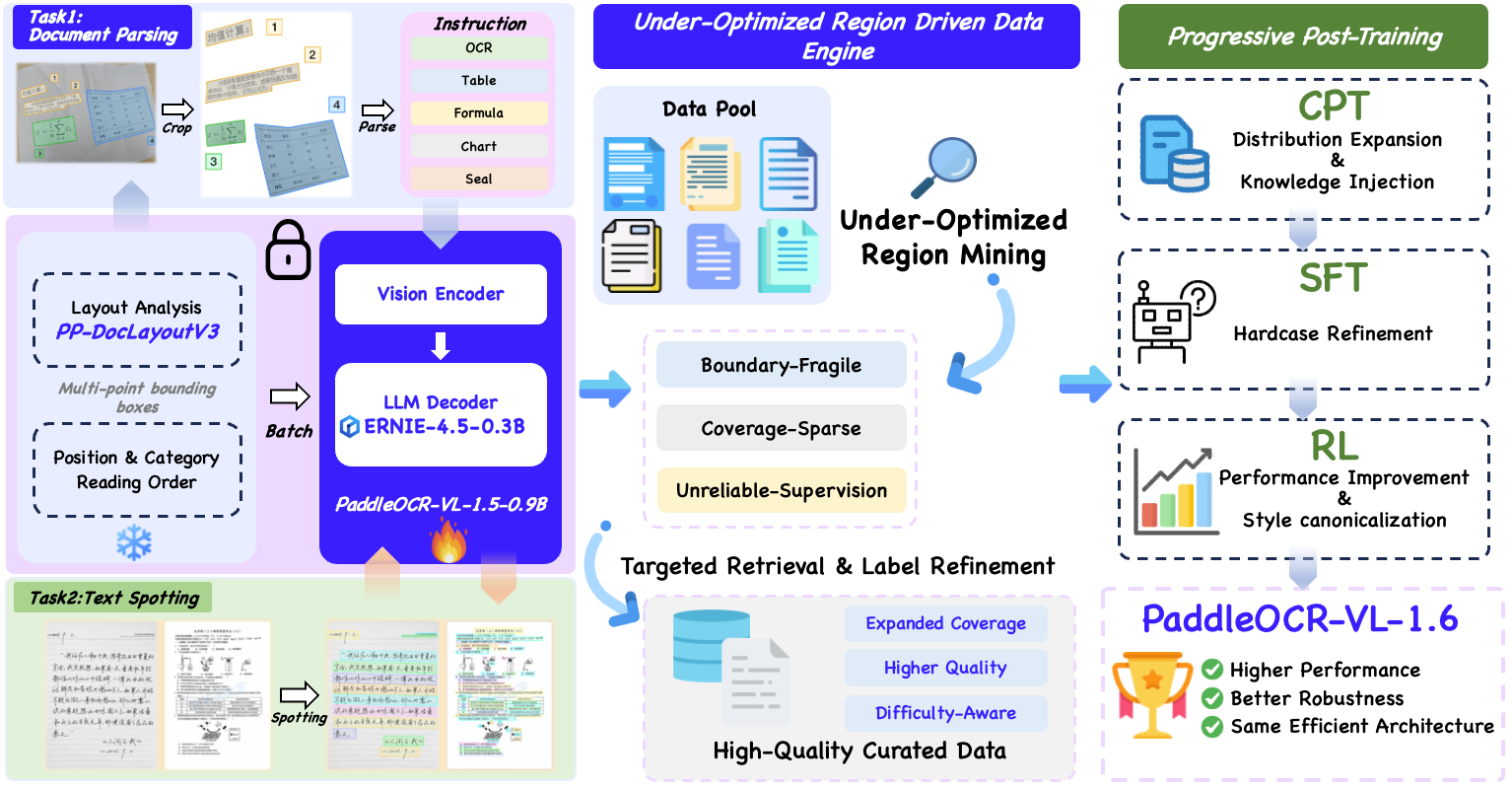
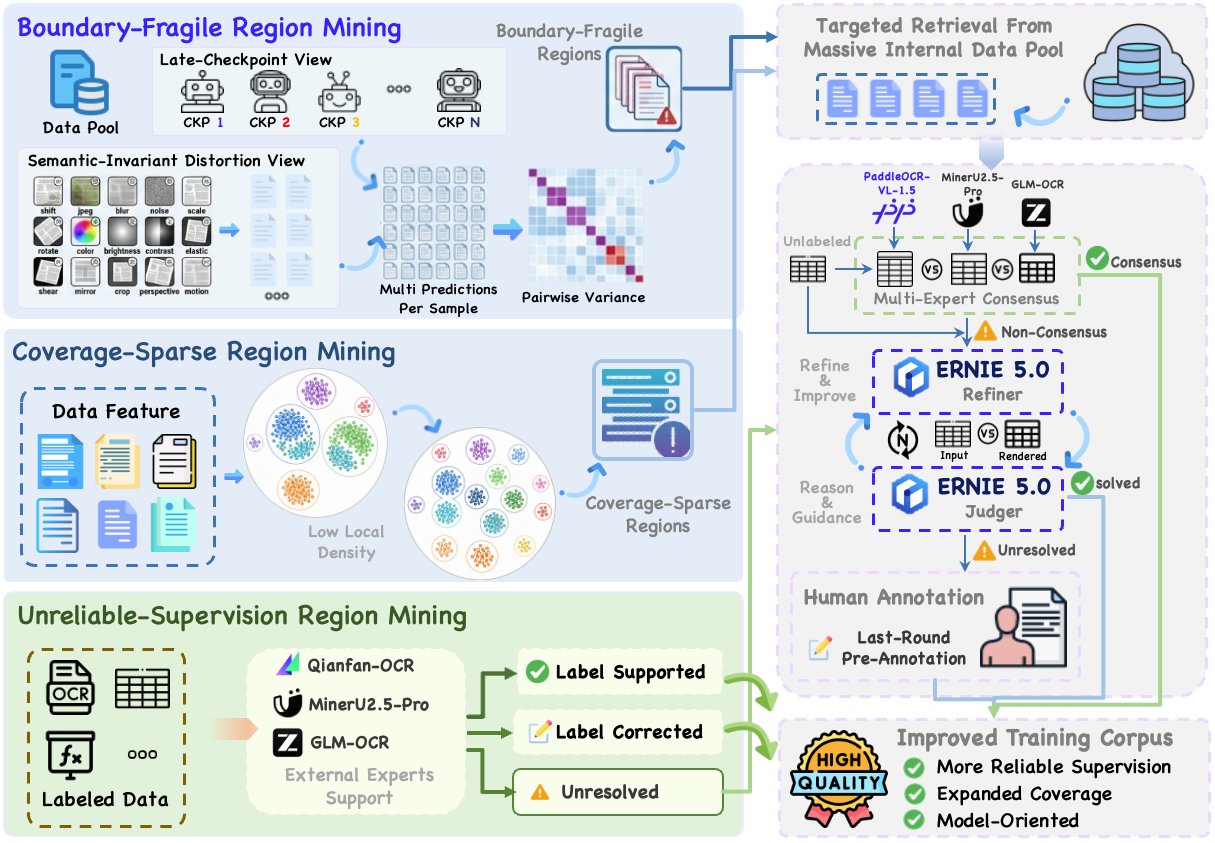
We introduce PaddleOCR-VL-1.6, an upgraded compact document parsing model built upon PaddleOCR-VL-1.5. PaddleOCR-VL-1.6 introduces a region-aware data optimization framework that identifies weak regions from the previous model, applies targeted enhancement to those regions, and improves the reliability of supervision signals. It further adopts a progressive post-training recipe based on curated data selection and reinforcement learning, pushing model performance to a higher level through staged optimization. **PaddleOCR-VL-1.6 achieves a new state-of-the-art score of 96.33% on OmniDocBench v1.6, sets new records on OmniDocBench v1.5 and Real5-OmniDocBench as well**, and demonstrates strong competitiveness against top-tier VLMs. The model architecture is fully compatible with PaddleOCR-VL-1.5, enabling zero-cost plug-and-play migration.
### **Key Capabilities of PaddleOCR-VL-1.6**
**🚀 New SOTA Accuracy**: OmniDocBench v1.6 achieves **96.33%**, setting new state-of-the-art records on OmniDocBench v1.5 and Real5-OmniDocBench as well. It delivers comprehensive leading performance across text, formula, and table recognition, surpassing both open-source and closed-source solutions.
**⚡ Fully Upgraded Capabilities**: Significant improvements in table, Chinese ancient document, and Chinese rare character recognition, along with notable enhancements in seal/stamp recognition, text spotting, chart recognition, and more diverse scenarios.
**🔄 Seamless Migration**: The model architecture is **fully compatible with PaddleOCR-VL-1.5** — zero adaptation cost, plug-and-play replacement.
### **PaddleOCR-VL-1.6 Architecture**
### **PaddleOCR-VL-1.6 Data Engine**
## News
* ```2026.05.28``` 🚀 We release [PaddleOCR-VL-1.6](https://huggingface.co/PaddlePaddle/PaddleOCR-VL-1.6). PaddleOCR-VL-1.6 achieves a new state-of-the-art score of 96.33% on OmniDocBench v1.6, sets new records on OmniDocBench v1.5 and Real5-OmniDocBench as well, and demonstrates strong competitiveness against top-tier VLMs. The model architecture is fully compatible with PaddleOCR-VL-1.5, enabling zero-cost plug-and-play migration.
### Install Dependencies
Install [PaddlePaddle](https://www.paddlepaddle.org.cn/install/quick) and [PaddleOCR](https://github.com/PaddlePaddle/PaddleOCR):
```bash
# The following command installs the PaddlePaddle version for CUDA 12.6. For other CUDA versions and the CPU version, please refer to https://www.paddlepaddle.org.cn/en/install/quick?docurl=/documentation/docs/en/develop/install/pip/linux-pip_en.html
python -m pip install paddlepaddle-gpu==3.2.1 -i https://www.paddlepaddle.org.cn/packages/stable/cu126/
python -m pip install -U "paddleocr[doc-parser]>=3.6.0"
```
> **Please ensure that you install PaddlePaddle framework version 3.2.1 or above, along with the special version of safetensors.** For macOS users, please use Docker to set up the environment.
### Basic Usage
CLI usage:
```bash
paddleocr doc_parser -i https://paddle-model-ecology.bj.bcebos.com/paddlex/imgs/demo_image/paddleocr_vl_demo.png --pipeline_version v1.6
```
Python API usage:
```python
from paddleocr import PaddleOCRVL
pipeline = PaddleOCRVL(pipeline_version="v1.6")
output = pipeline.predict("https://paddle-model-ecology.bj.bcebos.com/paddlex/imgs/demo_image/paddleocr_vl_demo.png")
for res in output:
res.print()
res.save_to_json(save_path="output")
res.save_to_markdown(save_path="output")
```
### Accelerate VLM Inference via Optimized Inference Servers
1. Start the VLM inference server:
You can start the vLLM inference service using one of two methods:
- Method 1: PaddleOCR method
```bash
docker run \
--rm \
--gpus all \
--network host \
ccr-2vdh3abv-pub.cnc.bj.baidubce.com/paddlepaddle/paddleocr-genai-vllm-server:latest-nvidia-gpu \
paddleocr genai_server --model_name PaddleOCR-VL-1.6-0.9B --host 0.0.0.0 --port 8080 --backend vllm
```
- Method 2: vLLM method
[vLLM: PaddleOCR-VL Usage Guide](https://docs.vllm.ai/projects/recipes/en/latest/PaddlePaddle/PaddleOCR-VL.html)
2. Call the PaddleOCR CLI or Python API:
```bash
paddleocr doc_parser \
-i https://paddle-model-ecology.bj.bcebos.com/paddlex/imgs/demo_image/paddleocr_vl_demo.png \
--pipeline_version v1.6 \
--vl_rec_backend vllm-server \
--vl_rec_server_url http://127.0.0.1:8080/v1
```
```python
from paddleocr import PaddleOCRVL
pipeline = PaddleOCRVL(pipeline_version="v1.6", vl_rec_backend="vllm-server", vl_rec_server_url="http://127.0.0.1:8080/v1")
output = pipeline.predict("https://paddle-model-ecology.bj.bcebos.com/paddlex/imgs/demo_image/paddleocr_vl_demo.png")
for res in output:
res.print()
res.save_to_json(save_path="output")
res.save_to_markdown(save_path="output")
```
**For more usage details and parameter explanations, see the [documentation](https://www.paddleocr.ai/latest/en/version3.x/pipeline_usage/PaddleOCR-VL.html).**
## PaddleOCR-VL-1.6-0.9B Usage with transformers
Currently, the PaddleOCR-VL-1.6-0.9B model facilitates seamless inference via the `transformers` library, supporting **comprehensive text spotting** and the recognition of complex elements including formulas, tables, charts, and seals. Below is a simple script we provide to support inference using the PaddleOCR-VL-1.5-0.9B model with `transformers`.
> [!NOTE]
> Note: We currently recommend using the official method for inference, as it is faster and supports page-level document parsing. The example code below only supports element-level recognition and text spotting.
```shell
# ensure the transformers v5 is installed
python -m pip install "transformers>=5.0.0"
```
```python
from PIL import Image
import torch
from transformers import AutoProcessor, AutoModelForImageTextToText
# ---- Settings ----
model_path = "PaddlePaddle/PaddleOCR-VL-1.6"
image_path = "test.png"
task = "ocr" # Options: 'ocr' | 'table' | 'chart' | 'formula' | 'spotting' | 'seal'
# ------------------
# ---- Image Preprocessing For Spotting ----
image = Image.open(image_path).convert("RGB")
orig_w, orig_h = image.size
spotting_upscale_threshold = 1500
if task == "spotting" and orig_w < spotting_upscale_threshold and orig_h < spotting_upscale_threshold:
process_w, process_h = orig_w * 2, orig_h * 2
try:
resample_filter = Image.Resampling.LANCZOS
except AttributeError:
resample_filter = Image.LANCZOS
image = image.resize((process_w, process_h), resample_filter)
# Set max_pixels: use 1605632 for spotting, otherwise use default ~1M pixels
max_pixels = 2048 * 28 * 28 if task == "spotting" else 1280 * 28 * 28
# ---------------------------
# -------- Inference --------
DEVICE = "cuda" if torch.cuda.is_available() else "cpu"
PROMPTS = {
"ocr": "OCR:",
"table": "Table Recognition:",
"formula": "Formula Recognition:",
"chart": "Chart Recognition:",
"spotting": "Spotting:",
"seal": "Seal Recognition:",
}
model = AutoModelForImageTextToText.from_pretrained(model_path, torch_dtype=torch.bfloat16).to(DEVICE).eval()
processor = AutoProcessor.from_pretrained(model_path)
messages = [
{
"role": "user",
"content": [
{"type": "image", "image": image},
{"type": "text", "text": PROMPTS[task]},
]
}
]
inputs = processor.apply_chat_template(
messages,
add_generation_prompt=True,
tokenize=True,
return_dict=True,
return_tensors="pt",
images_kwargs={"size": {"shortest_edge": processor.image_processor.min_pixels, "longest_edge": max_pixels}},
).to(model.device)
outputs = model.generate(**inputs, max_new_tokens=512)
result = processor.decode(outputs[0][inputs["input_ids"].shape[-1]:-1])
print(result)
# ---------------------------
```
👉 Click to expand: Use flash-attn to boost performance and reduce memory usage
```shell
# ensure the flash-attn2 is installed
pip install flash-attn --no-build-isolation
```
```python
model = AutoModelForImageTextToText.from_pretrained(model_path, torch_dtype=torch.bfloat16, attn_implementation="flash_attention_2").to(DEVICE).eval()
```
## Performance
### Document Parsing
#### 1. OmniDocBench v1.6
##### PaddleOCR-VL-1.6 achieves SOTA performance for overall, text, formula, tables on OmniDocBench v1.6
> **Notes:**
> - Performance metrics are cited from the [OmniDocBench official leaderboard](https://opendatalab.com/omnidocbench), except for Gemini-3 Pro, Qwen3-VL-235B-A22B-Instruct and our model, which were evaluated independently.
#### 2. Real5-OmniDocBench
##### Across all five diverse and challenging scenarios—scanning, warping, screen-photography, illumination, and skew—PaddleOCR-VL-1.6 consistently sets new SOTA records
> **Notes:**
> - Real5-OmniDocBench is a brand-new benchmark oriented toward real-world scenarios, which we constructed based on the OmniDocBench v1.5 dataset. The dataset comprises five distinct scenarios: Scanning, Warping, Screen-photography, Illumination, and Skew. For further details, please refer to [Real5-OmniDocBench](https://huggingface.co/datasets/PaddlePaddle/Real5-OmniDocBench).
## Acknowledgments
We would like to thank [PaddleFormers](https://github.com/PaddlePaddle/PaddleFormers), [Keye](https://github.com/Kwai-Keye/Keye), [MinerU](https://github.com/opendatalab/MinerU), [OmniDocBench](https://github.com/opendatalab/OmniDocBench) for providing valuable code, model weights and benchmarks. We also appreciate everyone's contribution to this open-source project!
## Citation
If you find PaddleOCR-VL-1.6 helpful, feel free to give us a star and citation.
```bibtex
comming soon
```